Unsupported Older Series Fanvil Phones X1, X3 etc... and Provisioning behind SBC 3CX V20 not working.

Madinsa

Bronze Partner
Joined
Aug 12, 2025
Messages
7
Reaction score
0
Hi

As per my subject line, I am all of a sudden struggling with the older series Fanvil phones. Auto Provisioning is not working. Manually entering the the Provsioning link in the phone UI is also not working. I tried the PNP method still does not work.

The strange thing is on the Fanvil X1 in pacticular the RPS info seems to be picked up and displays in the URL settings on the phones UI, however the phone does not respond further than that. After entering the SIP account login details manually the phone will either register but their is no audio either direction or it does not register at all.

On the exact same network their are other newer phones like X4 and X5 And V62 and they all work perfectly. It seems to be an issue only with the older legacy phones.

Anyone else having this issue?
 
What did you use as fqdn for the credentials in your phone? There need to be the sbc ip.
 
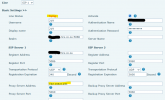
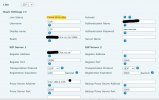
Something is missing then. Share a screenshot of the line page
 
  • Like
Reactions: bitn2
Something is missing then. Share a screenshot of the line page
1757603354118.png
This is Fanvil X1 using Fanvil V62 as SBC

The second screen shot is using my Laptop as SBC.

The exact same setup works perfectly on a Yealink T40P with no issues.
 

Attachments

  • Screenshot 2025-09-11 170537.jpg
    Screenshot 2025-09-11 170537.jpg
    70.7 KB · Views: 5
Hello @Madinsa ,

The SIP error 400, we see is not good.
Does not look like a simple password mismatch.
Did you try a factory reset of the phone already? Just asking :)

Paulo
 
Hello @Madinsa ,

The SIP error 400, we see is not good.
Does not look like a simple password mismatch.
Did you try a factory reset of the phone already? Just asking :)

Paulo
Yes, factory reset phone, upgraded and down graded firmware. Tried generic phone settings. Even tried on different networks, I took a X1 tired it on the clients network, same X1 tried on my LAB network, same result. So its not connectivity or network related. even tried SBC via router phone and SBC via Windows and I just tired SBC via Raspberry Pi, same result! What little hair I had left is all pulled out now. LOL!!
 
For this specific model only, and because its very old and misbehaves, try to delete the realm field. I can confirm it will register.

This might not apply to any other Fanvil, again keep in mind this model is now ancient.
 
For this specific model only, and because its very old and misbehaves, try to delete the realm field. I can confirm it will register.

This might not apply to any other Fanvil, again keep in mind this model is now ancient.
Sadly this did not work either.
 
I was able to get one to work that way, this is why I suggested it.

If you have further issues, I suggest you contact Fanvil because we no longer provide any support for these, but AFAIK neither does the manufacturer since they EOL'd them a few years back.
 
I was able to get one to work that way, this is why I suggested it.

If you have further issues, I suggest you contact Fanvil because we no longer provide any support for these, but AFAIK neither does the manufacturer since they EOL'd them a few years back.
What I dont seem to understand is that if I have these particular model phones already installed from a previous version of 3CX, say V18 and the same V18 system was upgraded to V20, then the phones still work fine. However if I try to use one of these phones as a new install on any V20 instance, then they no longer work? In this case, I moved a very small client that had a bunch of these phones onto one of our multi tenants and thats when the trouble started.
 

Members Online Now

Forum statistics

Threads
111,834
Messages
589,287
Members
164,663
Latest member
svdDGS