One cell number cannot call either DID for specific extension

Status
Not open for further replies.

pellisCMIT

Silver Partner
Advanced Certified
Joined
Apr 17, 2024
Messages
23
Reaction score
8
I'm a new partner working on establishing our production 3CX to switch over from an old on-premises PBX.

When I call my DID from my cell phone (on cellular, no wifi dialing, all 3rd party phone apps force closed including 3CX) my 3CX extension rings once and then goes directly to voicemail.
My presence is set available. I have two DIDs on two different SIP providers, both do the same thing and it's dropping me into my 3CX voicemail.

Anyone else can call me without any issue. I can dial out on the DID and call my cell without any problems.
The logs just say the call was sent to voicemail, I'm not getting any clear reason why. No other users have this issue, I can call every other number linked to our 3CX from my cell without any problems.
There are no special call handling rules set. I've changed my Mobile Number in my user profile in case that was causing some weirdness, no change.

I'm sure this is something trivial that I've missed but I'm running low on ideas.

Thanks,
Phil
 
Hi,
Can you be more specific about the scenario you're describing?
When I call my DID from my cell phone
How is this DID configured?
Does it route calls directly to your extension?
An IVR? A ring group?

my 3CX extension rings once and then goes directly to voicemail.
Where does it ring? On the computer? On a desk phone? On your mobile app?

same thing and it's dropping me into my 3CX voicemail.
Have you enabled "Ring my mobile simultaneously"?
 
Thanks for responding, the DID is on my extension. (I have two on my extension, one from each SIP provider, both ring once and then hit VM)
It rings on the computer only.
Ring mobile simultaneously is not enabled.
I also wanted to mention that if I prepare to answer the call before placing it, I can catch it and it works like any call would.
We're using the hosted service.
 
Thanks for responding, the DID is on my extension. (I have two on my extension, one from each SIP provider, both ring once and then hit VM)
It rings on the computer only.
Ring mobile simultaneously is not enabled.
I also wanted to mention that if I prepare to answer the call before placing it, I can catch it and it works like any call would.
We're using the hosted service.

Don't you have the 3CX app installed on your cell phone with your extension number ?
To better understand the cause of the behavior, we'll need to start a capture, reproduce the issue, stop the capture, upload it to your OneDrive or Google Drive, and send me the link privately so I can download and review it. In this capture, I'll be able to see if any device responds with a "Refusal" and the reason for the "refusal" if it’s a device other than the 3CX causing the problem.

Alternatively, you can enable "verbose" (activity logs) and reproduce the issue. The Activity Log page might contain relevant details or a support info file that includes all the logs. Please note that it is not recommended to send a "support info" file to anyone other than 3CX Staff or someone you trust, as it contains a lot of information about your system that could be sensitive. However, I can guide you on which log files in the compressed "support info" folder you could send me privately to assist with the diagnosis, without exposing sensitive information that is not relevant to the issue.
 
  • Like
Reactions: Evolute IT
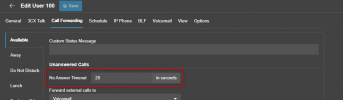
Whats your ringing timeout? You might have inadvertently changed this value to something ridiculously low and it doesnt give a chance for the extension to ring

1723189374377.png
 
  • Like
Reactions: Guillaume Bourgeois
Whats your ringing timeout? You might have inadvertently changed this value to something ridiculously low and it doesnt give a chance for the extension to ring

View attachment 43086
It's set to 60 seconds, I bumped it up from the default to make sure it wasn't holding some different value than what was displayed. I'll try to get more details on the issue. I removed our Teams integration and the problem remains.
 
Shared activity log with Guillaume, if we figure it out, I'll try to make sure to update this for future users.
 
  • Like
Reactions: Guillaume Bourgeois
Hi !

I enjoy coming back to share updates and results from a "private" conversation.
Perhaps others can benefit from the diagnosis I made.

I asked @pellisCMIT to send me the 3CXPhoneSystem.bldef and 3CXPhoneSystem-xxxxx.blrec files. I had already informed him that I do not work for 3CX and that he needed to be aware of the information I would have access to before sharing his files with me.

Therefore, I directed him to the following page so he could understand the purpose of my request and confirm that he is comfortable sharing his files with me despite the access I would have.

https://www.3cx.com/docs/3cx-log-viewer/
It's an excellent tool for thoroughly analyzing and filtering activity logs.
It's old but incredibly effective!

Note: His files do not include any passwords, but I still consider it important for users to be aware of what they are sharing before they share, obviously.

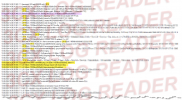
In the log analysis, we can see the call forking into several legs.
Upon examining each leg, I found that leg #6 returns a "Hangup request with reason Busy".

1723653660636.png


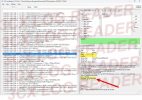
I then attempted to identify the device targeted by this leg.
I determined that it was the 3CX application on his mobile.

1723652523134.png

I requested the deactivation of Teams Integration and the removal of the 3CX app on mobile, followed by a restart of the 3CX services.

After retesting, everything now works correctly.
Now, I know who is "rejecting" the call.

This doesn't explain why, but at least it gives us a lead.
@pellisCMIT have reactivated the Teams integration, and it continues to function well.

My hypothesis is as follows; (I may be mistaken)
I suspect that the call was being sent twice to his mobile; through MSTeams and the 3CX Mobile App.
Assuming the MSTeams app was in a "ringing" state, the 3CX mobile app would return "busy" because the Android Telecom framework (similarly for Apple's CallKit) does not allow a second call during the "ringing" state, hence, the Android Telecom framework (or Apple's CallKit) would return a "decline" status. To confirm the hypothesis, we would need to enable DEBUG in the mobile application, replicate the issue, and analyze the mobile app's logs. However, I am convinced, until proven otherwise, that my hypothesis is correct.

@pellisCMIT discovered a workaround for the issue once it became apparent.
Initially, he attempted to forcefully close the application, which proved partially ineffective due to potential background services. The effective solution finded by @pellisCMIT involves temporarily disabling the app's functionality by forcibly stopping it and revoking its Phone permission. This method has proven successful as a workaround solution to the problem.


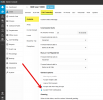
I infer that disabling the PUSH service of the 3CX app (via the extension settings in 3CX) would prevent this type of conflict if Teams and 3CX mobile app, are installed simultaneously on the mobile phone.

1723654922653.png
 
Thanks for your help, at least I know why it's happening now. I knew it was something I'd done. I appreciate all your help and insight on the troubleshooting process.

I can say it does not seem to be Teams related, I was able to accept Teams or 3CX App calls on my cell from anyone else, so it was specifically related to me already being on a cellular call and the background 3CX App would see the call and tell the PBX I was busy.

The weird thing is I hadn't been actively using the 3CX App, I was initially using just Teams, I just registered the app and closed it and it didn't seem to impact anything, but now I know it was impacting me doing a test call to myself.
The power settings on android seemed to be putting the foreground app to sleep, so it would not ring for any calls but it would report to PBX when I was on the cellular call and tell it I was 'busy'

I adjusted the battery settings for the app and left the app closed all morning, I just tested with a co-worker and it looks like I got the sleep settings corrected and now it rings properly on my cellphone and the situation seems a bit more obvious, you can't call yourself if your cell also rings for the 3CX extension.

The workaround: If I need to place a test call from my cell phone to my extension, I have to force stop the app then modify the app permissions to remove the "Phone" permission. I can then test the extension without the mobile app telling the PBX that I'm busy, though lacking that permission also stops the app from doing any phone activities, so you'll want to turn the permission back on after you're done testing.
 
Thanks for your help, at least I know why it's happening now. I knew it was something I'd done. I appreciate all your help and insight on the troubleshooting process.

I can say it does not seem to be Teams related, I was able to accept Teams or 3CX App calls on my cell from anyone else, so it was specifically related to me already being on a cellular call and the background 3CX App would see the call and tell the PBX I was busy.

[...]

The workaround: If I need to place a test call from my cell phone to my extension, I have to force stop the app then modify the app permissions to remove the "Phone" permission. I can then test the extension without the mobile app telling the PBX that I'm busy, though lacking that permission also stops the app from doing any phone activities, so you'll want to turn the permission back on after you're done testing.


Indeed, that’s very plausible.
Do you have an Android phone? If so, I will try to reproduce it with an iPhone.
 
  • Like
Reactions: Evolute IT
Yes, this was on Android. I did not test changing the push notifications setting, mine is current checked.
 
Status
Not open for further replies.

Forum statistics

Threads
111,953
Messages
589,914
Members
164,849
Latest member
BillyAkansel