One extension on multiple handsets on Yealink W80DM

Status
Not open for further replies.

lecostaque

Customer
Advanced Certified
Joined
Dec 14, 2022
Messages
8
Reaction score
1
Hello everyone,

I have recently set up a Yealink W80DM with 4 W80B bases and a couple of handsets and I would like to connect two Handsets to the same extension. I managed to connect the two handsets to the same extension from the 3CX FXS/DECT and they seem to be connected from the W80DM Web Interface, but when I am trying to call the extension, only one of the two handsets rings. Is there any other option I should set up for it?

Thank you in advance.
 
Hi,

If you only had one extension entry and assigned 2 handsets to the same one, you might have to change settings on the DM to get this to work, but I'm not sure if this would be reliable.

Try this instead:

- In your FXS/DECT page, add the same extension twice and then provision your DM.

- Provision one of the handsets to the first entry of the extension on your DM, and the other on the 2nd entry.

- Whenever the extension rings, both handsets will now ring.

PS: if you made manual changes to the base and don't know how to get it back to behave in the default manner, then factory reset and reprovision it from scratch.
 
Hello John,

Thank you for your reply.

I have tried to add the same extension twice from the FXS/DECT page, provisioned my DM and assigned the two handsets to each entry, but only one of them rings. Both handsets show the same extension number/name. There were no manual changes, except assigning a static IP to the DM and the bases.
 
I understand, let me check it a bit further and get back to you.
 
Hello,

I spoke too soon, it's unknown if this will be possible on the W80 system at least in the current firmware version.

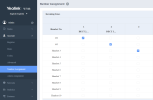
I can confirm it is available on the W70 which allows Number Assignment per handset
1680527844307.png


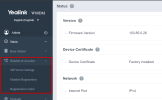
... but unfortunately the W80 does not appear to have this feature:
1680529221563.png

So to conclude, if you wish to use more than one handset for the same extension on the W80, it does not appear to allow this right now. If you want to find out whether it is possible, I would recommend to contact Yealink directly and see if they offer a solution.
 
Thank you very much John for your reply.
I will try to contact Yealink directly and search the W80DM a bit more.
 
Did you get anywhere with this? I've just migrated from a W60B to a W80DM/B system. I had 4 handsets all using the same extension and now only one of them rings with an inbound call!
 
Did you get anywhere with this? I've just migrated from a W60B to a W80DM/B system. I had 4 handsets all using the same extension and now only one of them rings with an inbound call!
Hello,

I issued a ticket to Yealink about this and they replied that it is not supported by their Multi-Cell system. A workaround I did to be able to have "the same extension" for two handsets is to create a ring group (i.e. 201) and create two extensions (601, 701), each one for a handset.
 
Thanks for the update. Unfortunately that solution won't work for me so it look like I'll have to move back to the W60B and find a different hardware supplier.
 
Status
Not open for further replies.

Members Online Now

Forum statistics

Threads
111,832
Messages
589,284
Members
164,662
Latest member
DejanMDS