One way Audio in Conference

Status
Not open for further replies.

Yellow_Flash

Customer
Advanced Certified
Joined
Mar 11, 2019
Messages
288
Reaction score
37
Hi,

We are using 3CX v15.5 SP6.
Calls are made from 3CX App for Android.

During Confernce call, some of the users are being kicked out of the conference.
Also, there is one way audio issue happening as users are not able to hear others sometimes.
We had a call with 3 extensions taking part in confernce call.
When one of them was talking others weren't able to hear him.
Other two users were able to hear eachother.

Now, its not just one specific user who is facing issues. but mainly its 2 users who are having the issues.

Has anyone experienced one way audio in conference? If so, what can be done?

Thank you
 
Hi,

Ensure that your audio ports are all open from 9000-10999 UDP.

Ensure that the apps are using the tunnel. Note that only the legacy android app is still compatible with V15.5 so going forward you may continue to face issues with this version.
Read the notes here also because this app will not work well with any android above v8.0
https://play.google.com/store/apps/details?id=com.tcx.sipphone_legacy&hl=en

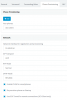
The settings should look like this for all extensions that will use the app
1587650725259.png
 
  • Like
Reactions: Yellow_Flash
yes, these settings are already in place.
And I had run firewall checker, it didnt show any errors.

I'm aware that the 3cx legacy app could cause issues with certain android versions and we are planning to upgrade to v16 soon.


if it was extenal call i could have checked at the provider end, but since it is the internal extension that is facing issue, that rules out the possibility.
Is there anything else that has to be checked? @JohnS_3CX

Thank you.
 
Thing is, this mainly happens for 2 extensions. The issue happens in the middle of calls. They would be communicating properly and in the middle of the call, others are not able to hear one of these two extensions, not at the same time though. But the one's facing the issue can hear everyone.
So they have to disconnect the call and then dial in again to conference.

There are many other users using the conference facility without any issues.
 
Hi,

Ensure that your audio ports are all open from 9000-10999 UDP.

Ensure that the apps are using the tunnel. Note that only the legacy android app is still compatible with V15.5 so going forward you may continue to face issues with this version.
Read the notes here also because this app will not work well with any android above v8.0
https://play.google.com/store/apps/details?id=com.tcx.sipphone_legacy&hl=en

The settings should look like this for all extensions that will use the app
View attachment 15757

There are 2 users having the same issue.
Only one of them is using the 3cx Legacy App, the other one is on the iOS App.
Legacy App, i understand there might be issues because they are on Android 9 but what about iOS?

iOS App works fine with both v15.5 SP6 and v16, right?

THank you
 
The iOS should work for now, but it is designed for V16. If it loses the connection or switches between LTE/WiFi I'm not sure it can re-establish the connection with the PBX.
 
The iOS should work for now, but it is designed for V16. If it loses the connection or switches between LTE/WiFi I'm not sure it can re-establish the connection with the PBX.
but this is one way audio.
The user is able to hear everything others are saying, it is just that others in the conference aren't able to hear him.
 
Are the users on the same LAN when on the conference call, and is your 3cx installation on the same LAN? Any time I have had one way audio is has been a router/firewall/port forwarding issue. Are you able to replicate the issue successfully or is it completely random? Is it happening after a certain amount of time on a call or is it from the second they are invited to a conference?
 
Are the users on the same LAN when on the conference call, and is your 3cx installation on the same LAN? Any time I have had one way audio is has been a router/firewall/port forwarding issue. Are you able to replicate the issue successfully or is it completely random? Is it happening after a certain amount of time on a call or is it from the second they are invited to a conference?

Sorry for the late reply.
The users aren't on same LAN, all are using 3cx iPhone App from their home WiFi.
Port forwarding has been done, firewall test passes without any issue.

I'm not able to replicate the issue.
But I can see that a few users are having the issue, previously it was just iPhone users now Android users are facing the issue(which might be because they are on Android 9 and using 3cx Legacy App).

Sometimes it happens right after they join a conference, and they have to join conference again. Even then also, it has happened to few users again.
 
Any solution for this one??
The issue still happens.

The other issue that happens which is also creating a lot of issue is users getting kicked out of the conference.
Not just the users(extensions) but even clients who are calling in to the conference line is getting kicked out of the conference sometimes.

Has anyone experienced this? Or know what could be causing this?

Thank you
 
Both extensions and external callers are getting kicked out.
 
Hi @TechieGuy

What you can do is change your Logs to Verbose mode and restart the services. The next time this happens, make note of the time and who got kicked out. Then use the Support menu on the top right of the MC and Generate Support Info Files. Those files can be further analyzed using this tool.
https://www.3cx.com/docs/3cx-log-viewer/

The guide tells you how to filter out specific calls and this could give some insight as to how/where/why the calls are dropped. It may be possible to to narrow down the cause
 
  • Like
Reactions: Yellow_Flash
Hi @TechieGuy

What you can do is change your Logs to Verbose mode and restart the services. The next time this happens, make note of the time and who got kicked out. Then use the Support menu on the top right of the MC and Generate Support Info Files. Those files can be further analyzed using this tool.
https://www.3cx.com/docs/3cx-log-viewer/

The guide tells you how to filter out specific calls and this could give some insight as to how/where/why the calls are dropped. It may be possible to to narrow down the cause

Thank you, I have done this and generated the support files today.
While going through the logs, i see that the logs doesn't include the calls that are having issues.
Basically log starts way after those calls has ended.
It starts from 8 PM,whereas the calls were made during 3 pm.
Is there a limit on the size or timeframe for the logs?
I was under the impression that logs will capture everything from the restart.

Thank you
 
Logs are UTC time, so depending on your time zone they might appear to be offset.
There are preferences in the Log Viewer to adjust this.
This assumes that the server time was correct and the server timezone was also correct
 
Logs are UTC time, so depending on your time zone they might appear to be offset.
There are preferences in the Log Viewer to adjust this.
This assumes that the server time was correct and the server timezone was also correct
yes, I understand.
I checked the server time and it is correct.
But the logs start almost 8 hours after I changed the activity log to verbose mode and restarted the service.
All the logs from the moment the services were restarted to 8 hours from that time arent available.
That is the reason why I asked if there is a limit for the logs.
And after checking in the forum, i see that the logs have a maximum limit of 50 MB, but im not sure how this works.
Can you please explain about this?
 
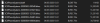
As you see here, the system creates the BLDEF file (the one you should be opening according to the guide) and then the actual data is stored in BLREC files that are broken into 50MB parts.
1588577616317.png

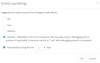
Logs do get deleted though to conserve disk space, so you may want to enable the option to keep logs for 1-2 days. Remember to disable this option as well as verbose logging when you are done with troubleshooting, as this will take up quite a bit of space.
1588661419459.png
 
Status
Not open for further replies.

Latest Posts

Forum statistics

Threads
111,945
Messages
589,871
Members
164,837
Latest member
Support99