• We do not provide troubleshooting help for unsupported phones. Please try with a supported phone.
  • V20 Update 10 Alpha Learn more

One way audio issue with HT814 analog extensions

Status
Not open for further replies.

oferlap

Free User
Joined
Nov 23, 2022
Messages
15
Reaction score
3
my on-premise 3CX home system (free version) consists of several SIP phones and devices of different manufacturers (Yealink T58w, Fanvil PA2, Fanvil I53w),
and analog gateways - Grandstrem HT814, HT813.
all of which are on the same IP LAN and VLAN segments as of the machine running 3CX.

whenever an analog extension receives a call - one way audio issue occurs, no matter where the call comes from (except other analog extension). analog outbound voice is being heard, but no vice versa. If the caller puts call on hold, no hold music is heard on analog side.
I found, however, sort of a workaround for this scenario - the analog callee puts call on hold (flash button), then returns (2nd flash). then the call may go on normally, but the caller still cannot put call on hold. if he does, no music is heard on analog, and one way audio issue starts over again. pretty weird.

HT814 is auto provisioned by provided link. HT813 is not supported, so is configured manually.
I tried enabling "PBX delivers audio", no change.
I tried to trace the traffic on 3cx machine using wireshark - it loooks like HT814 transfers RTP packets towards 3cx, and so does the caller's device, but 3cx doesn't refer to HT814 at all until the flash button is pressed twice. then two way communication starts.

I have no clue of where to start looking for a solution.
 
Hi,

- Are you talking about calls that pass via the trunk or are extension to extension calls also affected?

- Are you using the HT813 as an FXO by any chance (ie. as a SIP trunk provider) ?

but 3cx doesn't refer to HT814
Why is this? when an invite it sent to the 814, what contact IP does it have in its SDP? 3CX will only send the traffic where its told to send it. Hookflashing (ie. Hold / Unhold) forces a re-invite and the contact IPs (and codecs) get updated. This is why it works when this happens. Also, it could be that during the initial call, you negotiate a codec that the FXS does not understand, and hold/unhold re-negotiates the codec to one the FXS prefers. So check contact IPs and codecs to find out more
 
Thank you for your reply.

extension to extension calls are also affected, given the callee is one of the analog extensions, and the caller is a "real" digital device of any kind - IP phones, 3CX app softphones, VOip trunk provider, everything other than an analog extension.

as for codec compatibility, I always try to configure my extensions to follow the priority: Opus, 722, 711a, 711u, 729. extension to extension calls are almost always Opus or 722, while sip provider calls tend to be 711a or 711u. I did notice recently, that even though HT814 supports Opus and 722 by hardware, these codecs are not included in 3cx provisioning page for this device, as opposed to Yealink 58w. the problem, however, was not resolved even when I manually disabled Opus and 722 on Yealink, leaving 711a as a top priority codec for both Yealink and HT814.
I also tried to manually define Opus and 722 on HT814 (they are defined that way on HT813 FXS), and that, too, did not solve the problem.
I think the problem appeared nearly after the last 3CX service pack update, but I'm not sure when exactly it started. I'm pretty sure it wasn't there when I first installed the adapters.

as for HT813 FXO, I did define it as a trunk provider, but there are no outbound rules that make use of it at that time (it is connected to a GSM to PSTN adapter, which I bought and used in the past before switching to an IP PBX. it doesn't have any SIM installed at the moment, so it obviously cannot be used to make or receive calls).

as for SDP, what does the term refer to? where do I look for it?

Thanks
 
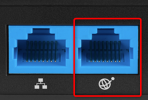
1. Ok, then for the sake of troubleshooting, unplug the unsupported HT813 just to prevent introducing more variables in an already complex issue. Only use the HT814 during testing, and ensure the ethernet cable is plugged in the highlighted port:
1676377206482.png

2. Then factory reset the HT814 and upgrade its firmware from Grandstream's website.

3. Finally, delete the HT814 entry from the FXS / DECT page of 3CX and add it again fresh, this time leaving all values as default especially the codecs.

Note: make sure that the test extension you assign to HT814 is a brand new extension, with all the default values. This is so we can perform troubleshooting from a "known good" configuration. You can now call your HT814 extension from a deskphone which also uses the default values. Starting from the defaults to confirm everything works, and if you want to make changes, they can be done later once the device is healthy.

Let me know if this ends up working once all steps have been carried out.
 
If you have not yet done so, check the 3CX Activity log, in Verbose, to see if there are any error messages, giving a clue as to what may be going on. Internally, I would normally recommend using G711 a or u as the primary Codec, at least to begin with. Once you have things working, then start changing thing around. If it then fails, you know what is causing it and can change back
 
Last edited:
  • Like
Reactions: oferlap
ensure the ethernet cable is plugged in the highlighted port:
View attachment 34253

Then factory reset the HT814 and upgrade its firmware from Grandstream's website.

I'm not sure whether it is related or not: after doing a factory reset, I now notice that the device has two similar MAC addresses, and, to my surprise, it is not the connected WAN port MAC address which 3CX recognizes, but the disconnected LAN port MAC, which also appears in the device's web GUI as "device MAC". I then recalled how I spent some extra time trying to configure my DHCP server to reserve it an IP address, a step which usually takes a few minutes at most.

Then, the device's firmware, which is 1.0.35.4, simply won't upgrade to the latest one, 1.0.43.11. I keep getting a strange web page error : "HTTP/1.0 500 Server Error Content-Type: text/html CGI Error
Attempted to send content larger than allowed limits."
I will try to use some other browsers before giving up on this step.
EDIT: I found a workaround.
 
Last edited:
Let me know if this ends up working once all steps have been carried out.
Yes, it ended up working. I will let it work for a while to make sure it's stable, and then do my changes very carefully until I find out which specific one caused the issue.

P.S. he LAN port MAC address thing seems to be unrelated, it only makes the initial appearing of the HT814 device in 3CX's "Phones" list pretty much useless, since no option buttons are available there, and the MAC to be copied and pasted is practically incorrect. later, however, after initial device provisioning, the "Phone UI" button of the related entry is no longer grayed out.
 
Last edited:
Note: make sure that the test extension you assign to HT814 is a brand new extension, with all the default values.
I did that too, deleting all "infected" extensions then creating fresh ones. now I couldn't finish creation process without supplying an email address to each new extension. The former ones had a blank email address entries, so I must wonder - is it a new limitation, following the latest software update?
 
I did that too, deleting all "infected" extensions then creating fresh ones. now I couldn't finish creation process without supplying an email address to each new extension. The former ones had a blank email address entries, so I must wonder - is it a new limitation, following the latest software update?
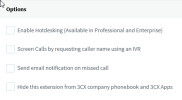
Turn off the option "Send email notification on missed call" this way you can create users without filling the Email field.
1676450577593.png
 
  • Like
Reactions: oferlap
you were right. that's what happens when I try so hard to avoid altering with the default settings
 
Just for information - I've spent the weekend messing with all possible ATA config setting, according to my needs, then through my imagination, then beyond it - none of these custom settings made any problem.
Then I tried to cure my second ATA, the HT813, again, no good results until a factory reset did the magic.

I now made xml backup files for the current working configurations, so I would try to use that first in the future, if any new problem appears.
 
Status
Not open for further replies.

Members Online Now

Forum statistics

Threads
111,832
Messages
589,282
Members
164,662
Latest member
DejanMDS