- Joined
- Jul 23, 2025
- Messages
- 4
- Reaction score
- 1
Hello everyone,
I’m experiencing one-way RTP packet loss on a 3CX v20 system running on Prime (Debian-based) behind a FortiGate firewall. The issue affects only remote extensions—they experience 2–20% packet loss in the RTP stream from the extension to the 3CX server.
On the local network, calls work perfectly with almost zero packet loss and very clear audio.
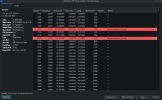
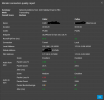
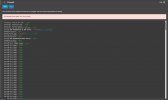
I performed a Wireshark capture, and it confirms one-way RTP loss in the direction from the remote extension to the 3CX PBX. The issue is also reflected in the Call Quality Report in the 3CX event log.
Has anyone encountered a similar issue? Could this be related to the FortiGate firewall configuration, NAT traversal behavior in v20, or something else? Any guidance or recommended troubleshooting steps would be greatly appreciated.
Thank you!
I’m experiencing one-way RTP packet loss on a 3CX v20 system running on Prime (Debian-based) behind a FortiGate firewall. The issue affects only remote extensions—they experience 2–20% packet loss in the RTP stream from the extension to the 3CX server.
On the local network, calls work perfectly with almost zero packet loss and very clear audio.
I performed a Wireshark capture, and it confirms one-way RTP loss in the direction from the remote extension to the 3CX PBX. The issue is also reflected in the Call Quality Report in the 3CX event log.
Has anyone encountered a similar issue? Could this be related to the FortiGate firewall configuration, NAT traversal behavior in v20, or something else? Any guidance or recommended troubleshooting steps would be greatly appreciated.
Thank you!