All incoming calls are going straight to voicemail with missed call

rkreddy

Free User
Joined
Jul 29, 2021
Messages
13
Reaction score
0
Hi, I’m getting notifications, but all incoming calls are going straight to voicemail.


Please help me. Outgoing calls and texts are working fine. The issue is only with incoming calls: I get a missed call notification, and the calls go directly to voicemail.

I checked with the Flowroute team, and they sent me a report with the details below. I’ve reviewed all previous support messages and tried everything, but no luck.


CSeq: 310121 INVITE
Session-Expires: 21600;refresher=uac
Allow: INVITE, ACK, CANCEL, OPTIONS, BYE, REGISTER, SUBSCRIBE, NOTIFY, REFER, INFO, MESSAGE, UPDATE
Content-Type: application/sdp
Supported: replaces, timer

User-Agent: 3CXPhoneSystem 18.0.9.35 (35)

Content-Length: 292

v=0

o=3cxPS 9524756453785600 33829300880801793 IN IP4 34.148.121.224
s=3cxPS Audio call

c=IN IP4 34.148.121.224
t=0 0

m=audio 10184 RTP/AVP 0 8 18 101
a=rtpmap:0 PCMU/8000
a=rtpmap:8 PCMA/8000
a=rtpmap:18 G729/8000
a=fmtp:18 annexb=no
a=rtpmap:101 telephone-event/8000
a=sendrecv
 
Which version of 3CX? Which device? Which version of the app or softphone?
 
Enable notifications in your browser.
 
Hi
Which version of 3CX? Which device? Which version of the app or softphone?
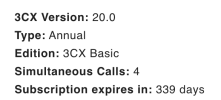
I am using the mobile app " 3CX
Version 5.6 (Build 153)
20.0.22.153
Third-Party Licenses"

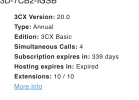
It was working fine before, but I subscribed to the Basic edition recently.

Looks like this edition is only available on the mobile app, but all calls go to voicemail within seconds.
 
If he is using the PWA this is correct, but we dont know.


Sounds like the old desktop app.

It’s not just me. All other numbers/users incoming calls are going directly to voicemail.

Outgoing calls and texting are working fine.
 
1787251758443.png
 

Attachments

  • 1787251603691.png
    1787251603691.png
    11 KB · Views: 6
  • 1787251713356.png
    1787251713356.png
    56.1 KB · Views: 5
Try re-intalling the mobile apps and registering them again, or check when using a different network.It looks like you are not getting push notifications.
 
Try re-intalling the mobile apps and registering them again, or check when using a different network.It looks like you are not getting push notifications.
It's not just one Mobile App. All users are having the same problem
 
I just tried reinstalling the app, but it keeps saying, “Record your message and press * to reach the operator.” There’s no response, even after pressing *.
 
Go to the Flowroute SIP trunk under Voice & Chat.

Open your trunk settings and look at the Default Destination on the first page, near the top.

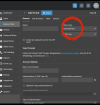
Where is it? Voicemail ?IMG_5909.png
 
User-Agent: 3CXPhoneSystem 18.0.9.35 (35)

I hope you’re not still on version 18. If you are, that explains everything. Please update to the latest version 20.
 
It's User, not voicebox. What should the default be?
 
That’s where your incoming calls should be routed when they’re received on the number (main trunk number) shown a little further down on the same page.

You should route it to an IVR or a department that’s configured with a valid destination.

The user may not have the mobile app installed, or their phone may simply be turned off.
 
That’s where your incoming calls should be routed when they’re received on the number (main trunk number) shown a little further down on the same page.

You should route it to an IVR or a department that’s configured with a valid destination.

The user may not have the mobile app installed, or their phone may simply be turned off.
Version is 20 & I tried all options, selecting IVR and others no luck 1788283860153.png
 
I can assist you with checking the settings.

If you’re comfortable with it, you can give me temporary access to your PBX and I’ll take a quick look. From the Dashboard, click “Remote Access” and generate a link valid for 1 day.

Send me the link privately, not here.
Click on my name and send me a private message.

I’ll connect to your PBX and review the routing and 3CX settings.
 
For anyone following this topic, here’s an update.​

I was able to access the system and review the 3CX configuration, including the Flowroute SIP trunk settings and the IP blacklist. I didn’t find anything abnormal on the 3CX side.

Internal extension-to-extension calls were working properly, but incoming external calls weren’t.

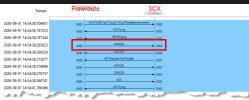
I captured the traffic with a PCAP and analyzed it in Wireshark.

1788301825406.png


As shown in the capture, Flowroute was sending a SIP CANCEL to the 3CX system, even though we could hear a 3CX voicemail answering the call. In the 3CX call history, the call was shown as abandoned by the caller ( Hangup by caller ).

Of course, it all makes sense now: another 3CX system is answering the call before the user has a chance to answer.

I then asked the system owner to verify the SIP trunk configuration directly in the Flowroute portal. He found that two different 3CX systems with different versions, running , were registered to the same Flowroute SIP trunk using the same credentials.

As a result, incoming calls were being forked to both systems. Since the old system is no longer in use, calls routed to it were immediately answered by voicemail. Flowroute then sent a CANCEL to the new 3CX system, preventing the user on the new system from answering the call.

The system owner changed the SIP trunk password and updated the new 3CX system with the new credentials. This resolved the issue. However, the old system should be completely shut down and decommissioned.

There’s another important concern here. Both 3CX systems are still running and are configured with the same 3CX FQDN. There’s a significant risk that the FQDN could eventually switch back to the old system if, for any reason, its services restart, for example after an automatic update attempt. I therefore recommended completely shutting down and removing the old 3CX server.

There’s now only one remaining issue to resolve: the inbound routes.
The system owner had to leave and ended the Remote Support session, so I didn’t have enough time to complete the remaining tests.

Based on the 3CX Flowroute configuration guide, I’m convinced that removing the + from the DID and keeping it in 1NPANXXXXXX format should resolve the inbound routing issue.

For anyone planning a similar migration, I’d strongly recommend the following:

  • Destroy or completely shut down the old system. It shouldn’t be allowed to start again unless you know exactly what you’re doing. Starting an old 3CX system can affect both incoming calls and the 3CX FQDN. Removing the old system entirely will prevent a lot of unnecessary problems.
  • Check with your SIP trunk provider, or through their portal if you have access, to confirm what needs to be changed after moving to a new public IP. IP-based SIP trunks will require the public IP to be updated. REGISTER-based SIP trunks generally don’t require any changes, but some providers also use IP filtering as an additional security mechanism, so make sure your new public IP doesn’t need to be authorized.
  • Make sure the SIP trunk username and password haven’t been compromised or reused unnecessarily. A migration is also a good opportunity to strengthen weak credentials. For example, if your SIP password looks like Admin123, it definitely deserves to be changed. Maybe :oops:
 

Latest Posts

Forum statistics

Threads
111,953
Messages
589,915
Members
164,850
Latest member
masvty