Ongoing audio issues

Status
Not open for further replies.

giwm

Forum User
Joined
Sep 27, 2016
Messages
279
Reaction score
51
When hosting a webmeeting, what might we do to get a better audio experience? It's bad enough that we're having other companies start a Zoom or Teams meeting to move us out of the 3CX meeting, which with the exact same setups don't have audio issues.
 
Can you please give a description of the type of audio issues you were facing?

Give as many details as you can and what actions you did.
 
One common one is that participants audio and video come across choppy, like their connection is poor or their CPU is bogged down. But swapping platforms off of 3CX resolves that. The other common one is that callers have trouble hearing people using computer audio.

One thought might be if some users - particularly callers - aren't muted and are in a slightly noisier environment, 3CX perhaps gives priority to their audio, causing it to cut out others. That's a complete guess based on observations with no hard evidence.

From a resource standpoint, I see low CPU and RAM usage on our 3CX box and regular phone calls do not experience audio issues, even while these meetings are.

Sorry, I know that's not heavily detailed.
 
No worries, that's a good description. Usually when there are some bandwidth starved users, your session will detect this and display a message for you as an organizer.

When this happens, you can click the gear icon on the top right and change the meeting quality to "Stability" which should improve the situation. This needs to be done manually on an "as-needed" basis, but if you wish you can enable it when the meeting starts if you suspect there will be problems.

Try this in your next meeting if you have trouble and see how it goes.
 
John,

I think that's a fair point as I'm not always the organizer so I don't think to have people do it. I'll test that as we see issues and try to report back here if it changed things. Is there any way from an organizational level to set Stability as the default for all new meetings?
 
No, it just starts with the slider in the middle by default.

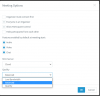
You can however set this per-meeting during the creation by setting the profile options:
1603097188618.png
 
Last edited:
We've had generally better results overall by making all ours "stability". Not great, but better. I would LOVE the option to set this at the administrator level as the default.
 
A side note: People calling in by phone have a HORRIBLE experience.
 
Not trying to hijack this but I'd say it's related: Is there anyway to disable automatic microphone gain for webmeetings by default/permanently/administratively? Right now, the webmeeting has auto-gain control enabled by default, seems to increase the gain to 100% and also doesn't reset this microphone setting after terminating the browser. At least with certain headsets this results in unacceptable loud and bad audio quality from the users. So they would have to disable auto-gain control for each and every webmeeting and still reset the mic gain in the system settings.
 
@CBX you can disable it under Settings->Multimedia->Advanced Settings->Automatic gain
 
@StefanW: Thanks for your answer but this wasn't the question. Also, if I tell this to the affected users, the result will be Zoom.
 
Status
Not open for further replies.

Forum statistics

Threads
111,973
Messages
590,078
Members
164,896
Latest member
sameage