open contact card automatically

Status
Not open for further replies.

timmussche

Forum User
Joined
Mar 29, 2021
Messages
4
Reaction score
0
hi all, i've set up a crm integration, and i am able to automatically open a contact url automatically from the webclient, but i need to have the same behaviour from the windows client.
Is there a way to have the contact url opened automatically in the windows app (only if the call is accepted)?
 
Hi @timmussche,

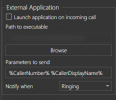
The Windows client has an option to launch application on incoming call. You can check this by navigating to Settings >> Advanced Settings >> Behaviour.

1620816814794.png
 
yes, i am aware of this option, but this does not let me open a url with the contact ID that is fetched from our server.

I need to open www.ourcrmsolution.com/accounts/accountid where the "accountid" is not a phone number, but a guid from our database.
The option in the softphone only gives me the name and number to use, this is not enough as i need the ID.
 
Hi @timmussche,

You could write a script that would take the CallerNumber and perform a lookup in a database / your CRM which brings back the account ID, and in turn opens the correct page. This is an example of what you could do and I'm not sure of your programming level, but it is something that could be done with some work.
 
  • Like
Reactions: Evolute IT
i am not new to programming, but the whole point of the 3cx CRM integration is just to do that right?
So, basically, i managed to get all the needed information into the 3cx system through a database connection.
I have all needed information right in the 3cx system, but then i would need to build a second solution myself to be able to acces this functionality (that is already builtin the webclient)?
I hope you understand this does not make sense?
 
Hi @timmussche,

I understand you, I didn't imply that you have to build a second solution yourself to make CRM integrations work, rather that the fields sent through by 3CX to the CRMs are %CallerNumber% and %CallerDisplayName%. When entering your CRM into the Open Contact URL field, it should open up as expected.

You can read more about our supported CRMs here, with guides attached.
 
That is the point, the 3cx windows app has no "open contact url" option like the webclient. Or so it seems for me.
Even if it had that option, i would need to receive the "contact.id" value from the 3cx server.
 
Status
Not open for further replies.

Forum statistics

Threads
112,349
Messages
592,027
Members
165,512
Latest member
gmacinit