Open contact in EspoCRM

dataceum

Bronze Partner
Basic Certified
Joined
Jun 30, 2021
Messages
8
Reaction score
3
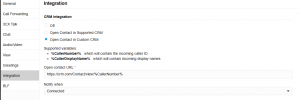
I have a 3CX-EspoCRM integration file. Contact lookup works fine and I can open contact URL when I click on the CRM icon on the dialer whenever there is an incoming call. However, the Open contact in Custom CRM option doesn't work automatically when call is connected. 3CX expects one of two variables only: %CallerNumber% or %CallerDisplayName% but EspoCRM provides Contact ID instead. Is there any way I can pass the Contact ID to the Open contact in Custom CRM on call connect? I'll appreciate any help given.
 
In the 3CX client you need to select the option to open the contact record from server side integration. This way you don't need those variables, everything will be provided by the XML template.
 
In the 3CX client you need to select the option to open the contact record from server side integration. This way you don't need those variables, everything will be provided by the XML template.
Thank for your reply. That's exactly what I've done but the variables 3CX expects are different from what EspoCRM supplies.
The CRM has the contact URL in this format: https://crm.com/#Contact/view/ContacID
whereas 3CX has the variables like this: https://crm.com/Contact/view/%CallerNumber%
My problem is if I supply the ContactID or any other field from the CRM to 3CX, it doesn't work since 3CX will be expecting a CallerNumber of CallerDisplayName. If I supply a CallerNumber as shown in the image below, it doesn't work either since the CRM will also be expecting a ContactID to open the contact URL


1759841263432.png
 
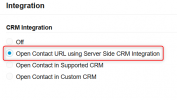
This is the option you should select on the 3CX Client:
1759843177478.png

It seems you don't have this option, so maybe you're not using a Professional / Enterprise 3CX license?

You mentioned that you have a file for the integration. I assumed it was the XML template, but maybe I misunderstood what you were trying to say....
 
  • Like
Reactions: dataceum
This is the option you should select on the 3CX Client:
View attachment 49630

It seems you don't have this option, so maybe you're not using a Professional / Enterprise 3CX license?

You mentioned that you have a file for the integration. I assumed it was the XML template, but maybe I misunderstood what you were trying to say....
Oh ok. I use Professional license though. And, yes, I have an XML template for the integration. Everything works fine apart from the automatic contact URL opening on call connect.
I guess I have to figure out how to get that option shown in your screenshot. Thanks a lot for pointing that out for me.
 
It should be shown if your license supports it. Try fully refreshing your web client browser tab.
 
Oh ok. I use Professional license though. And, yes, I have an XML template for the integration. Everything works fine apart from the automatic contact URL opening on call connect.
I guess I have to figure out how to get that option shown in your screenshot. Thanks a lot for pointing that out for me.
I think we have that working with our Espo template.
 
It should be shown if your license supports it. Try fully refreshing your web client browser tab.
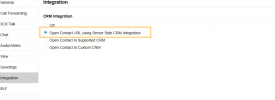
You're a life saver for pointing this out for me. I have that option now as shown in the screenshot. Thank you sooooo much
1759844948561.png
 
I think we have that working with our Espo template.
I have it working now. Thanks. Do you have contact creation for new contacts working with your template?
 
  • Like
Reactions: Evolute IT
I have it working now. Thanks. Do you have contact creation for new contacts working with your template?
Yes we do. It also assigns calls/chats and does lookup by email. We could probably add search easily as well.
 
Yes we do. It also assigns calls/chats and does lookup by email. We could probably add search easily as well.
I still can't get my contact creation to work. Below a snippet of my template:
<Scenario Id="CreateContactRecordFromClient" Type="REST">
<Request SkipIf="[CreateContactEnabled]!=True||[IIf([CreateOnCallDirection]==Inbound,[CallDirection]!=Inbound,False)]==True" Url="https://crm.com/api/v1/Contact" MessagePasses="0" RequestContentType="application/json" RequestEncoding="Json" RequestType="Post" ResponseType="Json">
<PostValues Key="">
<Value Key="firstName" Passes="2" Type="String">[FirstName]</Value>
<Value Key="lastName" Passes="2" Type="String">[LastName]</Value>
<Value Key="callDirection" Passes="1" Type="String">[CallDirection]</Value>
<Value Key="phoneNumber" Passes="1" Type="String">[Number]</Value>
</PostValues>
</Request>
<Rules>
<Rule Type="Any" Ethalon="">list.id</Rule>
</Rules>
<Variables>
<Variable Name="ContactID" LookupValue="" Path="list.id"><Filter /></Variable>
<Variable Name="FirstName" LookupValue="" Path="list.firstName"><Filter /></Variable>
<Variable Name="LastName" LookupValue="" Path="list.lastName"><Filter /></Variable>
<Variable Name="PhoneMobile" LookupValue="" Path="list.phoneNumber"><Filter /></Variable>
</Variables>
<Outputs AllowEmpty="false">
<Output Type="ContactID" Passes="0" Value="[ContactID]" />
<Output Type="FirstName" Passes="0" Value="[FirstName]" />
<Output Type="LastName" Passes="0" Value="[LastName]" />
<Output Type="PhoneMobile" Passes="0" Value="[PhoneMobile]" />
<Output Type="ContactUrl" Passes="0" Value="https://crm.com/#Contact/view/[Contact ID]" />
<Output Type="EntityId" Passes="0" Value="[ContactID]" />
<Output Type="EntityType" Passes="0" Value="Contacts" />
</Outputs>
</Scenario>

What am I missing?
 
I still can't get my contact creation to work. Below a snippet of my template:
<Scenario Id="CreateContactRecordFromClient" Type="REST">
<Request SkipIf="[CreateContactEnabled]!=True||[IIf([CreateOnCallDirection]==Inbound,[CallDirection]!=Inbound,False)]==True" Url="https://crm.com/api/v1/Contact" MessagePasses="0" RequestContentType="application/json" RequestEncoding="Json" RequestType="Post" ResponseType="Json">
<PostValues Key="">
<Value Key="firstName" Passes="2" Type="String">[FirstName]</Value>
<Value Key="lastName" Passes="2" Type="String">[LastName]</Value>
<Value Key="callDirection" Passes="1" Type="String">[CallDirection]</Value>
<Value Key="phoneNumber" Passes="1" Type="String">[Number]</Value>
</PostValues>
</Request>
<Rules>
<Rule Type="Any" Ethalon="">list.id</Rule>
</Rules>
<Variables>
<Variable Name="ContactID" LookupValue="" Path="list.id"><Filter /></Variable>
<Variable Name="FirstName" LookupValue="" Path="list.firstName"><Filter /></Variable>
<Variable Name="LastName" LookupValue="" Path="list.lastName"><Filter /></Variable>
<Variable Name="PhoneMobile" LookupValue="" Path="list.phoneNumber"><Filter /></Variable>
</Variables>
<Outputs AllowEmpty="false">
<Output Type="ContactID" Passes="0" Value="[ContactID]" />
<Output Type="FirstName" Passes="0" Value="[FirstName]" />
<Output Type="LastName" Passes="0" Value="[LastName]" />
<Output Type="PhoneMobile" Passes="0" Value="[PhoneMobile]" />
<Output Type="ContactUrl" Passes="0" Value="https://crm.com/#Contact/view/[Contact ID]" />
<Output Type="EntityId" Passes="0" Value="[ContactID]" />
<Output Type="EntityType" Passes="0" Value="Contacts" />
</Outputs>
</Scenario>

What am I missing?
This is executed when you click "Add contact" in the 3CX web client. This is not automatic. Are you clicking there and filling the form?
 
  • Like
Reactions: Evolute IT
This is executed when you click "Add contact" in the 3CX web client. This is not automatic. Are you clicking there and filling the form?
The Scenario Id CreateContactRecordFromClient actually should automatically create the contact and open the contact URL.
In any case, when I clicked on the Add Contact on the dialer, this is the error message I got:


Exception during contact creation. FirstName=xxx, . LastName=xxx, . Company="", . Number=+000000000, . Email=[email protected]. Exception: System.Exception: For some unknown reason, CRM did not create a contact. at MyPhoneServer.Common.ClientManager.ServerMessageProcessor.ProcessUpdateContact(RequestUpdateContact request, IClient client, ICrmProcessorFactory crmProcessorFactory, IGraphServiceClientFactory graphServiceClientFactory, IPhoneSystem ps, IMicrosoft365ConfigurationRepository configurationRepository, ICrmLookupService crmCacheService, CancellationToken token)

 
The Scenario Id CreateContactRecordFromClient actually should automatically create the contact and open the contact URL.
No, this has been changed long time ago. It used to be like that, but not anymore, now you need to click "Add contact", fill the form, and then this scenario will be invoked.

In any case, when I clicked on the Add Contact on the dialer, this is the error message I got:


Exception during contact creation. FirstName=xxx, . LastName=xxx, . Company="", . Number=+000000000, . Email=[email protected]. Exception: System.Exception: For some unknown reason, CRM did not create a contact. at MyPhoneServer.Common.ClientManager.ServerMessageProcessor.ProcessUpdateContact(RequestUpdateContact request, IClient client, ICrmProcessorFactory crmProcessorFactory, IGraphServiceClientFactory graphServiceClientFactory, IPhoneSystem ps, IMicrosoft365ConfigurationRepository configurationRepository, ICrmLookupService crmCacheService, CancellationToken token)
Most probably the scenario is not generating a valid output, then 3CX considers that no contact was created.
 
  • Like
Reactions: Evolute IT
No, this has been changed long time ago. It used to be like that, but not anymore, now you need to click "Add contact", fill the form, and then this scenario will be invoked.


Most probably the scenario is not generating a valid output, then 3CX considers that no contact was created.
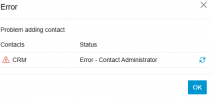
Thank you for your insights. But surprisingly, the CreateContactRecordFromClient Id works for me. Only problem is when I click the Add Contact and fill the form, I get an error message as shown in the screenshot but the contact gets created in the CRM anyway.

1759927672650.png

This is the error message I get in the Event Log


Exception during contact creation. FirstName=K, . LastName=A, . Company=, . Number=+2222222222, . Email=. Exception: System.Exception: For some unknown reason, CRM did not create a contact. at MyPhoneServer.Common.ClientManager.ServerMessageProcessor.ProcessUpdateContact(RequestUpdateContact request, IClient client, ICrmProcessorFactory crmProcessorFactory, IGraphServiceClientFactory graphServiceClientFactory, IPhoneSystem ps, IMicrosoft365ConfigurationRepository configurationRepository, ICrmLookupService crmCacheService, CancellationToken token)

Still can't figure out why I get this error even though the contact gets created in the CRM
 
Thank you for your insights. But surprisingly, the CreateContactRecordFromClient Id works for me. Only problem is when I click the Add Contact and fill the form, I get an error message as shown in the screenshot but the contact gets created in the CRM anyway.

View attachment 49646

This is the error message I get in the Event Log


Exception during contact creation. FirstName=K, . LastName=A, . Company=, . Number=+2222222222, . Email=. Exception: System.Exception: For some unknown reason, CRM did not create a contact. at MyPhoneServer.Common.ClientManager.ServerMessageProcessor.ProcessUpdateContact(RequestUpdateContact request, IClient client, ICrmProcessorFactory crmProcessorFactory, IGraphServiceClientFactory graphServiceClientFactory, IPhoneSystem ps, IMicrosoft365ConfigurationRepository configurationRepository, ICrmLookupService crmCacheService, CancellationToken token)

Still can't figure out why I get this error even though the contact gets created in the CRM
DM me. I'll send you our full template.
 
Thank you for your insights. But surprisingly, the CreateContactRecordFromClient Id works for me. Only problem is when I click the Add Contact and fill the form, I get an error message as shown in the screenshot but the contact gets created in the CRM anyway.

View attachment 49646

This is the error message I get in the Event Log


Exception during contact creation. FirstName=K, . LastName=A, . Company=, . Number=+2222222222, . Email=. Exception: System.Exception: For some unknown reason, CRM did not create a contact. at MyPhoneServer.Common.ClientManager.ServerMessageProcessor.ProcessUpdateContact(RequestUpdateContact request, IClient client, ICrmProcessorFactory crmProcessorFactory, IGraphServiceClientFactory graphServiceClientFactory, IPhoneSystem ps, IMicrosoft365ConfigurationRepository configurationRepository, ICrmLookupService crmCacheService, CancellationToken token)

Still can't figure out why I get this error even though the contact gets created in the CRM
This happens because 3CX is invoking the CRM REST API to create the contact, and this part is fine. The problem is how the response from the REST API is being treated. Your XML template should indicate how to map the response to valid outputs, so 3CX can consider the response successful. And this is what's not correct here, and that's why you see that error. A few tweaks to the template will do the trick.
 
This happens because 3CX is invoking the CRM REST API to create the contact, and this part is fine. The problem is how the response from the REST API is being treated. Your XML template should indicate how to map the response to valid outputs, so 3CX can consider the response successful. And this is what's not correct here, and that's why you see that error. A few tweaks to the template will do the trick.
We have one working that I sent him.
 
  • Like
Reactions: Evolute IT

Forum statistics

Threads
111,955
Messages
589,925
Members
164,853
Latest member
as7h