Open ports on the firewall for access to Dynamic365 CRM

Status
Not open for further replies.

Jimmy Xin

Free User
Joined
Sep 5, 2023
Messages
3
Reaction score
0
Hi, I’m working on a finance project that involves 3CX and has strict security requirements.

In order to integrate with Dynamics 365, I have the following questions:

Does 3CX perform CRM contact lookup on the PBX server side or on the WebRTC client side?
Which port is used by Dynamics 365 CRM?
Should I create a firewall rule on the PBX server or on the agent’s PC to allow network access for Dynamics CRM?


Thanks,
 
Does 3CX perform CRM contact lookup on the PBX server side or on the WebRTC client side?
The lookup is triggered from the 3CX server.

Which port is used by Dynamics 365 CRM?
This is an HTTPS connection, port 443.

Should I create a firewall rule on the PBX server or on the agent’s PC to allow network access for Dynamics CRM?
This is not needed, this is outbound traffic from the 3CX server to Dynamics, so it's enabled by default.
 
The lookup is triggered from the 3CX server.


This is an HTTPS connection, port 443.


This is not needed, this is outbound traffic from the 3CX server to Dynamics, so it's enabled by default.

Hi Ernesto,

Thanks for your reply. Since there is also another firewall that protects the LAN that the agents sit on, we have to know this information.

One more question:

1. I see in the document that the 3CX has the following features: For these two features, is it performed on the agent side or on the server side? If performed on the client agent side, we create the firewall rule, which is also HTTPS over 443, right?
  • Call & Chat Journalling – calls and chats are logged in the Microsoft Dynamics 365 Contact Card as CRM call records.
  • Create a new Microsoft Dynamics 365 contact from the 3CX client for calls from new numbers.

2. We've made some tests; we created a contact in 3CX with the name Jim and the phone number 123456. When we make a call from a FreeSwitch and the caller number is 123456 and route that call to the 3CX extension 1001, the IP Phone that registered the 1001 receives the call, but the caller name is not displayed as Jim. How can we troubleshoot it? We've tried the contact settings for exactly matching or at least matching 5 digits.


Best
 
1. I see in the document that the 3CX has the following features: For these two features, is it performed on the agent side or on the server side? If performed on the client agent side, we create the firewall rule, which is also HTTPS over 443, right?
Everything is triggered from the server side, through an HTTPS connection.

2. We've made some tests; we created a contact in 3CX with the name Jim and the phone number 123456. When we make a call from a FreeSwitch and the caller number is 123456 and route that call to the 3CX extension 1001, the IP Phone that registered the 1001 receives the call, but the caller name is not displayed as Jim. How can we troubleshoot it? We've tried the contact settings for exactly matching or at least matching 5 digits.
The integration works for external calls. I'm not sure how you're connecting this FreeSwitch, if it's over a SIP Trunk then the integration will be triggered. Please note that the CRM details are shown in the Web Client / Desktop App, not in a deskphone.
 
Everything is triggered from the server side, through an HTTPS connection.


The integration works for external calls. I'm not sure how you're connecting this FreeSwitch, if it's over a SIP Trunk then the integration will be triggered. Please note that the CRM details are shown in the Web Client / Desktop App, not in a deskphone.

Ok, so we will not need to create the fire rule for the agent client since their web client/ desktop app no need to access the CRM.

Do you mean the CRM details will not display on the IP Phone if the agent uses an IP phone such as Yealink?
Even the caller name does not display on the IP phone ?
 
Do you mean the CRM details will not display on the IP Phone if the agent uses an IP phone such as Yealink?
Even the caller name does not display on the IP phone ?
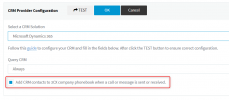
In order to display the contact name on the IP phone, you need to enable the following option in the 3CX Console > Settings > CRM:
1694177223287.png

When you do this and you receive a call, the contact details will be added to the 3CX phonebook as CRM contacts. These contacts are shown on the IP phone display, as long as the contact is in 3CX when the call is received. This means that the first time you receive a call, the contact will not be there and the phone will not show it, but the contact will be added. The second call, the contact name will be shown.
 
Status
Not open for further replies.

Forum statistics

Threads
112,228
Messages
591,391
Members
165,318
Latest member
PacketPilgrim