Out of office hours, in office hours status?

Status
Not open for further replies.

ElementalWindX

Bronze Partner
Advanced Certified
Joined
Oct 24, 2018
Messages
367
Reaction score
40
Is there somewhere in the UI that shows which status the entire system is in? In office hours, out of office hours? I ask because when I set a system to out of office hours with *802, it's still processing calls as if they're in hours.
 
Hi @ElementalWindX

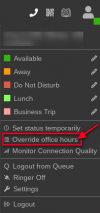
If you are refering for a V20 system this can be done by clicking the status button on the webclient from any extension and choose the option "override office hours"

1725290672344.png
 
  • Like
Reactions: Evolute IT
Yeah just found this out. This sucks. Wish the * dial code worked. I have a pbx with 2 depts, one A and one B. Both need to be set to out of office hours and when someone calls the DID going to either dept, it should be directing to a dummy extension with a vm message saying that location is closed. I've used the method you've shown above and both say they're out of office until tomorrow. (Wish they'd let us set a specific time, or "until office opens again").

Location A keeps saying the normal open hours message but it does go straight to A's vmbox

Location B is working as I want by saying the out of office hours message and going to B's vmbox.


I'm tearing my hair out trying to figure out why A won't work like B and I swear I have everything identical.


Both DID's go to a RG. They're set to go to A or B's dummy extensions vmbox. Both are tied to dept A or B.

For some reason it keeps playing the vm message for the "available" status. -_- idk why it wont change status to DND when set to out of office hours.

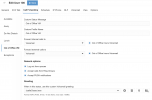
I even setup the dummy ext as such:

1725292097630.png
 
Last edited:
Status
Not open for further replies.

Members Online Now

Forum statistics

Threads
111,832
Messages
589,284
Members
164,662
Latest member
DejanMDS