


- Joined
- Jun 20, 2018
- Messages
- 4,475
- Reaction score
- 2,190
Debian
18.0.1880 Standard (new install from ISO, originally as 18RC2)
Hosted in KVM
Testing from web client
Trunk provider GreenLink (set as a generic trunk; but we have multiple installs using them)
This new client has two locations. My original plan was to use an E911 rule and send a different caller ID that way. GreenLink says their policy is to have a separate trunk for each location so I set that up, with its own E911 outbound rule. So there are now two trunks, named Office and E911. Each trunk has its own login/password. For ease of testing I also set up an outbound rule for calls from my test ext 000 to go out the second trunk. Both trunks are registered.
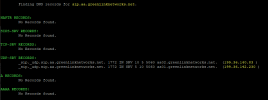
sip.aa.greenlinknetworks.net is an SRV record that (_sip._udp.sip.aa.greenlinknetworks.net) refers to aa01.greenlinknetworks.net and aa02.greenlinknetworks.net. aa01.greenlinknetworks.net is preferred so that's the established connection.
If both the Office and E911 trunks are set to use sip.aa.greenlinknetworks.net, with different credentials, and I make a call from 000, the Activity log (Medium) shows the call matching the outbound rule, and using the E911 trunk. However GreenLink says the call connects through their system using the Office trunk, and thus the call has the wrong caller ID at the remote end.
If I set the E911 trunk to use aa01.greenlinknetworks.net, same thing...the outbound call connects to them using the (incorrect) Office trunk.
If I set the E911 trunk to use aa02.greenlinknetworks.net, the log shows the same thing but it connects to them using the (correct) E911 trunk. I can change the E911 trunk between aa01 and aa02 and reproduce the problem at will.
Note that I can also reproduce this by setting both trunks to aa02.greenlinknetworks.net. It only "works correctly" if they are different.
I am rather confused about this. Could it be that 3CX is seeing an already open connection to the IP of aa01.greenlinknetworks.net and using that, even though it should be using the second trunk (connecting to the same IP)?
For the time being we can set the E911 trunk to use aa02, which seems like it will work until the primary trunk fails over someday, in which case one of them will have the wrong caller ID.
TL,DR: does 3CX differentiate between two SIP trunks with active connections to the same SIP server?
18.0.1880 Standard (new install from ISO, originally as 18RC2)
Hosted in KVM
Testing from web client
Trunk provider GreenLink (set as a generic trunk; but we have multiple installs using them)
This new client has two locations. My original plan was to use an E911 rule and send a different caller ID that way. GreenLink says their policy is to have a separate trunk for each location so I set that up, with its own E911 outbound rule. So there are now two trunks, named Office and E911. Each trunk has its own login/password. For ease of testing I also set up an outbound rule for calls from my test ext 000 to go out the second trunk. Both trunks are registered.
sip.aa.greenlinknetworks.net is an SRV record that (_sip._udp.sip.aa.greenlinknetworks.net) refers to aa01.greenlinknetworks.net and aa02.greenlinknetworks.net. aa01.greenlinknetworks.net is preferred so that's the established connection.
If both the Office and E911 trunks are set to use sip.aa.greenlinknetworks.net, with different credentials, and I make a call from 000, the Activity log (Medium) shows the call matching the outbound rule, and using the E911 trunk. However GreenLink says the call connects through their system using the Office trunk, and thus the call has the wrong caller ID at the remote end.
If I set the E911 trunk to use aa01.greenlinknetworks.net, same thing...the outbound call connects to them using the (incorrect) Office trunk.
If I set the E911 trunk to use aa02.greenlinknetworks.net, the log shows the same thing but it connects to them using the (correct) E911 trunk. I can change the E911 trunk between aa01 and aa02 and reproduce the problem at will.
Note that I can also reproduce this by setting both trunks to aa02.greenlinknetworks.net. It only "works correctly" if they are different.
I am rather confused about this. Could it be that 3CX is seeing an already open connection to the IP of aa01.greenlinknetworks.net and using that, even though it should be using the second trunk (connecting to the same IP)?
For the time being we can set the E911 trunk to use aa02, which seems like it will work until the primary trunk fails over someday, in which case one of them will have the wrong caller ID.
TL,DR: does 3CX differentiate between two SIP trunks with active connections to the same SIP server?

 That's why we're all confused, since they say it's not, as it's going through their system.


