Outbound Caller ID (empty list)

Status
Not open for further replies.

mromih

Customer
Joined
Sep 25, 2024
Messages
1
Reaction score
0
Hello,

yesterday we migrated from v18 to v20. There are quite a few changes, but I think we have successfully arranged everything.

But we have one "issue" that I can't solve, even with the help of the forum.

We have quite a few phone numbers in the company, but in most cases we use three. I'd like to add these three numbers to the list for users to choose from, but I can't seem to do that. If they type the number and make outgoing call, it works and is displayed to the caller. But it would be easier if you could choose between these numbers in the drop-down menu.
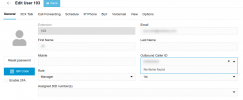
Zaslonska slika 2024-09-25 10-27-08.png
Thank you!
Regards, Martin
 
You have to assign the DID to the extension (look at the bottom of your screenshot), though if you have a "global" number you must assign that to wherever call routing goes. Therefore, it may be best you create outbound rules to change caller ID based on prepended digits.
 
3CX does not currently offer that as an option (selecting the desired outbound caller ID from a list), but we do.

But let us first talk about options you can implement to accomplish something similar without our tools. One common approach is to create multiple outbound rules, each rule assigned a different caller ID number. An agent can select the desired outbound caller ID simply by dials the desired number but with a code prepended to the phone number. For example, if the agent wanted to dial 8016424655, they could instead dial 9998016424655. Then on your outbound rule you could specify if the dialed number is 13 digits in length starting with 999 use this rule.

The rule would be configured to strip the 999 from the dialed digits and pass the original phone number to your SIP provider. The key is to assign a caller ID to the outbound rule to override your default caller ID. You can then do the same for the other two DIDs, by appending 777, or 888 and creating the appropriate outbound rules.

This works well if you only need a few caller IDs. But this approach falls apart if you have a large number of DIDs. Very quickly your outbound rules become difficult to manage, and expecting staff to memorize a large number of prefix digits is infeasible.

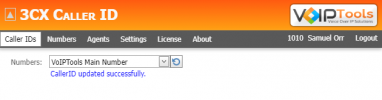
So, if you have a large list of caller ID numbers agents need to choose from, then you may want to take a look at our 3CX Caller ID tool. Our tool provides an ultra-simple web page where they can select the desired number and it will automatically update their extension with the correct caller ID number. To simplify the number selection process, you can give each phone number a friendly name. For example "8016424655 UT, Salt Lake" or "Business 1", "Business 2", etc. Further, you can assign different numbers to different groups (teams). For example, if you have a team in the UK, it does not make sense to show them USA phone numbers, and show UK phone numbers to the team in the USA.

Finally, when the agent is done making the necessary calls, they can press the "revert" button to reassign their default caller ID number.

1727269022126.png
 
Status
Not open for further replies.

Forum statistics

Threads
111,954
Messages
589,921
Members
164,852
Latest member
priya