Solved Outbound calls not working

Status
Not open for further replies.

jade1

Free User
Joined
Feb 1, 2022
Messages
7
Reaction score
1
Hi everyone,

i have an issue with outbound calls from 3CX to PSTN, as i got an error ( Call to <sip:0003@IP:0> has failed; Cause: 487 Request Terminated/INVITE from IP:5060 ) so the NO RTP media in both ways, we are using UDP peer to peer SIP trunk
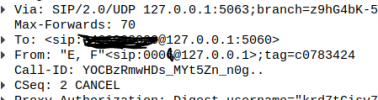
Noticed that on packet capture, from 3CX messages
1- Keep sending invite messages
2- Messages contain the source and the Destination IP are same

1643759789715.png

The PBX was working fine before

Thanks
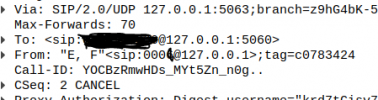
 
sip header showing Sr and Dst IPs are same and Cancel status
1643760520660.png
 

Attachments

  • 1643760451639.png
    1643760451639.png
    24.1 KB · Views: 0
Hello @jade1

If you are using a webclient or an SBC device or something else using the loopback interface then that would explain the 127.0.0.1 IP you are seeing.
Does the call connect but there is no audio? What SIP trunk provider are you using? What version is your PBX?
What device are you using to call out from? Is your PBX hosted in the cloud or local? Windows or Debian?
Any other information regarding your set up that will be useful to us?
 
Hello Yiannish,

The 127.0.0.1 is not an issue, i was capturing on the loopback interface, thats fine.

- Does the call connect but there is no audio? Yes
- What SIP trunk provider are you using? SIP peer to peer using UDP
- What version is your PBX? V.16
- What device are you using to call out from? Any device, soft-phone or Client web through web-page
- Is your PBX hosted in the cloud or local? Local
- Windows or Debian? Debian

Thanks for your reply


Best Regards,
Jade
 
Ok in that case you will need to perform a capture on the PBX and check the audio streams to see where the issue is. Let me know if you require any assistance.
Before doing that however run the firewall checker and make sure it passes all tests to eliminate any issues there.
 
Ok in that case you will need to perform a capture on the PBX and check the audio streams to see where the issue is. Let me know if you require any assistance.
Before doing that however run the firewall checker and make sure it passes all tests to eliminate any issues there.
Thank you Yiannish,

The issue has been resolved, it was internally with our routing
 
  • Like
Reactions: ChrisC_3CX
Glad to see you managed to identify the issue!

Feel free to start a ew thread should you need anything else!
 
Status
Not open for further replies.

Latest Posts

Forum statistics

Threads
112,324
Messages
591,897
Members
165,475
Latest member
lastshadow