Solved Outbound SMS number format from 3CX Contact

Status
Not open for further replies.

telica

Platinum Partner
Advanced Certified
Joined
Nov 26, 2008
Messages
22
Reaction score
1
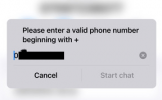
We have a customer where we've recently introduced an SMS service. They mentioned that when a customer calls them they'd like the option to reply by SMS, but they get the following when they click from the contact number:
1706013901542.png

If I reformat the incoming caller ID on the call SIP trunk to replace the leading 0 with +44 so that it meets the requirements for the outgoing SMS SIP trunk is this the most efficient way to achieve this?

So, under "Reformat Incoming or Outgoing Caller" on the call SIP trunk I set "Inbound" to:

Source Pattern:
0(.*)

Replace Pattern:
+44\1

Also, will this apply even when "Convert Inbound caller ID to e164 number format" is not enabled as don't wish to change anything for outbound calls?
 
Reformat doesn't work for SMS.

You absolutely need to reformat any numbers manually when creating the conversion.
 
Thanks for the update on this, but it is somewhat customer unfriendly. Can anyone from 3CX confirm @ConceptsWeb comment and whether there's any plans or option to allow this in future?
 
The most efficient solution is to use a supported SMS provider that uses the same number format for calls and SMS.

If your provider supports dialing in +E164 you could add your contacts in this format so you can dial them and send SMS to them by selecting them.

For calls you could reformat the caller ID to include +44 but your contacts would need to be saved like this.
Also, will this apply even when "Convert Inbound caller ID to e164 number format" is not enabled as don't wish to change anything for outbound calls?
You do not need to enable the "Convert Inbound caller ID to e164 number format" option. This works independently of reformatting.
 
The most efficient solution is to use a supported SMS provider that uses the same number format for calls and SMS.

If your provider supports dialing in +E164 you could add your contacts in this format so you can dial them and send SMS to them by selecting them.

For calls you could reformat the caller ID to include +44 but your contacts would need to be saved like this.

You do not need to enable the "Convert Inbound caller ID to e164 number format" option. This works independently of reformatting.
Hi Yiannis,

Thanks for this. Could you elaborate slightly on "For calls you could reformat the caller ID to include +44 but your contacts would need to be saved like this.".

Customer is using Twilio and I've been trying to find a link to 3CX supported SMS providers, but haven't found this as yet. Could you post a URL for this too?
 
Last edited:
Twilio supports E164 number format, in fact I believe that is the only format they do support.

Thanks for this. Could you elaborate slightly on "For calls you could reformat the caller ID to include +44 but your contacts would need to be saved like this.".
You said that the customer is selecting the number to send SMS from the contacts so to not have to reformat them then the contacts need to be saved in the correct format.

We do have a guide on setting up Twilio which includes SMS. Hope this helps
 
Hi Yiannis,

Apologies for the confusion the number is not stored as a contact, it is the contact number from the call log when the customer is using the 3CX app. Essentially the call comes in via the main "call" SIP trunk and the customer wants the option to SMS back via the Twilio SIP trunk, however when they tap on the chat icon the image in the original post comes up. So the incoming number on the log is the national format and the chat requires it in E164. So this is where, potentially, I'd like to reformat the incoming caller ID to E164 so that the outgoing chat number is in the correct format.
 
I see. You have a different trunk for calls and you are using Twilio for SMS. Then yes you could definitely try caller ID reformatting. The call log will show the number with +
 
  • Like
Reactions: Evolute IT
So after a lot of back and forward with the customer it appears that the caller ID reformat has provided a solution in this instance. Thanks @YiannisH_3CX for your input.
 
  • Like
Reactions: YiannisH_3CX
Glad I could help
 
Status
Not open for further replies.

Forum statistics

Threads
112,064
Messages
590,575
Members
165,019
Latest member
rsaldin@advancedbrainspin