Outgoing Calls failed in Teams

Status
Not open for further replies.

Samuel Ma

New User
Joined
Oct 13, 2021
Messages
14
Reaction score
2
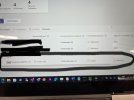
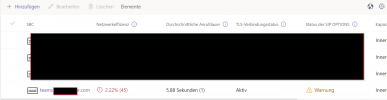
Hello i have the issue that i had setup everything in the 3CX and Teams Admin center but i can recive only incoming calls in 3CX and Teams. But i cant make outgoing calls in Teams, not to a Phonenumber and also not to a extention number (100/101/ etc.). I can make outgoing calls in the 3CX client so it wont be any problem of the 3 CX config i think but also in Teams admin center its showing me that the TÖS connection is not active. :( any idea?
 

Attachments

  • CF5E2B26-93F0-405E-AEB3-167302662528.jpeg
    CF5E2B26-93F0-405E-AEB3-167302662528.jpeg
    744.2 KB · Views: 10
Make sure your certificate works correctly and that it is to specs.

Also, check that the system is listening on port 5062/5061 (depending on your setup.)
 
  • Like
Reactions: Samuel Ma
Make sure your certificate works correctly and that it is to specs.

Also, check that the system is listening on port 5062/5061 (depending on your setup.)
How can i check that the cert. works correctly? I made al the steps like in the manual
 
  • Like
Reactions: Evolute IT
Hii I also checked this but no changes at the reaction in teams:(


View attachment 25129
That's not the point. We want to know if the system is actually listening to the port. We see here that some calls are indeed working, so could it be your user that is misconfigured?

Make sure your user (Teams Admin > Users) has the right 3CX Calling policies applied and that the On-Premise line corresponds to the user's Office Phone field (plus de ext=) suffix.)
 
  • Like
Reactions: NickD_3CX
Yes that because the incoming calls are working. Thats why there are some data of the calls. But incoming calls not working. I checked the config again and every thing is set up like it should be. I also did the userscript in PS again. Everything is right in the Teams admin center. :/
 
  • Like
Reactions: Evolute IT
@Samuel Ma please do this and post a screenshot of the output.

One thing at a time. Don't try and use logic to deduce where the problem is, the way Teams interacts with 3CX is quite complicated and is most likely not how you would expect it to be....
Hi Nick okei sure i do this. How can i access the *CX via SSH if the 3CX is hosted in 3CX directly? :)
 
Hi Nick okei sure i do this. How can i access the *CX via SSH if the 3CX is hosted in 3CX directly? :)
Ah, Hosted by 3CX! I just asked the hosting team to check and it looks ok... ;)

Next, in your screenshot, you have put the Teams SBC FQDN to be teams.xxxxxxxxfe.com.

If you ping that, does it return an IP address? Could you send me this FQDN in a PM please?
 
Ah, Hosted by 3CX! I just asked the hosting team to check and it looks ok... ;)

Next, in your screenshot, you have put the Teams SBC FQDN to be teams.xxxxxxxxfe.com.

If you ping that, does it return an IP address? Could you send me this FQDN in a PM please?
Ive made you a PM. Ping-> Host unknown.
 
As I mentioned in our PM, you need to actually create an A Record for teams.xxxxxxxxfe.com and point it to your 3CX system public IP.
 
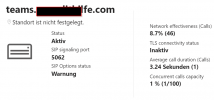
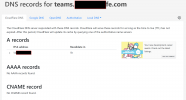
Hi Nick for your info until now i have this status in the Admin Center. I also see something in the DNS lookup. The technical support from my Domaincarrier (GoDaddy) told me i should ad a CNAME Record as well if i would like to create a sub domain. Is that true?
As I mentioned in our PM, you need to actually create an A Record for teams.xxxxxxxxfe.com and point it to your 3CX system public IP.

2021-10-15 16_12_45-DNS records for teams.pcundithilfe.com — NsLookup.io und 17 weitere Seiten...png2021-10-15 16_10_26-Direct Routing - Microsoft Teams Admin Center und 17 weitere Seiten - Gesc...png
 
Hi Nick for your info until now i have this status in the Admin Center. I also see something in the DNS lookup. The technical support from my Domaincarrier (GoDaddy) told me i should ad a CNAME Record as well if i would like to create a sub domain. Is that true?


View attachment 25183View attachment 25182
No, no CNAME. The person you spoke with doesn't know what he's doing clearly.

Just the A record, a certificate and the opened port. That's all you should need to get it to work.
 
No, no CNAME. The person you spoke with doesn't know what he's doing clearly.

Just the A record, a certificate and the opened port. That's all you should need to get it to work.
Hi Frederick thats what i told him as well. So never mind. Ive just added a A Record.
 
Status
Not open for further replies.