Solved NFTables V18 - Port 5062 not allowed by default

Status
Not open for further replies.
Update on my customer: we rebuilt the system completely but now we did figure out the private key is unable to load.

We will redo the certificate and see if that fixes it.
One more tip just in case, in Settings --> Microsoft 365 --> Teams Direct Routing, in the "Teams FQDN" field make sure you enter the value in lower-case characters only.
 
One more tip just in case, in Settings --> Microsoft 365 --> Teams Direct Routing, in the "Teams FQDN" field make sure you enter the value in lower-case characters only.
That's the first thing we checked.
 
Hello, I have the same problem, I have opened 5062 in AWS, I have verified with commands nft list table inet and nftables.conf but I still cannot open the port, even though everything seems to be well configured.

Has any conclusion been reached?
 
Hello, I have the same problem, I have opened 5062 in AWS, I have verified with commands nft list table inet and nftables.conf but I still cannot open the port, even though everything seems to be well configured.

Has any conclusion been reached?
First things first, after you have enabled the Teams integration, upload the cert/key, etc, as per the guide, then check that your 3CX is indeed listening on port 5062. You can do this by logging into your 3CX Instance via SSH and run command:
Bash:
netstat -laputen | grep 5062
You should see something like this:
1631601359276.png

Also make sure you check your AWS Security Group that you are using for your 3CX Instance and that port 5062 TCP is included there as well.
 
First things first, after you have enabled the Teams integration, upload the cert/key, etc, as per the guide, then check that your 3CX is indeed listening on port 5062. You can do this by logging into your 3CX Instance via SSH and run command:
Bash:
netstat -laputen | grep 5062
You should see something like this:
View attachment 24387

Also make sure you check your AWS Security Group that you are using for your 3CX Instance and that port 5062 TCP is included there as well.
Thanks for your comments, I actually followed the step by step, and checking with grep, it is confirmed that 5062 is not listening. I attach evidence.

Captura de Pantalla 2021-09-14 a la(s) 14.18.03.png

On the other hand, as I had mentioned from AWS, the ports are well configured.
Captura de Pantalla 2021-09-14 a la(s) 12.37.37.png
 
  • Like
Reactions: Evolute IT
Thanks for your comments, I actually followed the step by step, and checking with grep, it is confirmed that 5062 is not listening. I attach evidence.

View attachment 24403

On the other hand, as I had mentioned from AWS, the ports are well configured.
View attachment 24404
OK, so indeed the issue here is that 3CX is not listening on the port.

Could you please check the Certificate and Key files you uploaded for times to see if they are are a match?
You can check the instructions here: https://www.3cx.com/community/threa...5062-not-allowed-by-default.83936/post-392253

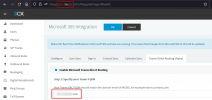
Also one very important question, the "Teams SBC FQDN" you have entered in Settings --> Microsoft 365 --> Teams Direct Routing tab, is it the same as your FQDN you used during the 3CX installation?
1631689366258.png
 
OK, so indeed the issue here is that 3CX is not listening on the port.

Could you please check the Certificate and Key files you uploaded for times to see if they are are a match?
You can check the instructions here: https://www.3cx.com/community/threa...5062-not-allowed-by-default.83936/post-392253

Also one very important question, the "Teams SBC FQDN" you have entered in Settings --> Microsoft 365 --> Teams Direct Routing tab, is it the same as your FQDN you used during the 3CX installation?
View attachment 24418
We have the same issue and files are indeed matching.

The cert has the CA and intermediate in it. The private key we tried encrypted and unencrypted.

It just won't load without any clearer error than "failed to load private key".
 
We have the same issue and files are indeed matching.

The cert has the CA and intermediate in it. The private key we tried encrypted and unencrypted.

It just won't load without any clearer error than "failed to load private key".
I'll send you a PM shortly.
 
To everyone reading this thread, I mentioned it before, but I will say it again and not link to the comment.

Use these 2 commands to validate that the Key and Cert file you are uploading match:
Code:
openssl rsa -noout -modulus -in <path to KEY file> | openssl md5
Code:
openssl x509 -noout -modulus -in <path to CERT file> | openssl md5

The output of the 2 commands must be 100% identical, otherwise you are a no-go.

Important Note:
Most of the Certificate Authorities give you a Cert file, and then a bundle file that contains the intermediate files. As stated, these need to be combined into 1 file.
The Certificate File contents must be at the top of the new file, then the contents of the bundle file below....

Also the above commands should be ran after you have "merged" the cert with the bundle.
 
  • Like
Reactions: Evolute IT
OK, so indeed the issue here is that 3CX is not listening on the port.

Could you please check the Certificate and Key files you uploaded for times to see if they are are a match?
You can check the instructions here: https://www.3cx.com/community/threa...5062-not-allowed-by-default.83936/post-392253

Also one very important question, the "Teams SBC FQDN" you have entered in Settings --> Microsoft 365 --> Teams Direct Routing tab, is it the same as your FQDN you used during the 3CX installation?
View attachment 24418
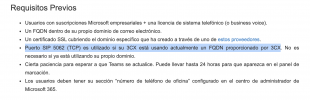
Dear, the fqdn is not the same. Here it says to use 5062 if the PBX uses the FQDN provided by 3CX.

Captura de Pantalla 2021-09-15 a la(s) 12.00.57.png
 
Status
Not open for further replies.

Members Online Now

No members online now.

Forum statistics

Threads
111,831
Messages
589,277
Members
164,660
Latest member
RJenkinsROCK