Solved Outgoing external call is disabled in OutOfOffice hours

Status
Not open for further replies.

benf

Bronze Partner
Basic Certified
Joined
Sep 27, 2017
Messages
123
Reaction score
12
Hi all, this started happening to me recently. I have never turned it on before, I went and looked there are no office hours set on the trunks. My extension doesnt have the block out of office hours checked. For a test I even went and deleted the Office hours for the 3CX and still get this message.

Any idea what I am missing? is there a new place this is enabled somewhere? on v16.08.9
 
First off, please provide the relevant information mentioned here: https://www.3cx.com/community/threads/information-to-provide-when-requesting-help.67558/

Also, is what you wrote as the subject the actual audio prompt you hear when attempting to place an outgoing call? If not, what do you hear exactly?

You may want to also make sure that the 3CX PBX has not been forced into Out of Office hours using the dial code, try dialing *64 to revert it back to the default office hours. (Check under "Settings >> Dial Codes" if not using the default)
 
Hi that message is actually whats in the activity log, when I dial it just goes dialing and then hangs up. My SIP vendor has no log of the call, and so that was just confirming everything for me.

If someone did press *64 , would that not be reflected in the GUI like on the trunk or something? The thing is that the trunk and extensions are not set with any time restriction, so out of office hours (I think) would have 0 effect on the functionality, but I am going to try it now and I guess I will see tonight.
 
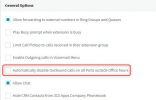
In that case you might also want to check the "Automatically disable Outbound calls on all Ports outside Office hours" in "Settings >> General". Although, it would still require that the 3CX PBX is in Out of Office mode.

Could you also please provide a screenshot of the message you get?
 
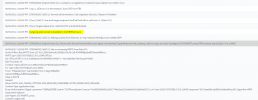
Thanks for the quick response! I don't get any message, Im using the WebRTC app, it just says dialing and then closes after 3-4 seconds. In the activity log I see this
1620307699223.png
 
If someone did press *64 , would that not be reflected in the GUI like on the trunk or something?
No. From your extension just dial *640 and tell us if you hear a prompt. If you do and it says something about "Default Office Hours", try a call again.


The thing is that the trunk and extensions are not set with any time restriction, so out of office hours (I think) would have 0 effect on the functionality, but I am going to try it now and I guess I will see tonight.
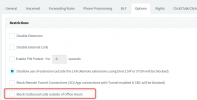
I see you tried from Extension 311. Go the the Extension Settings, in the "Options" tab and check the options there, specifically option "Block Outbound calls outside of Office Hours".
1620309436209.png
 
Yes, I checked that, I even turned it on, and turned it off again. I also cleared the office hours in the global settings and reboot the pbx.

When I dial *64 from my Webclient it just hangs up. *640 same, *642 same.
From a desk phone on another extension *640 busy, *642 busy, *64 busy

We can dial out now, because we are inside our office hours, so I cant test it again I guess until after 5pm.
 
If the issue is following your PBX's Global office hours, then it will not be related to the Force in/out of office dial code. Have you also checked the following option under "Settings >> General":
1620310643576.png
 
ding ding ding! we have a winner! that was it.

Thanks! thats the setting
 
Glad to hear you got this resolved! Please feel free to start a new thread should you need additional info or assistance!
 
Status
Not open for further replies.

Forum statistics

Threads
111,974
Messages
590,081
Members
164,899
Latest member
mazet