Outlook Integration signed with invalid cert

Status
Not open for further replies.

comfident

Bronze Partner
Joined
Oct 22, 2015
Messages
36
Reaction score
1
Hi,

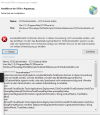
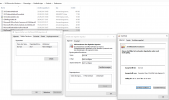
Outlook won't load or install the 3CX Plug-In, because those files are signed with an invalid signing certificate.
Please sign the files for Outlook Integration with a valid certificate and provide a download link for the package.

Regards
 
Hello @comfident,

What version of Outlook are you using? Are you installing 3CXPlugins or deploying the integration from the 3CX console? Can you share a screenshot of the error you get?
 
I did run the latest 3CX v16 Version till last week, but 3CX get somehow updated to version 18 1608.....
The problem exists in both versions.

It is a PRO license and followed the howto for CRM Integration:
https://www.3cx.com/docs/microsoft-outlook/

Outlook ist "Microsoft Apps for Enterprise" Version 2106.

I even deleted the folder "C:\ProgramData\3CXPhone for Windows\PhoneApp\DotNetScripts" and then restart 3CX.
The problem still exists.

As a workaround i am using the Registry value:
Computer\HKEY_LOCAL_MACHINE\SOFTWARE\Microsoft\.NETFramework\Security\TrustManager\PromptingLevel\MyComputer -> Enabled
 

Attachments

  • 3CX_OI_01.png
    3CX_OI_01.png
    55.4 KB · Views: 5
  • 3CX_OI_02.png
    3CX_OI_02.png
    84.2 KB · Views: 5
Here the Outlook.zip (Version 917) what i get from 3CX instance.
 

Attachments

Thanks for providing the information, I will investigate this. Meanwhile, can you please try installing 3CXPlugins from here instead? Please proceed as follows:
1) From the 3CX Console > Extension > Options > Uncheck the option "Enable integration (Legacy)".
2) Reprovision your 3CXPhone for Windows client.
3) Close Outlook and 3CXPhone for Windows.
4) Install 3CXPlugins, selecting Outlook when prompted.
5) Open 3CXPhone for Windows and Outlook.

Please let me know if it works this way.
 
I get the same error also with 3CX Plugins 15.

Name: 3CXOutlookAddin - 3CX Outlook Addin

Von: file:///C:/ProgramData/3CXPhone for Windows/PhoneApp/3CXOutlookAddin/3CXOutlookAddin.vsto


************** Ausnahmetext **************

System.Security.SecurityException: Benutzerdefinierte Funktionen können in dieser Anwendung nicht verwendet werden, weil das Zertifikat, mit dem das Bereitstellungsmanifest für 3CXOutlookAddin signiert wurde, oder sein Speicherort nicht vertrauenswürdig sind. Wenden Sie sich an den Administrator, um weitere Unterstützung zu erhalten.

bei Microsoft.VisualStudio.Tools.Applications.Deployment.ClickOnceAddInTrustEvaluator.VerifyTrustPromptKeyInternal(ClickOnceTrustPromptKeyValue promptKeyValue, DeploymentSignatureInformation signatureInformation, String productName, TrustStatus status)

bei Microsoft.VisualStudio.Tools.Applications.Deployment.ClickOnceAddInTrustEvaluator.VerifyTrustUsingPromptKey(Uri manifest, DeploymentSignatureInformation signatureInformation, String productName, TrustStatus status)

bei Microsoft.VisualStudio.Tools.Applications.Deployment.ClickOnceAddInDeploymentManager.ProcessSHA2Manifest(ActivationContext context, DeploymentSignatureInformation signatureInformation, PermissionSet permissionsRequested, Uri manifest, ManifestSignatureInformationCollection signatures, AddInInstallationStatus installState, TrustStatus sha256TrustStatus, X509Certificate2 sha256PublisherCert)

bei Microsoft.VisualStudio.Tools.Applications.Deployment.ClickOnceAddInDeploymentManager.VerifySecurity(ActivationContext context, Uri manifest, AddInInstallationStatus installState)

bei Microsoft.VisualStudio.Tools.Applications.Deployment.ClickOnceAddInDeploymentManager.InstallAddIn()

Die Zone der Assembly, bei der ein Fehler aufgetreten ist:

MyComputer
 
This looks like an issue with the security configuration of this particular PC. I'm not having any problem with this in my environment.

Please check this thread and the solution proposed:
https://www.3cx.com/community/threa...okaddin-or-its-location-is-not-trusted.78847/

Particularly, what's described here:
https://social.technet.microsoft.co...ing-to-install-and-an-excel-addin?forum=excel

After editing my registry \HKEY_LOCAL_MACHINE\SOFTWARE\MICROSOFT\.NETFramework\Security\TrustManager\PromptingLevel

to Enabled, it works perfectly now!
 
  • Like
Reactions: Evolute IT
Status
Not open for further replies.

Latest Posts

Forum statistics

Threads
112,323
Messages
591,896
Members
165,474
Latest member
costionofrei