Outlook Plugin is not working

Status
Not open for further replies.

qwon3cx

Free User
Joined
Nov 15, 2020
Messages
5
Reaction score
1
Hi,

i´m using the STD Version of the PBX Version 16.0.655. I´m able to call with the 3CX App Windows/IOS without problems to the Outside World. I´m trying to get the Outlookplugin to work. I´m able to chose Call contact with 3CX in the Conact inside from Outlook, but nothing happend in the client. I can find this entry in the Logfiles:

Clearing pendingOutboundCallDescriptor, the establishment of the outgoing call has taken too long. If you're experiencing this problem too often, consider changing the configuration parameter 'OutboundCallFailureMillisecondsTimeout' in section [General] into the configuration file %AppData%\3CXPhone for Windows\3CXCRM.ini. If the parameter is missing, the default value is 30000 (ie 30 seconds). Be aware that you will not be able to make a second outbound call until this time period elapses.

But adding this, will not solve the problem. I´m using Outlook O365 as the current client.

What i´m doing wrong about that?

Thx.
 
I found that in Logfile:

Pro only MicrosoftOutlookPlugin, Version=15.0.945.640, Culture=neutral
Error occurred when trying to initiate call in plugin handler
System.InvalidOperationException: Function call is not allowed
at _3CXWin8Phone.CallHandler.Prologue(Assembly callingAssembly)
at _3CXWin8Phone.CallHandler.MakeCallAction(Assembly callingAssembly, Action action)

So the STD Version does not support the plugin?

I´m right about that?
 
I found that in Logfile:

Pro only MicrosoftOutlookPlugin, Version=15.0.945.640, Culture=neutral
Error occurred when trying to initiate call in plugin handler
System.InvalidOperationException: Function call is not allowed
at _3CXWin8Phone.CallHandler.Prologue(Assembly callingAssembly)
at _3CXWin8Phone.CallHandler.MakeCallAction(Assembly callingAssembly, Action action)

So the STD Version does not support the plugin?

I´m right about that?
If my memory serves, you need Pro or Enterprise indeed.
 
You can use the Outlook plugin with STD licenses, as long as you install it with the 3CXPlugins installer. If you have a PRO/ENT license, then you can deploy it from the management console, which is easier.

In this case, it seems the 3CX client for Windows can't validate the signature of the Outlook plugin DLL. This could happen for example if you installed 3CX v16 Update 7 on your server, which uses a new certificate. In that case you will need a newer version of 3CXPlugins signed with the latest certificate. This new installer will be released when Update 7 final is released.

In order to solve this, try uninstalling the 3CX client for Windows, and then reinstalling it from here:
https://downloads-global.3cx.com/downloads/3CXPhoneforWindows16.msi

That's the client for Update 6, which has the appropriate certificate for the version of 3CXPlugins that you're using. Please give it a try and let me know how it goes.
 
  • Like
Reactions: Evolute IT
Hi Ernesto,

thanks for the tip but it´s still the same problem. The Clientversion is still the same like before 16.3.0.179. Is there a new Pluginpackage which I can try?

Thx.
 
Please do the following:
1) Go to "C:\ProgramData\3CXPhone for Windows\PhoneApp".
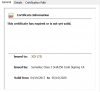
2) Right click the file "MyPhoneCRMIntegration.dll" and then select "Properties" > "Digital Signatures" tab > Select the signature > click Details > View certificate. Send a screenshot of this page.
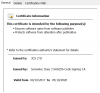
3) Right click the file "MicrosoftOutlookPlugin.dll" and then select "Properties" > "Digital Signatures" tab > Select the signature > click Details > View certificate. Send a screenshot of this page.

Both certificates should be the same, otherwise the plugin will not be trusted. If somehow you have no certificate for "MyPhoneCRMIntegration.dll", that will cause the issue.
 
Hi,

thanks for the hint. I´ve tried to get a little bit deeper in that problem. I´ve tried it with the Version 15 from the 3CXPhone for Windows. In this combo the plugin is working. I´ve checked the certificates.

Here are the results with the Version installed:

MyPhoneCRMIntegration.dll

2020-11-17 20_55_09-Certificate.png

MicrosoftOutlookPlugin.dll

2020-11-17 20_56_33-Certificate.png

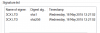
If i´m using the V15 the output seems different:

MyPhoneCRMIntegration.dll

2020-11-17 21_09_35-MyPhoneCRMIntegration.dll Properties.png

Both are not expired. They are the same like in V16 Screens.

Thx.
 
I would recommend that you copy the MyPhoneCRMIntegration.dll from v15 to your v16 installation, that should fix the issue.

As soon as we release Update 7 final, we will release an updated version of 3CXPlugins using a new certificate that expires in 2023, which will also be the certificate used by 3CXPhone for Windows. Until then, replacing this DLL should do the trick for you.
 
  • Like
Reactions: Evolute IT
Hi,

that seems to work.

What i´ve done was this:

1.Install V15 of the Windows Version (search after the 2 files -> MicrosoftOutlookPlugin.dll / MyPhoneCRMIntegration.dll -> "C:\ProgramData\3CXPhone for Windows\PhoneApp" and save them elsewhere.

2.Update with V16 of the Client.

3. Reinstall the Pluginspackage for Outlook and recopy the files above and finally it seems to work.

Maybe that will help some other with the same problem.

Thx for the hints!
 
  • Like
Reactions: edossantos
Status
Not open for further replies.

Latest Posts

Forum statistics

Threads
112,324
Messages
591,897
Members
165,475
Latest member
lastshadow