Override Office Hours log

bbaker73

Platinum Partner
Joined
Nov 27, 2015
Messages
276
Reaction score
93
Is this in one of the logs if it is activated by a user?

I can foresee clients looking for logged information on their trusted employees.

Also, I guess while I'm here, I'll suggest it would be nice to set a custom date/time for the overrides to end.

:)

Thanks!
 
You can look in to the audit log for this event.
 
Not showing up there for me.
I did an override on a couple of departments just now to retest.
Nothing in audit log
Changed reg office hours for the department just to make sure logging working
That shows up
Did overrides again.

Overrides don't show for me in the audit log.

Thanks
 
Are you using web client to override or dial code?
 
Webclient. Logged in System Owner. It's taking the hours override, just can't find a log reference.
My other various changes in the pbx show up.
 
Stupid suggestion but have you got all the filters set to any?
 
Yeah that was my first thought. That's why i went and changed the hours in the regular Office Hours section to make sure that showed up and it did.
 
is this v20?
 
Yes 20 upd 3 latest.

I just logged in as another user (receptionist), made same changes. Doesn't show in audit log.

Filters are today, any, any. so it's not that.

You can see a different behavior on your systems?
 
Is auditing turned on?
 
Yes. There's other data.

Funny you ask. I haven't found settings for audit log for 20. Figured they were just removed in 20.

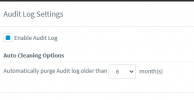
Can't find this in v20
1731062264973.png
 
You can see it under parameters if you search for audit but if it says enabled then its enabled.

Have you tried restarting services?
 
Parameters shows enabled with backlog 12.

Just restarted, but no change.
 
Just checked on an 18 upd 9 server. Doesn't log there either.
 

Forum statistics

Threads
111,956
Messages
589,927
Members
164,859
Latest member
MichaelRussell3