P-Asserted Identity Configuration

Kavin Wickham

Silver Partner
Advanced Certified
Joined
Oct 30, 2024
Messages
20
Reaction score
1
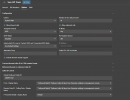
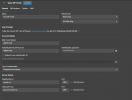
I am working with a local SIP trunk provider and we are wanting to change the way 3CX sends out it's P-asserted identity field so caller ID will function correctly. We've only been able to find the "P-Asserted Identity : Display Name". We are wanting to change additional fields in this header. The current settings are as follows:
1759774199391.png

1759774215074.png
 
We've only been able to find the "P-Asserted Identity : Display Name".
This is inbound.

In 3CX v20, outgoing parameters can no longer be changed directly.

You can export the SIP trunk template you're using, modify the parameters as desired, import the modified template and set it up again. This is the option provided by 3CX.

If it's not a 3CX SMB, you can use the 3CX Config API to directly modify the parameters of an existing SIP trunk. Don't forget to restart the relevant 3CX services or the entire 3CX system afterward.
 
  • Like
Reactions: bitn2
We've attempted to export the template and make changes, but it is difficult to know if the templates changes are sticking.

You're also noting that we cannot change outgoing parameters directly, are templates the exception to that?

If so I've attached the template we imported adding line 106 and 107 as we need to change these specific parameters of the P-asserted identity. These lines were not in the template at all before and we wrote them from scratch, is this something that can be done? Or can we only configure whatever is in the template?
 

Attachments

We've attempted to export the template and make changes, but it is difficult to know if the templates changes are sticking.
Look at the 3CX protocols, especially the INVITE of an outgoing call.

You're also noting that we cannot change outgoing parameters directly, are templates the exception to that?
Changing the templates is not a direct way, it is an indirect way as I see it.

Using the 3CX Configuration API is a direct way.

These lines were not in the template at all before and we wrote them from scratch, is this something that can be done?
yes

Or can we only configure whatever is in the template?
no

https://www.3cx.com/blog/docs/voip-provider-template/
https://www.3cx.com/docs/sip-trunk-outbound-calls/
 
I think line 106 and maybe 107 will not work. You use a custom value there.
 
Precisely. Line 106 and 107 are completely custom as the SIP trunk provider wanted to change more than the "<field name="ParameterOut" custom="" parameter="P-Asserted-IdentityDisplayName">Nite Owl</field>"

I do also understand you can change that specific value within the 3CX SIP Trunk configuration menu. The SIP Trunk provider was wanting to change the Host and user parts of the P-Asserted Identity
 
It appears that specific script in that forum post is no longer working in the newer V20 of 3CX. But it does describe that the API is the only way to change those parameters.
 
It appears that specific script in that forum post is no longer working in the newer V20 of 3CX.
it works - not only that specific script in that forum ;)
but you have to restart the service or the whole 3CX
 
Last edited:
  • Like
Reactions: bitn2

Latest Posts

Members Online Now

Forum statistics

Threads
111,831
Messages
589,276
Members
164,660
Latest member
RJenkinsROCK