Solved Paging Ring Group Terminates after v20 Upgrade

Status
Not open for further replies.

UAC

Customer
Joined
Dec 6, 2021
Messages
13
Reaction score
1
Hello,

We recently upgraded to v20 and it appears to have impacted our paging ring groups. Existing and new paging ring groups terminate the call within 1 second, but calling the phones directly work fine. Any advice on debugging?

Thanks!
 
Hi @UAC

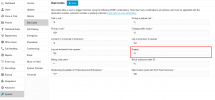
Navigate to System >> Dial Codes >> Under the paging dial code add *8 and try again.

1706905863541.png
 
  • Like
Reactions: UAC
That worked! We had a different dial code in there but changing it to *8 allowed the paging ring groups to work again. Thank you!!
 
We are glad the issue has been resolved :)
 
  • Like
Reactions: N_G
Is there an explanation as to why this needs to be changed to make paging work? I have quite a few systems set up with paging that all use a different dial code. It will be a pain to have to change all of them!
 
  • Like
Reactions: UAC and jed
You may have had a dial code which was clashing with others. *8 is not used anywhere, so this wiped out any doubt for clashes.
 
  • Like
Reactions: N_G and UAC
I have the same problem, whatever i put the code to it cuts the call and in the log i can see it says target is busy
 
Is there a technical explanation for this? I recently updated a v18 system to v20, which I had just set the calling code to *51 (not used in the system), after upgrade to v20, paging did NOT work. After changing the *51 code to *8 as pictured above, it began to work again. quite odd.
 
@BlueWaterNets
Thank you for the feedback. The dial code needs to be *8 as it can be the case of the conflict as shown in the screenshot of the very fist reply, those are default settings.
 
In v18 when we set this up, it was blank. We used *51 which didn't appear to be used. after the upgrade to v20, issue. I've set the client to *8 as you noted and confirmed it's working. Question for you - when we create a BLF speed dial - do we do *8xxx or just the extension defined for the page (xxx) ??
 
For paging a ring group, just the ring group number is required. To intercom directly to an extesnion, you need to dial *8Ext.
 
  • Like
Reactions: OlegR_3CX
Hello, after several testing, we figured out the problem on the paging is not the *50 and the extension, or *8 and the extension, the problem is the right under the user account. By default the account is under user, if you want a trustful paging you need to elevate the security to Recepcionist, after that, everything should work.
 
For paging a ring group, just the ring group number is required. To intercom directly to an extesnion, you need to dial *8Ext
Hello, after several testing, we figured out the problem on the paging is not the *50 and the extension, or *8 and the extension, the problem is the right under the user account. By default the account is under user, if you want a trustful paging you need to elevate the security to Recepcionist, after that, everything should work
 
For paging a ring group, just the ring group number is required. To intercom directly to an extesnion, you need to dial *8Ext.

Hello, after several testing, we figured out the problem on the paging is not the *50 and the extension, or *8 and the extension, the problem is the right under the user account. By default the account is under user, if you want a trustful paging you need to elevate the security to Recepcionist, after that, everything should work
 
You may have had a dial code which was clashing with others. *8 is not used anywhere, so this wiped out any doubt for clashes.

Hello, after several testing, we figured out the problem on the paging is not the *50 and the extension, or *8 and the extension, the problem is the right under the user account. By default the account is under user, if you want a trustful paging you need to elevate the security to Recepcionist, after that, everything should work
 
Status
Not open for further replies.

Forum statistics

Threads
111,973
Messages
590,070
Members
164,890
Latest member
James Hacker