Parallel Queues

Status
Not open for further replies.

Rmn3

Free User
Joined
Aug 30, 2021
Messages
90
Reaction score
2
Hi Guys,

i have a question.

How is it possible, when an agent is in two queues, to use the Q button in the 3cx app, to configure both queues?

in the Web-client you can set the Q on or off for every queue someone is signed in, but is it also possible in the 3cx desktop app?

Thanks in advance.
 
Hi @Rmn3,

How is it possible, when an agent is in two queues, to use the Q button in the 3cx app, to configure both queues?
Can you define what you mean by configure? Do you mean log in / log out?

Web-client you can set the Q on or off for every queue someone is signed in, but is it also possible in the 3cx desktop app?
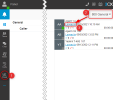
Yes it is also allows you to log out of individual queues by selecting Panel >> select the specific queue >> Log out / Log in the extension individually. Each extension can do this by themselves:

1631783573629.png
 
  • Like
Reactions: Evolute IT
Hi Vassili,

thank you very much for answer.

I mean it as follows: An Agent is queued up into 2 queues at a time. How can this agent handle their login / logout over the 3cx Windows app? So the agent can login logout in both queues as the needs to do in this moment?
 
Hi @Rmn3,

As shown above, that method allows the extension to log out of individual queues.

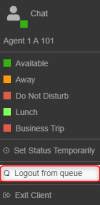
To log the extension out of ALL queues at once, simply click the Agent's status button at the top left, then select "Logout from queue".

1631784304579.png
 
  • Like
Reactions: Evolute IT
If i click in 3cx windows app into my status field, i just can change the status, nothing more
 
The update-check in our system says our 3cx pbx is the latest version.
 
  • Like
Reactions: VasilisV_3CX
Status
Not open for further replies.

Forum statistics

Threads
111,977
Messages
590,096
Members
164,906
Latest member
Nari