ronenba Bronze Partner Basic Certified Joined Nov 16, 2022 Messages 191 Reaction score 8 Feb 7, 2023 #1 How do I setup a key for SP0, SP1, and SP3 on the phone to show park calls? and how do you park called?
How do I setup a key for SP0, SP1, and SP3 on the phone to show park calls? and how do you park called?
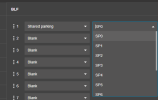
JohnS_3CX Support Team Staff member 3CX Support Joined Jan 4, 2019 Messages 14,523 Reaction score 3,694 Feb 7, 2023 #2 Hi, Edit your extension, and look at your BLFs. In the drop down menu you can select shared parking, and then simply reprovision the phone. The BLFs will become populated and you can start using them. This is available on supported phones.
Hi, Edit your extension, and look at your BLFs. In the drop down menu you can select shared parking, and then simply reprovision the phone. The BLFs will become populated and you can start using them. This is available on supported phones.
ronenba Bronze Partner Basic Certified Joined Nov 16, 2022 Messages 191 Reaction score 8 Feb 7, 2023 #3 I am using Fanvil x7A when I choose BLF it doesn't show any other options
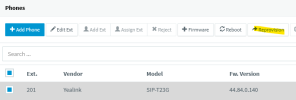
SteveITS 3CX MVP Silver Partner Advanced Certified Joined Jun 20, 2018 Messages 4,404 Reaction score 2,139 Feb 7, 2023 #4 Don't edit the phone directly, edit the extension either in the web client, desktop app (Settings/BLF), or the management console (BLF tab for the ext.) Then reprovision the phone from the Phones page: ...or reboot the phone. Reactions: JohnS_3CX
Don't edit the phone directly, edit the extension either in the web client, desktop app (Settings/BLF), or the management console (BLF tab for the ext.) Then reprovision the phone from the Phones page: ...or reboot the phone.
SweetAction 3CX MVP Gold Partner Advanced Certified Joined Jan 19, 2018 Messages 3,461 Reaction score 2,316 Feb 7, 2023 #5 Do it in the 3CX Management Console or Web Client Reactions: JohnS_3CX
JohnS_3CX Support Team Staff member 3CX Support Joined Jan 4, 2019 Messages 14,523 Reaction score 3,694 Feb 8, 2023 #6 ronenba said: I am using Fanvil x7A when I choose BLF it doesn't show any other optionsView attachment 34087 Click to expand... You will have issues if this is how you manage your BLFs. 3CX has already done the work for you, by allowing you to manage everything from the webclient or management console. Look at the screenshot posted above by @SweetAction or better yet, make use of our 3CX Academy and learn about all the features you have available for your use: https://www.3cx.com/3cxacademy/videos/basic/configuring-ip-phones/ To park/unpark all you have to do is press the SP BLF button. Last edited: Feb 8, 2023
ronenba said: I am using Fanvil x7A when I choose BLF it doesn't show any other optionsView attachment 34087 Click to expand... You will have issues if this is how you manage your BLFs. 3CX has already done the work for you, by allowing you to manage everything from the webclient or management console. Look at the screenshot posted above by @SweetAction or better yet, make use of our 3CX Academy and learn about all the features you have available for your use: https://www.3cx.com/3cxacademy/videos/basic/configuring-ip-phones/ To park/unpark all you have to do is press the SP BLF button.
ronenba Bronze Partner Basic Certified Joined Nov 16, 2022 Messages 191 Reaction score 8 Feb 17, 2023 #7 i established to make it work on Fanvil phone by setting up call park for SP1, SP2, SP3 on Grandstream GXP2160 when you press call park you need to hangup the call, while on Fanvil you don't any ideas?
i established to make it work on Fanvil phone by setting up call park for SP1, SP2, SP3 on Grandstream GXP2160 when you press call park you need to hangup the call, while on Fanvil you don't any ideas?
JohnS_3CX Support Team Staff member 3CX Support Joined Jan 4, 2019 Messages 14,523 Reaction score 3,694 Feb 20, 2023 #8 You probably have this option enabled: If you switch it to blind then the transfer to SP will happen automatically.
You probably have this option enabled: If you switch it to blind then the transfer to SP will happen automatically.
ronenba Bronze Partner Basic Certified Joined Nov 16, 2022 Messages 191 Reaction score 8 Feb 20, 2023 #9 will try thank you