- Joined
- Sep 10, 2020
- Messages
- 4
- Reaction score
- 0
I have been working on this issue for a long time. About a month now. I have created a wireshark captures for the many many tests I have performed.
Context:
We have recently pulled a 3CX from a hosted cloud environment, to an on prim environment.
We experienced a loss of fax capability.
Enabled the BETA g711 fallback
Could receive faxes again, but partials and incomplete.
Began researching why the partial documentation
Called the SIP provider to analyze for packet loss. No loss.
Provider has T.38 enabled on the SIP trunk
Captured wireshark from one end to another from the perspective of 3CX and the UTM
Provider and myself saw a "clean" connection as far as we could tell. Meaning it looked to have gotten there and sent its responses.
There were visual queues to indicate that a page had been malformed in the wireshark details
---Like when we would recreate the audio RTP stream and play it, we could see in our 5 pages sent example one of the audio streams would look different than the others
---We would find out then that the same page that would have come in during that was either cut off, or missing.
---We would notice during the G711 fallback that their partials would result in consistent and very cut off partials. However when I would send to them from outside,
---Their network, It would be intermittent in that some pages would come in okay, and some would be garbage.
---All inbound faxes are affected, but I am told they are not getting complaints about their faxes leaving in poor condition.
The firewall checker when run would find mismatched ports and throw that error.
Regular calling works perfectly fine.
---Each time we ran it the ports were different, but always seemed to be 2 in number
---The final time we ran it being the 5th time in a row, it passed (Because 3CX support wouldn't engage until it was green). So we kept it there
------Regarding this we checked the UTM on the network to make sure the correct ports were being forwarded, as per instructed in 3CX documentation.
------I don't believe this is the reason for the Fax T.38 Failures. The connection is still being made from our end and being picked up on the 3CX active calls.
------We would call a DID when sending the fax and the active call log would say the Callee was 8888 our default fax extension. I believe this is normal.
We ran an extensive capture of the network with the fallback enabled to try and find where the disconnect was. Perspectives from the UTM and the 3CX both indicate normal routing.
We decided from this point to attempt to get T.38 working instead of work through a BETA solution that is not guaranteed.
********Turned the G711 fallback off*************
Now the fax was using G711 only to esablish the call and then the switchover would occur.
We sent test faxes to them from outside the network, and they themselves sent some for testing purposes.
Sending to themselves would result in no successful fax delivered.
Myself sending to them would indicate the CNG tones, the 3CX would see the call in the active call log, but again no fax delivered.
---They are using Fax Star for their sending purposes with this test in specific. So the fax generates from fax star and the provider would see a different number in the 'from' in the call trace
---This is normal behavior.
From here what we are seeing is the 3CX will receive the call and it will reflect as such on the active call log, but the fax will not be sent to the email that we specify in the 3CX
I have checked the outbound rules to make sure, but if they worked with G711, I can not imagine T.38 would change that.
I have done 5 captures with this BETA feature disabled
I began digging deep into the wireshark.
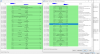
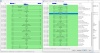
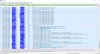
I believe there is something happening with my T.38 handshake not completing. *SEE ATTACHED* The invite and such that is cut off in the top of the snap is normal and not the focus.
My reading up on the subject suggests that there is meant to be a process that continues after the v21 Preamble. But once it tried 3 times, the DCN - Disconnect is thrown.
Further more, you can see that the direction of the connection after the T.38 switchover is only from the private address.
the .135 address is the trunk to the provider
the .10 address is the private address
the .181 address is the UTM Public Nat address
the 75 is the SIP DID that was called using our fax
I have noticed that after the switchover, the private address is the only one sending in relation to this call ID with T.38. That can not be right...Right? Looks like one way to me, but the only thing in between the Gateway UTM and 3CX server is an avaya switch.
I can not for the life of me figure out why this is happening. Maybe this is not the problem and I am too far down the rabbit hole?
Context:
We have recently pulled a 3CX from a hosted cloud environment, to an on prim environment.
We experienced a loss of fax capability.
Enabled the BETA g711 fallback
Could receive faxes again, but partials and incomplete.
Began researching why the partial documentation
Called the SIP provider to analyze for packet loss. No loss.
Provider has T.38 enabled on the SIP trunk
Captured wireshark from one end to another from the perspective of 3CX and the UTM
Provider and myself saw a "clean" connection as far as we could tell. Meaning it looked to have gotten there and sent its responses.
There were visual queues to indicate that a page had been malformed in the wireshark details
---Like when we would recreate the audio RTP stream and play it, we could see in our 5 pages sent example one of the audio streams would look different than the others
---We would find out then that the same page that would have come in during that was either cut off, or missing.
---We would notice during the G711 fallback that their partials would result in consistent and very cut off partials. However when I would send to them from outside,
---Their network, It would be intermittent in that some pages would come in okay, and some would be garbage.
---All inbound faxes are affected, but I am told they are not getting complaints about their faxes leaving in poor condition.
The firewall checker when run would find mismatched ports and throw that error.
Regular calling works perfectly fine.
---Each time we ran it the ports were different, but always seemed to be 2 in number
---The final time we ran it being the 5th time in a row, it passed (Because 3CX support wouldn't engage until it was green). So we kept it there
------Regarding this we checked the UTM on the network to make sure the correct ports were being forwarded, as per instructed in 3CX documentation.
------I don't believe this is the reason for the Fax T.38 Failures. The connection is still being made from our end and being picked up on the 3CX active calls.
------We would call a DID when sending the fax and the active call log would say the Callee was 8888 our default fax extension. I believe this is normal.
We ran an extensive capture of the network with the fallback enabled to try and find where the disconnect was. Perspectives from the UTM and the 3CX both indicate normal routing.
We decided from this point to attempt to get T.38 working instead of work through a BETA solution that is not guaranteed.
********Turned the G711 fallback off*************
Now the fax was using G711 only to esablish the call and then the switchover would occur.
We sent test faxes to them from outside the network, and they themselves sent some for testing purposes.
Sending to themselves would result in no successful fax delivered.
Myself sending to them would indicate the CNG tones, the 3CX would see the call in the active call log, but again no fax delivered.
---They are using Fax Star for their sending purposes with this test in specific. So the fax generates from fax star and the provider would see a different number in the 'from' in the call trace
---This is normal behavior.
From here what we are seeing is the 3CX will receive the call and it will reflect as such on the active call log, but the fax will not be sent to the email that we specify in the 3CX
I have checked the outbound rules to make sure, but if they worked with G711, I can not imagine T.38 would change that.
I have done 5 captures with this BETA feature disabled
I began digging deep into the wireshark.
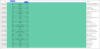
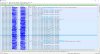
I believe there is something happening with my T.38 handshake not completing. *SEE ATTACHED* The invite and such that is cut off in the top of the snap is normal and not the focus.
My reading up on the subject suggests that there is meant to be a process that continues after the v21 Preamble. But once it tried 3 times, the DCN - Disconnect is thrown.
Further more, you can see that the direction of the connection after the T.38 switchover is only from the private address.
the .135 address is the trunk to the provider
the .10 address is the private address
the .181 address is the UTM Public Nat address
the 75 is the SIP DID that was called using our fax
I have noticed that after the switchover, the private address is the only one sending in relation to this call ID with T.38. That can not be right...Right? Looks like one way to me, but the only thing in between the Gateway UTM and 3CX server is an avaya switch.
I can not for the life of me figure out why this is happening. Maybe this is not the problem and I am too far down the rabbit hole?