Participant Already Connected

Status
Not open for further replies.

PhoneNerd

Bronze Partner
Basic Certified
Joined
Feb 25, 2021
Messages
7
Reaction score
1
So after using a ton of web meetings in the past today I totally lost face in front of one of my biggest clients when none of their 3 people could get into the web meeting I set up.

All of them got the Participant Already Connected error.

What is bizarre is I can't replicate that error. I've tried connecting to the meeting from another PC in my office, works fine. I've had friends in other locations connect to the meeting, they had no issue.

But 3 different people all working from their homes in different places got the same error and none of those 3 people could join my meeting.

Does anyone have any ideas what could be going on here? I'm worried I lost the client over this. I can't let this happen again if there is anything I can do about it.

What I tried -

Creating a whole new meeting
Using the link from the invite
Using the open meeting link

They just keep getting the same error..

What is happening??!!
 
Hi @PhoneNerd,

Can you provide some additional information with regards to how you set the meeting up? Which calendar option did you choose?
 
Hi @PhoneNerd,

Can you provide some additional information with regards to how you set the meeting up? Which calendar option did you choose?
I set it up as I have in the past as a video conference starting now. I used the legacy email option.
When I created the second meeting to try to fix the problem I just sent the invite to myself then copied the open meeting link from the meeting and sent that along to the others.

That link worked for me on other computers and for other people I asked to test but failed for the 3 people I needed it for.
 
Hi @PhoneNerd,

I've not been able to reproduce this. I'd suggest filling in the email addresses you'd like to invite from the legacy email option in which case they'll receive a user specific link otherwise using one of the other calendar options.

The only way to receive the message and not be in the Web Meeting would be to have accidentally sent them your organizer link. Sending them the open link would allow anyone to enter and won't limit how many times they can connect.
 
I just had exact same problem, and on a link that has had 120 participants last few weeks.
All got the same link, I just create to myself only, and reused the link for all, from the mail invite.
looks like
https://xxxxxxxxxx/join/sPXz.........
This week I see first person gets in, with my name in "Christen get ready to join"...
Participant #2, 3, 4... does see the same, my name, but on join they all do see:
> You are already connected to this meeting. You can't connect to the same meeting with the same meeting link twice.

I need it again for those 120 participants this weekend.
All new meetings I do make also has same "only one in a meeting allowed"

I will keep this one open a day, or two. created as Outlook 365 calendar, on 12-12-2021 12:12
From invite: https://xxxxxxxxxx/webrtc/open/d39ad3deac4327xxxxxxxxxa193160
https://xxxxxxxxxxxxxx/webrtc/open/d39ad3deac4327xxxxxxxx0f2aacada193160
same as: https://xxxxxxxxxxxx/join/Ze2cClmFJO8FxxxxxVcdEupW
 
Hi @Fihl,

Are you scheduling Web Meetings or Webinars? It appears you're following an incorrect method of sending out links. The correct way to send the links is to either add each email address in the legacy option (for example) which will create 120 unique participant links. A .csv file can be imported to speed up invite speed (name,email is all that is required).

Otherwise adding participants via the Office 365 link per event should work without any problems.
 
Thanks
WebMeetings, and I get an /open from the 365 message. I invite no one. Everyone later just gets this shared /open link.
The /join link also does work the same (to me correct) way. And those from weeks ago still does work.

I fixed the problem by rebooting the whole server last night.
New WebMeetings created after that does now work correctly.

Those bad ones create before the boot still does not work. They do not start out by asking for "Whats your name", but jumps right into the meeting with "Christen" as name ! Se example at bottom

I can send private mail with the working link, created after reboot of server.

This one does not work:

https://xxxxxxxxxxxx/webrtc/open/dcb70e1c5443aec5ff614bbf0cdfc77159c2d18e
 
Just to clarify, the join link is your own link to join the conference with. It'll be the one that appears in the Web Client.

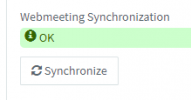
The open link is the one that you can send to all participants. If you're running into issues, something valuable to check would be the synchronisation status by clicking Webmeeting FQDN from the Dashboard. You should see webmeeting synchronization OK.

1614768554261.png
 
My /join to same /open. My /join is: join/sPXzas1IQgywcyBAdHzSAef7
I do not use the /join much, just for some tests.
Both does however not ask for user name (edited: now and then I see now, it is quite random)

I have now an /open meeting running,
so if you try, you cannot get into meeting, as you are now called "Christen" and already joined.

But sometimes the /open works, I just tried 10 times, and from other IP's.
Problem is not "stable".
Right now I have 2 that can get in, and 2 that cannot get in. A mix og PC and Mac, no real system in that

(I cannot find Sync status anywhere. Not on server, not on WebMeeting planning page)
 
Can you PM the links of any meetings that you've recently created that you cannot get in to?
 
  • Like
Reactions: Fihl
Status
Not open for further replies.

Forum statistics

Threads
111,973
Messages
590,078
Members
164,896
Latest member
sameage