Solved Partly broken integration? Zendesk x 3CX

Status
Not open for further replies.

AndreasHD

Bronze Partner
Basic Certified
Joined
Jan 25, 2024
Messages
5
Reaction score
1
We're running Version 20.0 Update 0 (Build 1458) hosted by 3CX
3CX fetches contact info from Zendesk correctly, but on incoming calls it tries to open a new zendesk window, using this lookup:
https://https//[DOMAIN].zendesk.com//agent/search/1?type=user&q=[phonenumber]

Obviously this fails, and does not successfully open a new window with the relevant contact.

Also, with high call volume, you end up with quite a few tabs, is this the intended behavior?
 
Looks, like you're configuring the client side lookup, not the full integration. And also you configured it with a wrong setting.

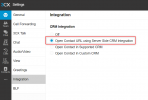
If you're configuring the CRM integration from the Admin console > Integrations > CRM, then on the Web Client side you need to choose this option in Settings > Integration:
1706188821657.png

You're probably selecting the next option "Open Contact in Supported CRM", and then configuring the full URL including the "https" prefix when you should just set the FQDN. In any case, these are 2 different functionalities, if you use the server side approach, you should set the option mentioned above.
 
  • Like
Reactions: N_G and Evolute IT
Hi edossantos, Thanks for replying
If I leave the Client settings at "open contact URL using Server Side CRM integration", nothing happens?
New numbers/contacts doesn't show up in ZenDesk, only existing contacts.
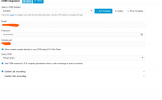
Here is the admin integration setup:

1706192761494.png
 
New numbers/contacts doesn't show up in ZenDesk, only existing contacts.
This is by design. When a number is not found in Zendesk, the Web Client will show an "Add contact" link. You must click it, fill the form, and create the contact. This will add the contact details to your Zendesk.
 
  • Like
Reactions: Evolute IT
That sounds like a decent solution, albeit I don't see any links show up when new Callers call in. Where is it supposed to show up?
 
That sounds like a decent solution, albeit I don't see any links show up when new Callers call in. Where is it supposed to show up?
Okay I figured it out, there is a small "add to contacts" link under the phone number calling. On my display, it is pretty hard to identify.
Thanks @edossantos problem solved.
 
  • Like
Reactions: edossantos
Status
Not open for further replies.