Pass order number to url

Status
Not open for further replies.

Federico Moschini

Free User
Joined
Jan 6, 2017
Messages
32
Reaction score
1
Dear VAD Team

I would like to make a simple application that ask to customer to digit the order number.

When for example digit as order number: 123456789 need to pass this info to an url like

http::/intranet.demo.com/OrderId=?<%OrderID%> , so should display http:// intranet.demo.com/OrderID=123456789

How to make it?

Best regards,
Federico
 
Hi Federico,

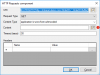
Assuming that the User Input component that you use to collect the Order ID is named "requestOrderID", you need to use the following expression for the URI property of the HTTP Request component:
CONCATENATE("http:// intranet.demo.com/OrderID=",requestOrderID.Buffer)

Kind regards.
 
Dear Ernesto,

I never used VAD, is this what I have to do ?

upload_2017-5-26_20-43-48.png
 
Yes, and because you're using the GET method, you should leave empty the Content Type and Content fields.
 
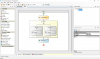
I tried but when I take the call the order number is not displayed (I was suppose that when caller digit order number and I reply to the call it's displayed on Chrome the webpage...) - When I reply nothing happens....upload_2017-5-26_21-17-45.png
 
First, I see that when you enter a valid Order ID, you're transferring the call. So the call flow will never reach the HTTP Request component. You should place the HTTP Request component in the "Valid Input" branch.

Second, this app will be executed in the 3CX server, and not in an agent PC. When you invoke that URL from the app, it will not be shown in a browser. The app will make the HTTP request, and needs to do something with the response... You need to open that URL in the agent's PC browser? If that's what you need to do, then you need to use a different approach. In order to show anything in the agent PC you need a CRM plug-in (www.3cx.com/blog/releases/crm-integration-diy/). You might want to collect the ID in a CFD app, and then save it in a database along with the Call ID, so later the CRM plug-in can take it from there. Is that what you need?

Kind regards.
 
First, I see that when you enter a valid Order ID, you're transferring the call. So the call flow will never reach the HTTP Request component. You should place the HTTP Request component in the "Valid Input" branch.

Second, this app will be executed in the 3CX server, and not in an agent PC. When you invoke that URL from the app, it will not be shown in a browser. The app will make the HTTP request, and needs to do something with the response... You need to open that URL in the agent's PC browser? If that's what you need to do, then you need to use a different approach. In order to show anything in the agent PC you need a CRM plug-in (www.3cx.com/blog/releases/crm-integration-diy/). You might want to collect the ID in a CFD app, and then save it in a database along with the Call ID, so later the CRM plug-in can take it from there. Is that what you need?

Kind regards.
 
Yes I need to pass the order ID in the client web browser. So How can I make it , what you mean with CFD app? There is something similar already? So I do not need 3cx call flow for this scope ?
 
What I would like is to receive the order id and pass on 3cx client

upload_2017-5-26_21-34-17.png
 
Using the CFD you create voice apps that run in the server. If you need to collect the Order ID using a voice menu, and the user enter this info via DTMF, then you need the CFD for that part. Then you need to save that information in a database for example, along with the Call ID. So, you have for example in the database a record that tells that the Order ID 123456 belongs to Call ID 654321. Once you have this, you transfer the call to an agent.

When the agent picks up the call, you need a CRM plug-in to do the rest of the job. You can create your plug-in using the Visual Studio template provided by 3CX, as explained here:
https://www.3cx.com/docs/crm-integration/

When the agent receives the call, the plug-in will receive a notification. There you need to use the 3CX Call Control API to get the Call ID of this call. When you have the Call ID, you go to the database and get the Order ID saved by the CFD app at the beggining. And then launch the browser from this plug-in.

Hope the information helps.

Kind regards.
 
Status
Not open for further replies.

Latest Posts

Members Online Now

No members online now.

Forum statistics

Threads
111,863
Messages
589,444
Members
164,702
Latest member
iamatlas