Patton SN4171 Pri fails

Status
Not open for further replies.

Simon Dulwich

Free User
Joined
Jun 12, 2018
Messages
31
Reaction score
1
As anyone managed to get the new Patton SN4171 device working with 3CX. I have downloaded the new templates from Patton and attempted Smartnode, E1, and Trinity templates but still the ISDN lines fail to connect to 3CX.

The Patton device holds the IP address of the 3CX system but there is no comunication from ISDN to 3CX.

Thanks
 
Hi Simon,

Yes I have got these working, please confirm these are the templates you are using:
https://www.patton.com/support/kb_art.asp?art=478&p=0

Where these are not specific to model (E1/T1 1-4 ports etc) they should work fine with the 4171.

This string (although BRI variant) contains a lot of useful information:
https://www.3cx.com/community/threads/patton-incompatibility.62776/

If you still experiencing issues then I would login the the command line of the device and run the following commands:

enable
show running‐config
debug call‐router
debug call‐control
debug ccisdn signaling
debug context sip‐gateway signaling detail 5
debug context sip‐gateway transport detail 5
debug context sip‐gateway error

Then "no debug all" after to cease the log flow.

These may differ slightly between the Smartware and Trinity operating systems so use this as reference: https://www.patton.com/support/kb_art.asp?art=446&

Feel free to send the log over to me via PM and I will take a look - you can also send it over to Patton support of analysis, they are normally very helpful.

From this log you should at the very least be able to tell whether it is an issue with the configuration or the line itself - I assume you have checked with the provider to check all is OK ?
 
Hi Simon,

Yes I have got these working, please confirm these are the templates you are using:
https://www.patton.com/support/kb_art.asp?art=478&p=0

Where these are not specific to model (E1/T1 1-4 ports etc) they should work fine with the 4171.

This string (although BRI variant) contains a lot of useful information:
https://www.3cx.com/community/threads/patton-incompatibility.62776/

If you still experiencing issues then I would login the the command line of the device and run the following commands:

enable
show running‐config
debug call‐router
debug call‐control
debug ccisdn signaling
debug context sip‐gateway signaling detail 5
debug context sip‐gateway transport detail 5
debug context sip‐gateway error

Then "no debug all" after to cease the log flow.

These may differ slightly between the Smartware and Trinity operating systems so use this as reference: https://www.patton.com/support/kb_art.asp?art=446&

From this string you should at the very least be able to tell whether it is an issue with the configuration or the line itself - I assume you have checked with the provider to check all is OK.
Thanks that's really helpful.

I will test all this this afternoon. The templates are what I am using, and the line works as its currently being used on an older phone system we are replacing.
 
That should be fine then, but in some very rare circumstances (at least in the UK where I am) you may have a legacy ISDN variants still floating about.

Ensure that the line you were using in the old system is Euro ISDN and not another type (such as DASS 2) https://en.wikipedia.org/wiki/Digital_Access_Signalling_System_2

Normally identified by it being presented as BNC connectors: https://en.wikipedia.org/wiki/BNC_connector

Although I have known different, such as it coming via a converter which presents as what looks liks Euro. You can normally check the bill or system/device it was plugged into.

Pattons only support Euro ISDN: https://en.wikipedia.org/wiki/Digital_Subscriber_System_No._1
 
This is in Dubai
 
Hi Simon,

Yes I have got these working, please confirm these are the templates you are using:
https://www.patton.com/support/kb_art.asp?art=478&p=0

Where these are not specific to model (E1/T1 1-4 ports etc) they should work fine with the 4171.

This string (although BRI variant) contains a lot of useful information:
https://www.3cx.com/community/threads/patton-incompatibility.62776/

If you still experiencing issues then I would login the the command line of the device and run the following commands:

enable
show running‐config
debug call‐router
debug call‐control
debug ccisdn signaling
debug context sip‐gateway signaling detail 5
debug context sip‐gateway transport detail 5
debug context sip‐gateway error

Then "no debug all" after to cease the log flow.

These may differ slightly between the Smartware and Trinity operating systems so use this as reference: https://www.patton.com/support/kb_art.asp?art=446&

Feel free to send the log over to me via PM and I will take a look - you can also send it over to Patton support of analysis, they are normally very helpful.

From this log you should at the very least be able to tell whether it is an issue with the configuration or the line itself - I assume you have checked with the provider to check all is OK ?


I'm trying to run thos commands but get the following errors

0EF367#debug call-router
% ^ Keyword prefix mismatch
0EF367#debug call-control
% ^ Keyword prefix mismatch
0EF367#debug ccisdn-signalling
% ^ Keyword prefix mismatch
0EF367#debug context sip-gateway error
% ^ Keyword prefix mismatch
 
If you look at my original post you will see a link to the Smartware > Trinity comparison guide (some of the commands are different and will need a slight alteration). I have translated these for you:

enable
show running config
debug cr full-detail
debug cc full-detail
debug isdn-signaling full-detail
debug sip-signaling full-detail
debug sip-transport full-detail
debug context sip-gateway error
no debug all

If you tab in the CLI also it will auto-complete the command as well. PM me the results if they are not conclusive.
 
  • Like
Reactions: Wendelspanswick
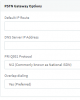
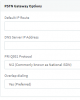
On the 3CX template for Patton ISDN Single Port T1 (Trinity) I'm advised to fill out PSTN Gateway option default IP route and DNS server IP address. What are these, are these the PAtton device IP address, and my local LAN DNS server IP address?

upload_2019-1-30_5-56-51.png
 

Attachments

  • upload_2019-1-30_5-54-59.png
    upload_2019-1-30_5-54-59.png
    9.8 KB · Views: 4
So the command for the Patton device “debug sip-signaling full detail” and found that this generates an error [GW_SIP] NO AUTHENTICATION CREDENTIALS FOUND. User: 10000, realm: 3CXPhoneSystem


So I checked the Patton config file I uploaded from 3CX and can see that the password is not saved in the start-config after saving and rebooting the Patton device. I can see username and password, but these disappear after rebooting.
 
A good explanation of the default IP route can be seen (at least in Smartware) on this guide :
https://www.3cx.com/voip-gateways/patton-network-configuration/

This is covered in the Trintiy guide by Patton also: https://support.patton.com/index.ph...tton-trinity-smartnode-configuration-with-3cx

If you wanted to configure this via CLI you can also use the commands:

context ip ROUTER
routing-table DEFAULT
route 0.0.0.0 0.0.0.0 interface LAN INTERFACE metric 0

Note: the interface name can differ as per your setup.

The DNS server is exactly that - so it would be your local IP router or if you have direct access then a public one perhaps
 
In regards to your password/authentication disappearing this is not right. In the configuration file it should look something like the example below:

authentication-service AS_ALL_LINES
realm 1 3CXPhoneSystem
username 10001 password xzqhIzUuk5

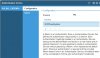
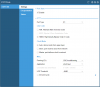
If you want to input this configuration manually you can put these details in the SIP > Authentication service section in the GUI or via CLI with:

authentication-service AUTH_SRV
realm 1 voip-public
realm 2 voip-intranet
realm 3 ms-exchange
username 433 password fK+bfnzL45Goh/VdjrWxAA== encrypted
username john.doe password D60t7CBZ58k7JK2jxdlw4w== encrypted

Attached are some screenshots of how the GUI configuration should look (2nd picture is from an FXS device with 2 extensions - hence why there are 2 entries).
 

Attachments

  • auth_srv.1.jpg
    auth_srv.1.jpg
    84 KB · Views: 11
  • auth_srv.2.jpg
    auth_srv.2.jpg
    23.9 KB · Views: 9
That worked perfectly. Now I have a green light in my Gateway on 3CX to the Patton device. Password remains encrypted on Patton reboots.

Just tried ISDN line but still no Green light on Pri 0 on front of the device. Do i need to enable this port on the device?
 
No, the template should enable this. CLI into the device and check the status:

#enable
#configure
#show port pri 0 0

Or in the GUI you can see if the port is enabled under the PRI menu. Have you ensured you are using the correct ISDN type for your country ? your post previously had National ISDN set.

If all else fails run the troubleshooting commands again and send over a new log.
 
I have no Pri option only E1/T1

upload_2019-1-30_12-14-20.png
 
That's fine they are all the same thing:

E1/ISDN-30/PRI in Europe.
T1/ISDN-23 channels in the U.S and Japan.
 
I'm in Dubai but the ISDN router says E1
 
Don't worry about that, all it means is you have 30 channels there not 23.

I find it strange all these issues are occurring as the template should be automatically configuring all this, what version of 3CX are you using?
 
  • Like
Reactions: patton
Standard Annual 15.5.15502.6 License
 
Yes as long as your not using v16 pre-release.

Anyway try the checks & amendments and if all else fails try the logging again, since the registration error is now gone there should be a clear indication when you make a test call.
 
Will try again from London, Our 3CX partnet gave us a SN4971 device which has worked easily. They say 3CX do not support SN4171 device, as its not mentioned on their website and also 3CX website states it doesn't not support trinity software.

At least I have a working Patton device. Only issue is I have to get SN4171 working in China next.
 
Status
Not open for further replies.

Forum statistics

Threads
111,913
Messages
589,706
Members
164,781
Latest member
Alina avdeyeva