Solved PBX Express option to restore is missing

Status
Not open for further replies.

Noel Evolution

Silver Partner
Basic Certified
Joined
Apr 10, 2020
Messages
99
Reaction score
12
We had to blow away a bricked install after upgrade. There was not an option during the pbxexpress wizard to specify a restore so I though the option must be put in later. Nope. Install is finished, I have a brand new server an no way to restore the backup file.

Ideas?
 
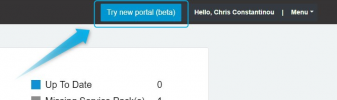
You do actually have the option to restore in our new portal. If you're already in the old one, just click on "Try new portal" in the top right corner:
1642408140958.png


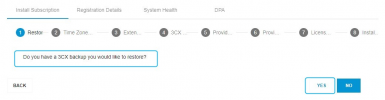
When you attempt to deploy a machine, you should be provided with the following option:
1642408171723.png

Then you'll be give an option to restore the backup.


If you've already deployed the machine, you could either delete it and redeploy, or you could actually restore the backup you have on top of it.

Provided that the backup does not contain an License Key information, you should be able to follow the steps mentioned in the above guide to restore your config.
 
Last edited by a moderator:
Thank you. I switched to the new portal. How do I restore a backup that has 8 Gigs of recordings inside of it? There is a size limit with this option.
 
Status
Not open for further replies.

Forum statistics

Threads
111,974
Messages
590,081
Members
164,899
Latest member
mazet