PBX Unresponsive and CPU Usage at 100%

Status
Not open for further replies.

RHopkinson

Bronze Partner
Basic Certified
Joined
Mar 31, 2019
Messages
84
Reaction score
15
A few times after upgrading to v18, we've seen our PBX's CPU usage hit 100% and never come back down. The 3CX app is unable to connect, we can establish new connections to the 3CX management console, and eventually the PBX loses connectivity to the phones and SIP trunk provider. Rebooting the PBX from the AWS Lightsail interface fixes the issue, but is obviously not desirable. Is anyone else experiencing this issue or does anyone have an idea of how to prevent this issue from recurring?

Thanks,
Russell Hopkinson
Enterprise 18.0 (Build 314)
 
It is a dedicated AWS Lightsail instance, provisioned with the 3CX Express setup tool. It has 1 GB RAM, 1 vCPU, 40 GB SSD, and is running Debian 4.19.208-1.
 
Hi @RHopkinson,

When the machine is working without maxing the CPU, where does the RAM and CPU idle normally?

How many users do you have on the PBX?
 
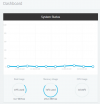
Looks like 74% RAM utilization and 0% CPU utilization. I've attached a screenshot from the dashboard. We have 15 extensions defined, but all but 2 use softphones, and we typically see 9 users available at any given time in the 3CX app.
 

Attachments

  • 3cxcpu1.PNG
    3cxcpu1.PNG
    23.5 KB · Views: 8
  • 3cxcpu2.PNG
    3cxcpu2.PNG
    22.5 KB · Views: 8
Hi @RHopkinson

I suggest considering increasing the RAM, it shouldn't idle much higher than 50 - 60%. You could look into increasing the RAM temporarily to 2GB and monitor to see if the CPU maxes again.
 
Hi @RHopkinson

I suggest considering increasing the RAM, it shouldn't idle much higher than 50 - 60%. You could look into increasing the RAM temporarily to 2GB and monitor to see if the CPU maxes again.

Agreed, Linux uses memory for caching. In our instance we have 4gb allocated to the VM.

According to HTOP, 1.29gb is used, however the vm is using the rest for caching. as well, does your team have any CFD's running? if they are incorrectly configured they can also cause crashing issues.

Definately would reccomend bumping to 2gb. as a general rule. keep ram usage peaks under 80%.

@VasilisV_3CX Possibly reccomend bumping the minimum ram requirement in the KB to 2gb? at this point 1gb might not be a good starting reccomendation, I can confirm I also had crashing when I had a small "free" GCP instance.
 
OK, I'll definitely increase the RAM. Unfortunately, the only way to do this with a Lightsail instance is to take a snapshot of the existing instance and provision a new instance from the snapshot with the updated hardware requirements. Something that will def need to happen after hours. Thanks for the review and responses!
 
  • Like
Reactions: VasilisV_3CX
Hi @FridayIT,

For the smallest deployments, 1GB should be enough so before we go changing any KBs, it's best to follow the requirements:

For over 10 but under 50 extensions, we recommend a t2.xlarge AWS Lightsail Instance, that comes with 16GB of RAM, which for 15 extensions may be overkill, so a t2.small may be enough which comes with 2GB of RAM standard.
 
Status
Not open for further replies.

Members Online Now

No members online now.

Forum statistics

Threads
111,831
Messages
589,277
Members
164,660
Latest member
RJenkinsROCK