- Joined
- Mar 3, 2022
- Messages
- 3
- Reaction score
- 0
Hello,
I have successfully enabled address book synchronization for 3CX app users. Both, private directory and corporate directory show up perfectly inside windows or mobile apps for any extension.
The problem is that with the yealink phones, only the shared company phone directory is synced, but the personal one is missing.
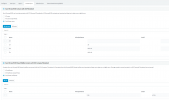
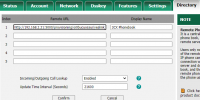
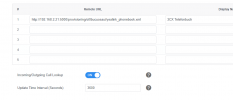
On the phones webui I noticed that all my yealink phones only sync with the same URL and directory (which is the corporate one yealink_phonebook.xml). Personal phone directory is missing as a source (See screenshot of the phone interface). How do I add the personal directory, which the app does recognize, to the Yealink phone as well? Via a custom URL to the personal phonebook, if so what is it? Or delete phone and provision it again? Or is it unsupported?
Have a look at attachments for better understanding.
Thanks for helping
Best Regards
I have successfully enabled address book synchronization for 3CX app users. Both, private directory and corporate directory show up perfectly inside windows or mobile apps for any extension.
The problem is that with the yealink phones, only the shared company phone directory is synced, but the personal one is missing.
On the phones webui I noticed that all my yealink phones only sync with the same URL and directory (which is the corporate one yealink_phonebook.xml). Personal phone directory is missing as a source (See screenshot of the phone interface). How do I add the personal directory, which the app does recognize, to the Yealink phone as well? Via a custom URL to the personal phonebook, if so what is it? Or delete phone and provision it again? Or is it unsupported?
Have a look at attachments for better understanding.
Thanks for helping
Best Regards