


- Joined
- Apr 9, 2024
- Messages
- 91
- Reaction score
- 19
3CX v20u3, Ent, On Prem, 128sc, 3CX Desk client v20.0.664.0
Question: what’s causing the 3CX Desk App’s FQDN to change from what we entered on the config screen versus what the App appears to be trying to use?
This is a lengthy narrative, please bear with me…
Hi, we’re stuck trying to upgrade our 3CX Desk App to v20. We have two 3CX v20u3 instances, set up for failover. Failover is working so aside from mentioning it’s in the environment I don’t think that has any impact on the issue. Split DNS is set up, but we’re only testing internal connectivity for now. The Primary/Active 3CX instance name is lab3cxa in DNS, the Secondary/Passive instance name is lab3cxb, each with a unique IP Address. We have a DNS entry lab3cx that we manually set to point at either the Primary or Secondary. Currently, we’re stuck at the point of connecting to the 3CX.
The issue comes up when we install and first run the v20 Desk App, we’re presented with a config screen that prompts for the 3CX URL and Login Credentials. We enter https://lab3cx.<domain>.<tld> (where <domain> and <tld> are the actual FQDN components that I’m choosing not to broadcast). Once we have the 3CX URL and Login Credentials entered, we click the Login button (M365 integration not set up at this point).
The Initial config screen. We enter the 3CX URL as https://lab3cx.<domain>.<tld>. Notice that we entered “lab3cx”:
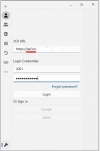
After clicking the Login button, this screen is displayed and stays showing “Connecting…” for as long as we’ve been willing to wait. After at least 5 minutes we’re still trying to connect.
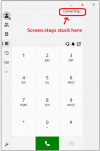
If we click on our user’s icon, then Configure -> Manage Accounts, we see this screen. Presumably what’s preventing us from connecting is for some reason the 3CX URL FQDN now shows as “3cxlab” as opposed to what is in DNS and what we specified on the config screen.
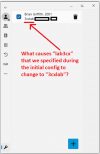
We’ve tried to use the IP Address or actual name of the Primary/Active instance in the FQDN but when we do this, we get an error saying “Unknown host.” If we try to use http, we get an error saying “Requires a secure connection.”
Things that have crossed my mind as potential explanations:
So, assuming the root cause for what we’re experiencing is that through one or more install actions, 3CX thinks our lab is “3cxlab” as opposed to our DNS thinking it’s “lab3cx.” How do we recover – do we ask 3CX to change the registration? Do we need to re-install and specify the actual hostname? Both?
Thanks,
Question: what’s causing the 3CX Desk App’s FQDN to change from what we entered on the config screen versus what the App appears to be trying to use?
This is a lengthy narrative, please bear with me…
Hi, we’re stuck trying to upgrade our 3CX Desk App to v20. We have two 3CX v20u3 instances, set up for failover. Failover is working so aside from mentioning it’s in the environment I don’t think that has any impact on the issue. Split DNS is set up, but we’re only testing internal connectivity for now. The Primary/Active 3CX instance name is lab3cxa in DNS, the Secondary/Passive instance name is lab3cxb, each with a unique IP Address. We have a DNS entry lab3cx that we manually set to point at either the Primary or Secondary. Currently, we’re stuck at the point of connecting to the 3CX.
The issue comes up when we install and first run the v20 Desk App, we’re presented with a config screen that prompts for the 3CX URL and Login Credentials. We enter https://lab3cx.<domain>.<tld> (where <domain> and <tld> are the actual FQDN components that I’m choosing not to broadcast). Once we have the 3CX URL and Login Credentials entered, we click the Login button (M365 integration not set up at this point).
The Initial config screen. We enter the 3CX URL as https://lab3cx.<domain>.<tld>. Notice that we entered “lab3cx”:
After clicking the Login button, this screen is displayed and stays showing “Connecting…” for as long as we’ve been willing to wait. After at least 5 minutes we’re still trying to connect.
If we click on our user’s icon, then Configure -> Manage Accounts, we see this screen. Presumably what’s preventing us from connecting is for some reason the 3CX URL FQDN now shows as “3cxlab” as opposed to what is in DNS and what we specified on the config screen.
We’ve tried to use the IP Address or actual name of the Primary/Active instance in the FQDN but when we do this, we get an error saying “Unknown host.” If we try to use http, we get an error saying “Requires a secure connection.”
Things that have crossed my mind as potential explanations:
- It took us multiple attempts installing v20, and I’m pretty sure the first time through the guy running the installer specified 3cxlab as the hostname. Checking portal.3cx.com, our Lab license does show as 3cxlab.
- I don’t have screen shots of when we ran the 3CX installer off the iso. One step asked for the FQDN, which we specified the personalized FQDN option.
- I don’t have Linux command line access, but it’s possible the hostname for the 3CX instances are 3cxlab.
So, assuming the root cause for what we’re experiencing is that through one or more install actions, 3CX thinks our lab is “3cxlab” as opposed to our DNS thinking it’s “lab3cx.” How do we recover – do we ask 3CX to change the registration? Do we need to re-install and specify the actual hostname? Both?
Thanks,


