Phone is registering but can not make or recieve calls

Status
Not open for further replies.

davidsimcox

Premier Customer
Joined
Feb 11, 2021
Messages
19
Reaction score
3
We have a phone on N3 network which was blocked by firewall

All ports have been opened as per documentation

Ports/Protocols
TCP 5001
TCP 443
TCP 5015
UDP & TCP 5060
TCP 5061
UDP & TCP 5090
UDP 9000-10999
TCP 443
TCP 2528

Plus SIP Ports for each Phone UDP
5067
5068
5071

Plus RTP Ports for each Phone UDP
14040-14059
14060-14079
14120-14139

Before these ports were opened we could not get the phone to register.

Now ports are open the phone is registering and we can see the phone in the 3cx admin section and the extension in the webclient

However when we call the extension we get a very long silence and it goes to voicemail

When we try to make a call from the phone to another extension it again is silent

Have i missed a port that needs to be available?
 
It may not be a local firewall issue, but did you sucessfully run the 3CX Firewall Checker? The issue may be that the set is not registering in a way that allows 3CX to reach it. Is it using STUN? I''m guessing it is because of the various 506X ports you mentioned. If so then it may be registering using it's private IP. It could even be a firewall/router issue, at the extenson end, that is preventing 3CX from reaching it. Check the 3CX Activity Log, that may help you detirmine if this is the case.

You might also include more information about your setup.
https://www.3cx.com/community/threads/information-to-provide-when-requesting-help.67558/
 
Hi
Its only phones on this 1 external network that is having the issue.

We cant run the firewall checker as the 3cx is google cloud-based and as stated other phones are connecting fine using STUN

  • 3CX Version, e.g. Professional Annual
  • Server OS, Debian GNU/Linux 9.13 (stretch),4.9.0-13-amd64
  • Is the 3CX Server Hosted and where? Hosted on Google Cloud
  • IP Phone Make/Model/Firmware Yealink T21P E2 latest firmware
  • Provisioning Method: STUN
  • Trunk Provider or Gateway Make/Model: Gradwell
  • Has the Firewall Checker passed: YES ON SERVER
All phones are working from other networks and when we plug this phone in any other network it works ok The issue is when we plug it into the N3 network

We have asked for the ports on the N3 network to be opened

Ports/Protocols
TCP 5001
TCP 443
TCP 5015
UDP & TCP 5060
TCP 5061
UDP & TCP 5090
UDP 9000-10999
TCP 443
TCP 2528

Plus SIP Ports for each Phone UDP
5067
5068
5071

Plus RTP Ports for each Phone UDP
14040-14059
14060-14079
14120-14139

Before we did this the phone would not even register on with the 3cx system but now it is registering but no calls can be made to and from the extension which is what is making me believe it is a firewall issue

The phone is showing as connected in 3cx and the extension is green as registered

When we call the extension in the activity log we get the below

27/02/2021 17:06:50 - Call to T:Extn:517@[Dev:sip:[email protected]:65487] from L:1489.1[Extn:020] failed, cause: Cause: 408 Request Timeout/INVITE from local
27/02/2021 17:06:50 - [CM503003]: Call(C:1489): Call to <sip:[email protected]:0> has failed; Cause: 408 Request Timeout/INVITE from local
 
We cant run the firewall checker as the 3cx is google cloud-based and as stated other phones are connecting fine using STUN
Neither of these facts stop you from running the firewall checker but you mentioned it passed so that doesn't appear to be relevant for this.

We have asked for the ports on the N3 network to be opened

Ports/Protocols
TCP 5001
TCP 443
TCP 5015
UDP & TCP 5060
TCP 5061
UDP & TCP 5090
UDP 9000-10999
TCP 443
TCP 2528
Don't need any of these ports opened at all on remote networks. Necessary ports depending on the device are listed here:

How to configure your Firewall Router in 3CX Phone System

We have asked for the ports on the N3 network to be opened

Plus SIP Ports for each Phone UDP
5067
5068
5071

Plus RTP Ports for each Phone UDP
14040-14059
14060-14079
14120-14139

First I would say you should be using a SBC. Then you wouldn't need any ports 'opened' unless the firewall was blocking outbound traffic by default which is not common unless you are in an enterprise network or otherwise paranoid.

Second, pleas confirm if 'opened' means forwarded. If so, you are on the right track provided you have the specific unique ports per phone forwarded to that phone's internal IP address. You would also want to make sure SIP ALG is turned off.
 
Last edited by a moderator:
Neither of these facts stop you from running the firewall checker but you mentioned it passed so that doesn't appear to be relevant for this.


Don't need any of these ports opened at all on remote networks. Necessary ports depending on the device are listed here:

How to configure your Firewall Router in 3CX Phone System


First I would say you should be using a SBC. Then you wouldn't need any ports 'opened' unless the firewall was blocking outbound traffic by default which is not common unless you are in an enterprise network or otherwise paranoid.

Second, pleas confirm if 'opened' means forwarded. If so, you are on the right track provided you have the specific unique ports per phone forwarded to that phone's internal IP address. You would also want to make sure SIP ALG is turned off.
 
Last edited by a moderator:
The firewall checker is for the 3CX system not for the actual phone on the external network so what I mean is the firewall checker is not relevant for the phone as it can’t be used on that specific network

The n3 network is the nhs network and is locked by the service provider we have to request ports to be opened and the destination

we have asked for the ports quoted to be opened and destination both our ip and pbx url we have set specific sip and rtp ports for this phone

we don’t have access to internal network do we need to direct the ports to the internal IP we have not had to do that for any other phones

as I state if we plug this phone into any other network with Internet access it works fine so this is why I’m thinking it’s the n3 network not been configured correctly for us
 
Yes it does sound like the n3 network is not configured correctly, which is not a 3CX issue. But the amount of work required to make STUN work is depending on the network. In this case, a SBC sounds like it would make your life a lot easier so I'd look at going that route.
 
Last edited by a moderator:
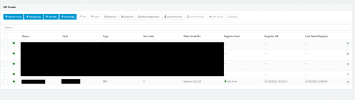
@ChrisC_3CX we have installed and SBC and the SBC is connected and on our 3cx please see the image

We tried provisioning the phone to work and it failed it would not even connect this time. I have watched and read the SBC guide and it states it has no firewall requirements. If the SBC is connecting but the phone will not provision what should I be looking at next
 

Attachments

  • sbc.png
    sbc.png
    26.3 KB · Views: 4
Last edited:
Please try the following and let me know what happens:

Before proceeding, double check that the IP Phone is running the latest 3CX Supported firmware mentioned here: https://www.3cx.com/support/phone-firmwares/

1. Factory reset the IP Phone, once it starts up and reaches an idle state, access the Management Console and go to Phones. Does it appear in the list? If yes, does anything happen after assigning it to an extension? Check to see if the IP Phone provisioned(extension and name are shown on the screen).

2. If it does not provision as per step 1, try using the Manual Link Provisioning method. Does it provision this way? Again, check the IP Phones screen for the extension number once you are done(it might take a couple of minutes to provision).

3. If step one fails but step 2 succeeds, factory reset the device and follow step 1 again while running a packet capture on the 3CX SBC host and on the IP Phone. After you have assigned an extension to the IP Phone, wait for approximately 30 seconds and then stop the packet capture on both the SBC and the IP Phone. Then check the packet captures for SIP traffic between the IP Phone and the 3CX SBC, does it exist on both captures?
 
Status
Not open for further replies.