


- Joined
- Dec 4, 2017
- Messages
- 33
- Reaction score
- 2
Hello
Provisioning a phone on LAN works perfectly. But now I try to connect a Yealink T46S from another (V)LAN.
So I added the phone, set the settings and pushed on the OK button. I first tried the default settings (Local SIP port of phone: 5060). But I saw on the provisioning page of the T46S that the SIP port should be 5065: https://www.3cx.com/sip-phones/yealink-t4-series/
So I also tried that.
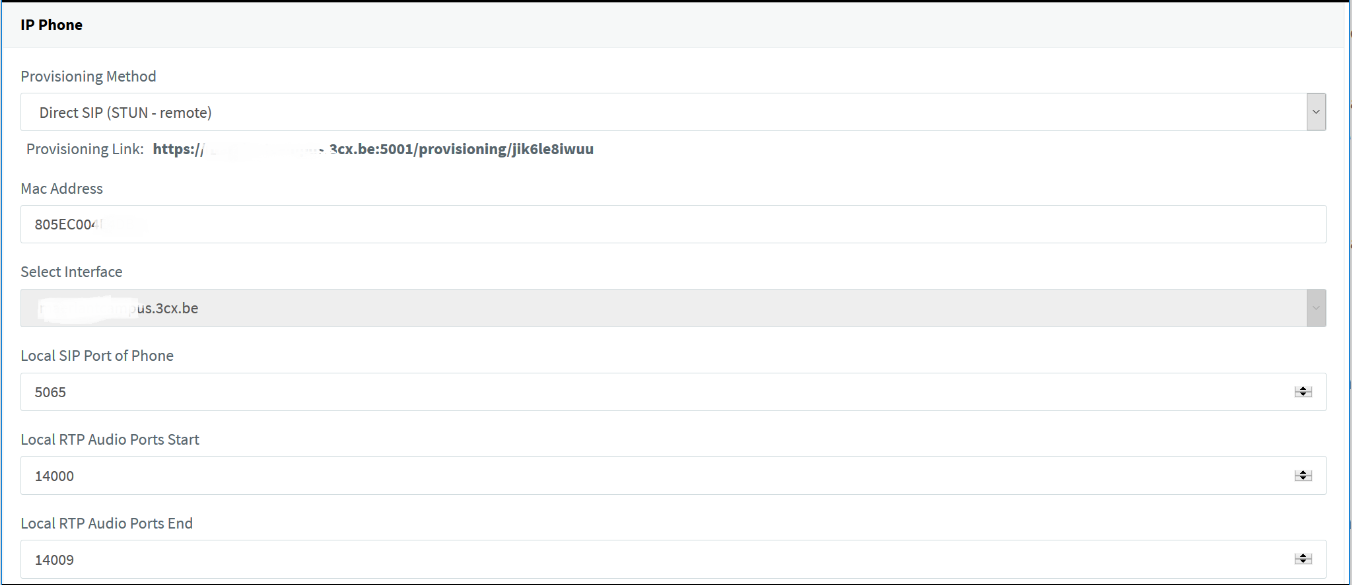
My settings look like this now:
I checked the events and this shows:

So, all good I guess? But when I reboot the phone, the popup for credentials is not shown, it shows "no service" and the phone is not in the Phones list in 3XC.
What could be wrong?
Thanks a bunch
Provisioning a phone on LAN works perfectly. But now I try to connect a Yealink T46S from another (V)LAN.
So I added the phone, set the settings and pushed on the OK button. I first tried the default settings (Local SIP port of phone: 5060). But I saw on the provisioning page of the T46S that the SIP port should be 5065: https://www.3cx.com/sip-phones/yealink-t4-series/
So I also tried that.
My settings look like this now:
I checked the events and this shows:
So, all good I guess? But when I reboot the phone, the popup for credentials is not shown, it shows "no service" and the phone is not in the Phones list in 3XC.
What could be wrong?
Thanks a bunch


