


- Joined
- Feb 25, 2020
- Messages
- 4
- Reaction score
- 0
Hello everybody,
I've created an XML file with the 3CX CRM Template Designer to get the names of the contacts from our CRM.
My XML document looks like this:
The test is also apparently okay (I don't know what the hint in the yellow box is supposed to mean).
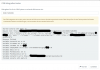
So now the question: what am I doing wrong, or where do I have to configure something else?
And am I correct in assuming that an entry for the CRM result is automatically created in my local 3CX system phone book? That would be desirable.
Many thanks for the help!
I've created an XML file with the 3CX CRM Template Designer to get the names of the contacts from our CRM.
My XML document looks like this:
XML:
<?xml version="1.0"?>
<Crm xmlns:xsd="http://www.w3.org/2001/XMLSchema" xmlns:xsi="http://www.w3.org/2001/XMLSchema-instance" Country="DE" Name="Hirschbuero" Version="5">
  <Number Prefix="Zeros" MaxLength="[MaxLengthNumber]" />
  <Connection MaxConcurrentRequests="16" />
  <Parameters>
    <Parameter Name="UserName" Type="String" Parent="General Configuration" Editor="String" Title="Username:" />
    <Parameter Name="Password" Type="Password" Parent="General Configuration" Editor="String" Title="Password:" />
    <Parameter Name="MaxLengthNumber" Type="String" Parent="General Configuration" Editor="String" Title="Maximum number of digits to keep in the phone number:" Default="20" />
  </Parameters>
  <Authentication Type="Basic">
    <Value>[UserName]:[Password]</Value>
  </Authentication>
  <Scenarios>
    <Scenario Type="REST">
      <Request Url="https://[UserName]:[Password]@example.de/3cx/kontakt/suchen/[Number]" MessagePasses="0" RequestEncoding="UrlEncoded" RequestType="Get" ResponseType="Json" />
      <Rules>
        <Rule Type="Any">kontakt.id</Rule>
      </Rules>
      <Variables>
        <Variable Name="ContactID" Path="kontakt.id">
          <Filter />
        </Variable>
        <Variable Name="FirstName" Path="kontakt.vorname">
          <Filter />
        </Variable>
        <Variable Name="LastName" Path="kontakt.nachname">
          <Filter />
        </Variable>
        <Variable Name="CompanyName" Path="kontakt.firma">
          <Filter />
        </Variable>
        <Variable Name="Email" Path="kontakt.email">
          <Filter />
        </Variable>
        <Variable Name="PhoneBusiness" Path="kontakt.rufnummer">
          <Filter />
        </Variable>
        <Variable Name="PhoneBusiness2" Path="kontakt.rufnummer_ansprechpartner">
          <Filter />
        </Variable>
        <Variable Name="ContactUrl" Path="kontakt.url">
          <Filter />
        </Variable>
      </Variables>
      <Outputs Next="" AllowEmpty="true">
        <Output Type="ContactID" Passes="0" Value="[ContactID]" />
        <Output Type="FirstName" Passes="0" Value="[FirstName]" />
        <Output Type="LastName" Passes="0" Value="[LastName]" />
        <Output Type="CompanyName" Passes="0" Value="[CompanyName]" />
        <Output Type="Email" Passes="0" Value="[Email]" />
        <Output Type="PhoneBusiness" Passes="0" Value="[PhoneBusiness]" />
        <Output Type="PhoneBusiness2" Passes="0" Value="[PhoneBusiness2]" />
        <Output Type="ContactUrl" Passes="0" Value="[ContactUrl]" />
      </Outputs>
    </Scenario>
  </Scenarios>
</Crm>
The test is also apparently okay (I don't know what the hint in the yellow box is supposed to mean).
So now the question: what am I doing wrong, or where do I have to configure something else?
And am I correct in assuming that an entry for the CRM result is automatically created in my local 3CX system phone book? That would be desirable.
Many thanks for the help!


