Phone provisioning URL switched from http to https after 3CX VM reinstall and restore from backup

Status
Not open for further replies.

giox069c

Customer
Joined
Mar 31, 2022
Messages
26
Reaction score
3
I had to reinstall the Debian VM from 3cx ISO and a recent .zip backup (5 hours old). I restored to 3cx 18.0 U9 build20, I think it's the same version as the original one.
After the restore, many old phones stopped to provision.
After investigating I discovered that all phone provisioning URLs shown in "Provisioning link" (user xxx->phone provisioning) switched from http:// to https:// and it can't work, because I don't have a public CA signed certificate and phones cannot download from the https URL. During the reinstall/restore it seems that 3CX switched to use PROVISIONING_LINK_LOCAL_SEC instead of PROVISIONING_LINK_LOCAL.
How can I tell 3CX to use PROVISIONING_LINK_LOCAL for phone provisioning instead of PROVISIONING_LINK_LOCAL_SEC?

Thank you
 
Hello,

what mode of phones are they? do they support uploading of SSL Cert to them?
 
They are "old" Yealink T23G. I had to manually upload my private RootCA cert on every single phone (20 phones) to solve this problem. And then phones started to reprovision again. This is bad, because automatic provisioning after a phone reset is no longer possible: a manual intervention to upload the certificate is required.

I have another Fanvil phone: no problems with Fanvil, because it seems not to enforce provisioning URL certificate check.

So the question is: how do I make 3CX revert to http provisioning so I can automatically import the T23G into 3CX after a reset, without manually loading the RootCA certificate on the phone ?
 
Assuming you are using v18, there are two provisioning links in Parameters settings, PROVISIONING_LINK_LOCAL_SEC (Secure with https) and PROVISIONING_LINK_LOCAL (HTTP). CAn you try using the link you get under PROVISIONING_LINK_LOCAL and add the suffix for the provisioning path then retry? alternatively (subject to you checking in with 3CX support (or your partner) as I wouldn't recommend you updating the values without 3CX recommendation as it may interfere with the security of the instance, you can try to change the link in PROVISIONING_LINK_LOCAL_SEC to http. restart 3CX services and retry. You ca get these settings under Parameter Settings. And if I may ask, you don't have a hostname bound to 3CX with an SSL?

Direct link https://{your3cxiporhostname}:{port}/#/app/settings/parameters/custom
 
An attempt I did yesterday, before fixing everything with the RootCA certificate upload on the phone, was to change https:// to http:// and port from 5000 to 5001 on the phone GUI, save, and reprovisioned from the phone GUI. This is the same as using PROVISIONING_LINK_LOCAL + path. It worked, the phone did the provisioning, but the provisioning process overwrote the provisioning URL on the phone with PROVISIONING_LINK_LOCAL_SEC, deleting my new url.
And I agree with you: I would like NOT to change PROVISIONING_LINK_LOCAL_SEC to http, it could break something elese.

I have a hostname bound to 3cx, but is not on a 3cx domain, is on our own domain. 3cx has a SSL certificate produced by an internal CA (Microsoft Active Directory CA) which will expire in 90 years. The url https://pbx.mydomain.xx:5001/#/app/settings/parameters/custom can be reached from internal phones and externally only from a limited set of public IP address. Most of the world ha blocked access.
I don't want to put thirdy party certs for three reasons: they require human management (a valid SSL cert expires every year), port 80 of my public IP address is already in use for other purposes so let'sencrypt cannot be used in automatic mode, and I don't want to open ports to the public for letsencrypt verification.
 
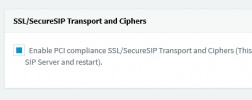
Have you tried unchecking this under anti-hack?

1705393332948.png
 
I worked on this issue for quite some time and eventually gave up fighting with v18 once I decided to switch to Linux and with OLD Yealink Phones you have lots of SSL issues, from what I remember you have the following: 1) the SSL Cert needs to send the Intermediate CA(s) as CA Bundle in the PEM file (just append them one after the other as PEM format is base64 text file), 2) there is an option in the Phones that has to be manually configured to ignore the missing Root CAs, 3) you may have to adjust Nginx Config to support non-SSL for provisioning. As long as you don't factory reset the phone you should be OK.

As we move forward with newer releases, 3CX is making it harder to support non-standard configs. I know you may not like to hear this, but I upgraded all my customer's phones, and all my troubles went away! Remember the issue here is Yealink has dropped support for the phone. It certainly is possible for Yealink to add the missing Root Cert but that is not going to happen.

To check that Nginx will respond to HTTP you can send the Provisioning URL via Firefox browser or Fiddler could do the job and the browser should respond and get a downloaded config file. Edge and Google seem to want to force HTTPs these days so they don't work anymore. All of what I used to do was not standard and un-supported by 3CX.

On Windows I wrote my own PowerShell Script to handle the Let's Encrypt and the CA Bundling, but my skills are not as good on Linux -- yet! You won't have to worry about Let's Encrypt as your Cert is good for 90 Years. And you only have to do the CA Bundling once as well.

As xcobean indicated you might have to adjust PROVISIONING_LINK_LOCAL_SEC and PROVISIONING_LINK_LOCAL. I avoided all of this as I was doing custom templates at that time which is also NOT supported.

I'm not familiar with the above option with the SSL/Secure SIP Transport and Ciphers.
 
Last edited:
Hi, thank you both for the answers.
1) I tried "SSL/Secure SIP transpor and Chipers"... but I did not restart the SIP server as it required, because I had some active calls. Going to the User->phone provisioning->T23G, the URL is still https://
2) "there is an option in the Phones that has to be manually configured to ignore the missing Root CAs". Yes, I can activate it, but the reprovisioning of the phone deactivates it again.
3) "you may have to adjust Nginx Config to support non-SSL for provisioning": no need. http:// provisioning is still working. When I manually change the https to http URL in the phone, Nginx correctly allows a provisioning. But the new https// url is reprovisioned to the phone, so it works only 1 time.

As I can understand, there is a "secret" setting somewhere, that allows http provisioning URL, and this setting is not preserved across backups.
 
2) "there is an option in the Phones that has to be manually configured to ignore the missing Root CAs". Yes, I can activate it, but the reprovisioning of the phone deactivates it again.
3) "you may have to adjust Nginx Config to support non-SSL for provisioning": no need. http:// provisioning is still working. When I manually change the https to http URL in the phone, Nginx correctly allows a provisioning. But the new https// url is reprovisioned to the phone, so it works only 1 time.

As I can understand, there is a "secret" setting somewhere, that allows http provisioning URL, and this setting is not preserved across backups.
3CX does not want you using HTTP anymore that is just a fact I'm afraid and v20 is going to make that even harder to do from what I understand. As a separate example HTTP removal for Chrome is coming soon.

As all of what I reference is non-standard thus it is a set of custom change you have to make, and it won't be preserved across backups because the backups are only backing-up the data and not the 3CX software -- like any custom Nginx changes. My experience is that #2 should be fine across multiple provisioning unless you to a factory reset.
 
Status
Not open for further replies.

Forum statistics

Threads
112,148
Messages
590,963
Members
165,169
Latest member
Isaac415