Phone Recording FTP Issue

Status
Not open for further replies.

LeeJennings

Forum User
Joined
Oct 18, 2021
Messages
6
Reaction score
0
We are experiencing an issue when trying to archive Recordings via FTP. We are using FileZilla Server and are able to telnet/ftp into this externally and add and remove files/folders.

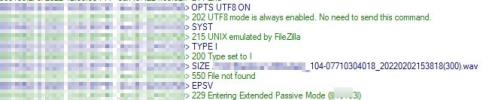
We get the attached errors when the Archive schedule runs.

Any ideas?

1643893947466.png
 
Last edited by a moderator:
If you're referring to the "550 File not found" message then note that it's actually expected to come up. All it means is that the file does not exist on the FTP which should be true if you are archiving it just now.

Can you not see a "Successfully transferred" message a few lines ahead?
 
Hi Chris,

Unfortunately not, can't see a message advising its been successfully transferred and also can't see the files on the FTP server - the recordings also still seem to exist on the 3CX side of things too as the recording sizes aren't dropping.
 
What can you see after the "Entering Extended Passive Mode" message?
 
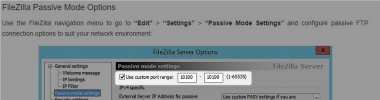
First thing I would recommend you do is make absolutely sure that the port range you have specified in filezilla has been forwarded on the FTP's network and OS firewall to allow this traffic to actually reach the FTP Server:
1643897978868.png

You could probably confirm if this is the issue or not by running a packet capture on the PBX and on the FTP server at the same time, while trying to archive a recording. You'll be able to see if the traffic sent from the PBX on that port is actually reaching the FTP server.
 
Status
Not open for further replies.

Forum statistics

Threads
111,974
Messages
590,083
Members
164,901
Latest member
Silent_Guru