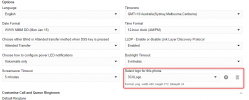
Phone Wallpaper Option Missing 3CX V20 Enterprise (T54W)

Status
Not open for further replies.

VOYP

Bronze Partner
Advanced Certified
Joined
Sep 29, 2021
Messages
6
Reaction score
1
Just installed a backup copy into a fresh installation of V20, as a direct upgrade was not successful from V18 (tried twice).

However, two issues have occurred thus far:

1. Hotdesk phones would not login, using the custom code that I had in V18 (*00), and when I went to the user account, the "Enable Hotdesking" was checked, but greyed out. I since have tried troubleshooting the issues with sporadic results, but ended up temporarily assigning a permanent extension.

2. Primary Issue - There is not an option in the IP phone settings to set the wallpaper. This is not an issue on my other V20 Enterprise installation for another client. Just this one that is restored from backup.

License information shows valid, and Enterprise, not expiring till later this year.

This seems, however, to be a licensing hiccup.

Assistance would be appreciated, and I'm also writing this to inform of a possible rare bug.

Thanks!
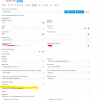
 

Attachments

  • co3cx.png
    co3cx.png
    54.2 KB · Views: 44
Someone moved this to the Yealink forums but it seems to me like a 3cx licensing issue... since moving to V20.
 
Confirm the licence for that install is an Enterprise Edition. Any edition below Enterprise will not have this option from my understanding.

1717739935421.png
 
Hit Ctrl+Shift+R in Chrome to reload the page and try again.

But also go to the license menu and click the license refresh icon to make sure the system knows what license it has.
 
All of the suggestions have been done already, @JohnS_3CX . The only irregularity of this instance is that for whatever reason, it originally would not update from v18 to v20, I would always have to restore the vm checkpoint as it would never come back online after the "upgrade". I did not have time or a chance to troubleshoot why.

When I moved servers to a datacenter, I installed 3CX v20 fresh, and restored a backup of this instance, of V18, not sure if it would work, but it did.... (not sure if that's related possibly but just a note)

All is working, except, like I said, hotdesking, and wallpaper. (The actual ability to select/use the feature in 3cx). My other instance that has a different enterprise license key works just fine.

SMS is still working, but, I'm really not sure where to go from here to restore the ability for the other two features.

I've been troubleshooting a bigger issue on another instance in v20 where calls to an extension are not going to a voicemail, regardless of settings, just ringing until a busy signal... But i'll save that for another post once I've exhausted my options.

In summary, besides the obvious, what would be more deep level ideas that would be most efficient to restore the functionality, (let's just assume I've already checked the basic "unplug and plug it back in" steps.)
 
  • Like
Reactions: Jaydan
Did you set your machine to MULTICOMPANYMODE?

This would hide the wallpaper (logo) option.
 
We totally need the option to update wallpaper in 'Multicompanymode' is it going to be put back in a later release? Part of the appeal of Multi Tennant is to have our branding on phones alongside the 3CX branding..
 
  • Like
Reactions: Evolute IT
Came here with the same issue. This is MUCH needed...................
 
We totally need the option to update wallpaper in 'Multicompanymode' is it going to be put back in a later release? Part of the appeal of Multi Tennant is to have our branding on phones alongside the 3CX branding..

Use Yealink’s YMCS, a tool provided by Yealink specifically for Yealink phones. It allows you to schedule recurring tasks, such as changing the wallpaper on the phones every day at midnight. However, keep in mind that if the phone is reprovisioned via 3CX at 9 AM, it will receive the wallpaper from 3CX until the scheduled task is automatically executed.

https://www.yealink.com/en/product-detail/management-cloud-service

That said, please don't ask me how to use it, as it’s not a tool supported by 3CX. You’ll need to seek help directly from Yealink or consult the guide provided by Yealink.
 
  • Like
Reactions: Evolute IT
Use Yealink’s YMCS, a tool provided by Yealink specifically for Yealink phones. It allows you to schedule recurring tasks, such as changing the wallpaper on the phones every day at midnight. However, keep in mind that if the phone is reprovisioned via 3CX at 9 AM, it will receive the wallpaper from 3CX until the scheduled task is automatically executed.

https://www.yealink.com/en/product-detail/management-cloud-service

That said, please don't ask me how to use it, as it’s not a tool supported by 3CX. You’ll need to seek help directly from Yealink or consult the guide provided by Yealink.
I am currently testing Fanvil's FDMCS tool. The same type of "scheduled configuration" can be set up as well. I'll report back here with my findings once confirmed viable/working.
 
Status
Not open for further replies.

Members Online Now

No members online now.

Forum statistics

Threads
111,831
Messages
589,277
Members
164,660
Latest member
RJenkinsROCK