Phones need to reprovision after upgrade to version 20.

dbnsllc

Bronze Partner
Basic Certified
Joined
Jun 2, 2023
Messages
14
Reaction score
0
We recently upgraded to V20. All was good until the update was applied on 7/01/2025 11:37 AM ET.
The 3CX app on iPhones is showing grey and not active. Phone call history is missing and not able to make and receive calls. We were able to send password reset to users and ask them to activate account again with 3CX QR code. But as soon as the user does activate 3CX app with new password, desk phone is unregistered and need to reset and activate again in the console. Not sure if this is isolated issue or we are missing anything on settings. Lt me know if others are experiencing the same and if any solution at all for it.
Thanks
Dritan
 
Hello dbnsllc,

Please note that when you klik the reset password option for a user, the SIP account will be reset as well.
Actually also the Voicemail PIN.

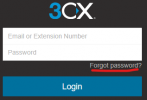
Request the users to goto the 3CX server website and klik the forgot password.
The email will contain the password recover option.

But not sure why you got to this state after the update?

Paulo
 
Hello,

Were the iPhones on the latest app version? What happens after you reset the password is as @paulodagraca mentioned normal, but it is odd you needed to rest passwords.

Did you try to just reprovision the mobile app without a password reset?

Best,
KS.
 
  • Like
Reactions: Evolute IT
Well, after password reset user is able to setup 3cx app on iPhone, but very often we have to do factory reset on desk phones. Not sure why is that. Sometimes removing desk phone from extension and adding it back again will solve the issue.
 
Was your FQDN on port 5001 previously? v20 move to 443 so provisioning url will change.
 
We do use SBC on all sites and pbx is on AWS
I do not see FDQN to have been changed. Issue is not with all phones, only some of them. we reset user password and desk phone is down. Factory reset will bring it back.
 
Reset the user's password from the web client login page, to not affect other devices. Resetting from the admin console will also disconnect the app, and desk phones, though per my limited testing the desk phone should pick up the new password automatically.

If the app/phone is reset, have you checked to see if their IP is being blocked by the 3CX server?
 
Reset the user's password from the web client login page, to not affect other devices. Resetting from the admin console will also disconnect the app, and desk phones, though per my limited testing the desk phone should pick up the new password automatically.

If the app/phone is reset, have you checked to see if their IP is being blocked by the 3CX server?
No IP blocked. I do have reservation for all phnes in DHCP servers. Phone wil always take same IP. If was blocked will be even ater factory reset.
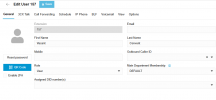
We do reset password on admin console under edit user. same place where QR & 2FA is. What do you mean by web client logging page?
 
Thanks for your response.

What about this then? Is it the same as Regenerate on V18?
Why using this will disconnect desk phone also?

1752611052625.png
 
The behavior changed in v20.

Let me walk back what I said though, per this post apps should automatically reprovision/reconnect also. (IIRC, originally in v20 the phones and apps were disconnected)

Still if you only want to change the user's login password it's better to do it from the web client login page.
 
  • Like
Reactions: KyriacosS_3CX

Latest Posts

Forum statistics

Threads
111,961
Messages
589,954
Members
164,862
Latest member
ARTipsadmin