• We do not provide troubleshooting help for unsupported phones. Please try with a supported phone.
  • V20 Update 10 Alpha Learn more

PI SBC - Getting disconnected every day or 2

Status
Not open for further replies.

JustinVMMC

Forum User
Basic Certified
Joined
Feb 28, 2022
Messages
28
Reaction score
5
Rolling out a fairly large 3cx install with 30+ locations. Out of the first 5 SBC's I have installed for testing/pilot phones 2 seem to work flawless. The other 3 seem to have to be rebooted every 2 or 3 days to get the trunk to come back up. Is there anything I can do to keep these more stable? Should they all use different starting RTP ports? Do I need to make a cron and reboot them every night? Thanks in advance.
 
  • Like
Reactions: YiannisH_3CX
They are brand new 4g Pi 4's. I only have 1 or 2 phones behind each of them as we are doing some proof of concept/demo work with them. They are up and have network access as I can ssh into them and reboot them. The tunnels just go red and the phones wont connect.
 
On the other side where is located your PBX ? is it on premise? cloud? debian? Windows? what kind of internet link do you have?
How have you done Pi install ? did you follow the 3CX guide ? what kind of SD card are in the PIs ?
 
Having to reboot the SBC's constantly is not something you should need to do especially with such a small number of phones. You will need to enable Verbose logging and check the logs of the PBX to see why this is happening. I would recommend creating a ticket with our support department so they can have a look at the issue.

Make sure you are on the latest update for the SBC and the PBX
 
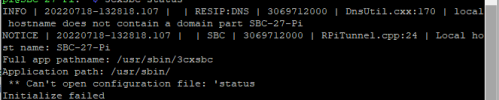
I had 2 down this morning. I did a status check and this is what I got.

3cx7-18-22.PNG
 
All these are setup on voice vlans with fiber primary and failover circuits sub 20ms pings at all locations. I have a 2 pbx setup with failover enabled in separate datacenters. These are all new Pi 4's 4 gig with 128 gig class 10 cards powered and connected with ethernet/poe injectors. I am running them with static DHCP leases but connectivity cant be the issue as I can ssh into the units and do updates/reboot to bring them back online. There should be a watchdog service built into these to restart the service if the tunnels go down.

@YiannisH_3CX how do I create a ticket directly with 3cx?
 
I had one go down last night and it seems to match up with a circuit drop for maintenance. SBC is still down and never came back.. Currently 6 hours. I do have verbose logging turned on. Do the SBC's not try and reconnect when their tunnel goes down?
 
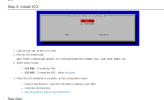
I am unable to connect to any of my SBC's to run the configuration wizzard. Is there something in there that is different than the initial setup?

  1. When the 3CX installation is complete, run the configuration wizard:
  • Using a Web Browser - Open the URL
    http://<device_ip>:5015
    .
 
That text was literally taken from the PI SBC install documentation.

1658336012358.png
 
Where it says “to install the SBC - follow [this guide]” click that and ignore the rest of the page. :)
 
  • Like
Reactions: Evolute IT
I edited the 3cxsbc.conf.local and extended the GiveupTimeout and so far it has been better.. More updates after the weekend
 
This morning I rebooted my firewall. Down for 5 minutes max. SBC didnt connect back up to server

1658837613566.png
 
Tried to just restart the service and it wants a password...

1658837786384.png
 
Have you tried just reinstalling the SBC? Use the same IP so phones connect.
Did you ever manually install OS updates on the SBC? (if so, don't)

For all our clients dropouts have not caused a permanent disconnection like you describe.

re: authentication, try using "sudo" for the command.
 
@SteveITS Yes I have reinstalled multiple times. I always manually update when I do an install... I shouldn't do that??? This last install I did the bare minimum like didnt even change the hostname. You really think updating is my issue? Are you able to update them from the phone panel then when needed?
 
I don't know if updating is an issue, I'm just guessing as to what could be different. 3CX's position on updates is to never install updates manually. The idea is, don't install newer software they haven't tested. With the 3CX server, if updates are set to automatically install, 3CX will install any needed updates when a 3CX update installs. Manually installed updates don't do that. For an SBC, I'm unclear if/when OS updates are installed. However if SSH is not enabled then only the SBC ports should be exposed and 3CX updates their software.

The other day we had a client with a Pi SBC have Comcast neighborhood "maintenance" the other day and their SBC dropped off a bunch of times, for up to an hour at least once. And we have had outages in our office where we have a Debian SBC VM...recently we cut off our Internet for a few hours as we moved some wiring and a rack around.
 
OK.. I just did a re-install without doing anything extra. I am willing to try anything at this point. Thank you
 
Status
Not open for further replies.

Members Online Now

No members online now.

Forum statistics

Threads
111,832
Messages
589,284
Members
164,662
Latest member
DejanMDS