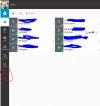
LiVe88 Free User Joined Dec 20, 2019 Messages 4 Reaction score 1 Aug 29, 2021 #1 Hello, How do I get the contacts that are hidden under the "3 dots" in the red circle back in the quick selection where they belong? I really don't need her then? thanks
Hello, How do I get the contacts that are hidden under the "3 dots" in the red circle back in the quick selection where they belong? I really don't need her then? thanks
ChrisC_3CX Staff member 3CX Support Joined Dec 18, 2018 Messages 4,594 Reaction score 1,365 Aug 30, 2021 #2 There is no way of moving those options from the submenu. There does exist a post in our Ideas section describing something similar to what you are asking so you might want to consider upvoting it to help push it up the list: https://www.3cx.com/community/threads/full-icons-display-instead-of-hidding-with-the-icons.83666/
There is no way of moving those options from the submenu. There does exist a post in our Ideas section describing something similar to what you are asking so you might want to consider upvoting it to help push it up the list: https://www.3cx.com/community/threads/full-icons-display-instead-of-hidding-with-the-icons.83666/