PnP provisioning across VLANs

Status
Not open for further replies.

kylejwx93

Premier Customer
Joined
Apr 14, 2020
Messages
35
Reaction score
2
We have a UniFi network with my phones on VLAN 60 and my 3CX server on VLAN 70. According to the documentation, some type of multicast packet is sent out from the phone to look for the server. It's not working across my VLANs. As far as I can tell, I've enabled multicast on both networks in UniFi. Are there any more specifics about the multicast packet I need to allow?

Here's what I read in the documentation: https://www.3cx.com/docs/manual-u5/configuring-ip-phones/

1. Connect the phone. It will send a multicast message, which will be picked up by 3CX.
2. The phone will appear in the “Phones” view of the 3CX Management Console.


Side note: I saw this line on another thread while researching this. "Phones should be provisioned by secure URL although you can switch this off at your own risk if you wish." Does the PnP method use a secure URL? How would I know? Where can I find this secure URL for my installation?

Thanks!
 
Are you trying to provision the phones or get phone to phone multicast messages working?
 
Just provision phones right now.
 
This is assuming things on vlan60 can route to vlan70.
This is the part that is not working. I have "multicast" turned on in Ubiquiti, but it's still not working. If I plug the phone into a port configured for VLAN 70, then it shows up for auto provisioning in 3CX. If the phone is on VLAN 60, it doesn't show up.

So maybe this is more specifically a Ubiquiti question, but I had to start researching somewhere.
 
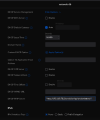
on UniFi it is called a TFTP server option:
dhcpd66.png
 
  • Like
Reactions: kylejwx93
Ok, thanks. I think that points me in the right direction, but I'm going to have a lot more questions...... in the morning.
 
I see what you are saying about the TFTP server. I had completely forgotten about that.

Here's where it gets more complicated.

At the location of my 3CX server, I am running Active Directory for DHCP and so I found the DHCP scope option looking like this: http://192.168.5:5000/provisioning/randomcharacters (someone else set this up for me).

At that building, the auto provisioning is working.

The other building, which is what started this thread is using Ubiquiti and is running an SBC. So when I go to look at a phone that is provisioned to the SBC, it is using the URL: https://mydomain.xx.3cx.us:5001/provisioning/randomcharacters

So one is using a FQDN and the other is using an IP address.

When I drop that FQDN provisioning link in Ubiquiti, it says it is not a valid TFTP server. I'm guessing Ubiquiti doesn't like having a port in the URL because when I drop the port, it allows me to enter the URL as https://mydomain.xx.3cx.us/provisioning/randomcharacters. But I'm still not getting the phone to show up for auto provisioning.

Overall, I'm trying to do this on an SBC and I should have said that from the beginning. Sorry.

 
  • Like
Reactions: nub
From your description it sounds like:

1. either the SBC is not registered
2. or multicast is not allowed
3. or the SBC is not on the same network as the phones

If you are using an SBC at the 2nd site, then TFTP should not be necessary and would probably not work anyway due to the reason you mentioned above. Plus, some phones might not send PnP messages at all if they detect Option 66 or TFTP on the network.

- The SBC must be on the same network as the phones, and multicast must be allowed on that network / VLAN.
- Also ensure your SBC only has a single NIC, and that it appears as registered in your SIP trunks page.
- If this is met then resetting a phone should result in your phones appearing as new when you factory reset them.
- One last thing, make sure you don't have any blacklisted IPs, that would block provisioning from working.

If you are running update 7 you can also provision them via RPS, which might work as a better solution when PnP is not available to you. Let me know if you still have trouble and I can explain how this can be done.
 
  • Like
Reactions: nub
Ok, interesting. I might be thinking about this the wrong way.

The documentation says that the phone and SBC must be on the same network/subnet/vlan. But I have the phones and SBC on different VLANs with different subnets. The theory being that I should be able to tell my switch to pass the multicast packet between these two networks. I thought that was a possibility. Can that work?
 
I see what you are saying about the TFTP server. I had completely forgotten about that.

Here's where it gets more complicated.

At the location of my 3CX server, I am running Active Directory for DHCP and so I found the DHCP scope option looking like this: http://192.168.5:5000/provisioning/randomcharacters (someone else set this up for me).

At that building, the auto provisioning is working.

The other building, which is what started this thread is using Ubiquiti and is running an SBC. So when I go to look at a phone that is provisioned to the SBC, it is using the URL: https://mydomain.xx.3cx.us:5001/provisioning/randomcharacters

So one is using a FQDN and the other is using an IP address.

When I drop that FQDN provisioning link in Ubiquiti, it says it is not a valid TFTP server. I'm guessing Ubiquiti doesn't like having a port in the URL because when I drop the port, it allows me to enter the URL as https://mydomain.xx.3cx.us/provisioning/randomcharacters. But I'm still not getting the phone to show up for auto provisioning.

Overall, I'm trying to do this on an SBC and I should have said that from the beginning. Sorry.
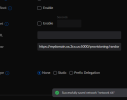
It works on my test network,
 

Attachments

  • network66-2.png
    network66-2.png
    15.7 KB · Views: 23
Ok, interesting. I might be thinking about this the wrong way.

The documentation says that the phone and SBC must be on the same network/subnet/vlan. But I have the phones and SBC on different VLANs with different subnets. The theory being that I should be able to tell my switch to pass the multicast packet between these two networks. I thought that was a possibility. Can that work?
Not a supported or tested setup I'm afraid, I would advise against it especially since you are having issues.
Too many unknowns for the phones and SBC to handle thrown into the mix, and probably won't make for a good experience.
You could get it working now and discover later for example that transfers or conference might not work, or sessions get established with one way audio etc..

Try to put the phones and SBC in the same LAN if you can, the way the SBC was designed to work.
And if you use VLANs try to do the tagging on the ports rather than on the phones, so that they are oblivious of the VLAN. Simplify as much as you can and this should reduce the issues.
 
It works on my test network,
I tried the TFTP server with port number in Ubiquiti again and it worked. I guess my copy and paste skills failed the first time.
 
Status
Not open for further replies.

Forum statistics

Threads
111,973
Messages
590,079
Members
164,898
Latest member
grahamaskew