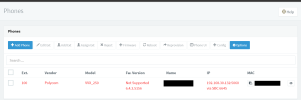
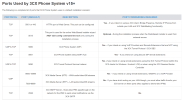
- Joined
- Nov 2, 2022
- Messages
- 10
- Reaction score
- 1
Hi,
I just started to get serious with 3cx for our (small) phone system. In the past I was scared away by not being able to use ip phones without an SBC for cloud hosting. Now I setup a self-hosted instance at Digital Ocean and everything is up and running with a Voxtelesys SIP trunk. I have 2 offices with 1 IP phone each and so I don't really want to use an SBC at each just to run the phone, if thats the case I will just use the 3CX app. But I do like IP phones.... So I find that the VVX 250 is on the supported list.
I have recent VVX 250 phones and I have multiple issues here I think.
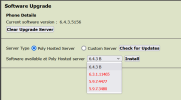
1. The supported firmware is listed as 6.4.3.5018, however the phone is 6.4.3.5156. I am only given 4 choices to select from. I tried downgrading to 6.3.1 to see if I could select other 6.4.3 versions but I only got the choice for 6.4.3 B still. So I don't know if this is an issue or not, but it was #1 to try.
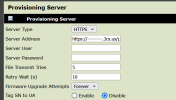
2. Since I can't use RPS or LAN multicast provisioning, I logged into the UI and entered the provisioning info. The phone restarted and the 3CX logo shows up but the line is unregistered still.
I go to the logs, see attached
Okay maybe connectivity issue here, so I run all tests, including the firewall test and all come back okay.
I then try to access the files from the provisioning server via web browser, error 404 comes back.
So I log into the machine via SFTP and look in the provisioning folder and the files aren't there....
From what I could find online, this is the correct directory to look in and the one that 3cx directs me to:
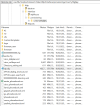
So there are no MAC address based files here like the phone is looking for.
3. To fix the provisioning issue, could I use a local SBC to provision the phones, and then move them back to talk directly with the server? (shutdown SBC) Maybe this will get everything on the same page first.
Thanks for any help you all can provide.
Zac
I just started to get serious with 3cx for our (small) phone system. In the past I was scared away by not being able to use ip phones without an SBC for cloud hosting. Now I setup a self-hosted instance at Digital Ocean and everything is up and running with a Voxtelesys SIP trunk. I have 2 offices with 1 IP phone each and so I don't really want to use an SBC at each just to run the phone, if thats the case I will just use the 3CX app. But I do like IP phones.... So I find that the VVX 250 is on the supported list.
I have recent VVX 250 phones and I have multiple issues here I think.
1. The supported firmware is listed as 6.4.3.5018, however the phone is 6.4.3.5156. I am only given 4 choices to select from. I tried downgrading to 6.3.1 to see if I could select other 6.4.3 versions but I only got the choice for 6.4.3 B still. So I don't know if this is an issue or not, but it was #1 to try.
2. Since I can't use RPS or LAN multicast provisioning, I logged into the UI and entered the provisioning info. The phone restarted and the 3CX logo shows up but the line is unregistered still.
I go to the logs, see attached
Code:
1102101237|dectU|4|00|DECT_UPDATER size of (updateStatusDetails) 384
1102101237|dectU|4|00|DECT_UPDATER Read Could not open file
1102101237|so   |4|00|[soMainWriteBootProvProxies] Provisioning proxy resolve state '0'
1102101238|copy |4|00|Could not set the custom header Content-Range for HTTP/s request. Head request failed to get content-length of server file.
1102101238|copy |*|00|Server '--------.ca.3cx.us' said 'provisioning/u1avr1yt9glijey/4825672403e3-phone.cfg' is not present
1102101238|cfg  |4|00|Prov|File transfer failed due to curl error code:22 and respCode:404
1102101238|dect |4|00|Dect Base macId from config:. Len:0
1102101238|log  |4|00|UtilLogServerC::uploadFifoLog: upload error. protocol 0 result = 0
1102101239|copy |*|00|Server '--------.ca.3cx.us' said 'provisioning/u1avr1yt9glijey/4825672403e3-web.cfg' is not present
1102101239|cfg  |4|00|Prov|File transfer failed due to curl error code:22 and respCode:404
1102101239|copy |*|00|Server '--------.ca.3cx.us' said 'provisioning/u1avr1yt9glijey/4825672403e3-cloud.cfg' is not present
1102101239|cfg  |4|00|Prov|File transfer failed due to curl error code:22 and respCode:404
1102101240|copy |*|00|Server '--------.ca.3cx.us' said 'provisioning/u1avr1yt9glijey/000000000000-license.cfg' is not present
1102101240|copy |*|00|Server '--------.ca.3cx.us' said 'provisioning/u1avr1yt9glijey/4825672403e3-license.cfg' is not present
1102101240|cfg  |4|00|Prm|4825672403e3-config.cfg: Unknown parameter "voice.volume.persist.usb.bluetooth.headset" found, ignoring.
1102101240|cfg  |4|00|Prm|4825672403e3-config.cfg: Unknown parameter "homeScreen.features.enable" found, ignoring.
1102101240|cfg  |4|00|Prm|4825672403e3-config.cfg: Unknown parameter "homeScreen.status.enable" found, ignoring.
1102101240|cfg  |*|00|Prm|4825672403e3-config.cfg: Value "" for configuration parameter lineKey.2.index is invalid, ignoring
1102101240|cfg  |*|00|Prm|4825672403e3-config.cfg: Value "" for configuration parameter lineKey.2.category is invalid, ignoring.  Valid values are:
1102101240|cfg  |*|00|Prm|4825672403e3-config.cfg:    "Unassigned"
1102101240|cfg  |*|00|Prm|4825672403e3-config.cfg:    "Line"
1102101240|cfg  |*|00|Prm|4825672403e3-config.cfg:    "BLF"
1102101240|cfg  |*|00|Prm|4825672403e3-config.cfg:    "SpeedDial"
1102101240|cfg  |*|00|Prm|4825672403e3-config.cfg:    "Presence"
1102101240|cfg  |*|00|Prm|4825672403e3-config.cfg:    "EFK"
Okay maybe connectivity issue here, so I run all tests, including the firewall test and all come back okay.
I then try to access the files from the provisioning server via web browser, error 404 comes back.
So I log into the machine via SFTP and look in the provisioning folder and the files aren't there....
From what I could find online, this is the correct directory to look in and the one that 3cx directs me to:
So there are no MAC address based files here like the phone is looking for.
3. To fix the provisioning issue, could I use a local SBC to provision the phones, and then move them back to talk directly with the server? (shutdown SBC) Maybe this will get everything on the same page first.
Thanks for any help you all can provide.
Zac