Poor audio quality through handset but fine when using USB headset or Smartphone app?

Status
Not open for further replies.

Neil Shaw

Forum User
Basic Certified
Joined
Mar 6, 2019
Messages
24
Reaction score
4
Our 3CX installation has a frustrating issue where handsets intermittently have really bad audio yet USB headset users or people using the smartphone app are fine.

We have a dedicated FTTC 60:20 line for up to 8 simultaneous calls. We're running the PBX as a virtual server on a powerful host and the phones have a dedicated switch.

We've tried different handsets from two manufacturers, moved ports around on the switch, stopped the users piggybacking their LAN to PC on the phone and changed many settings on 3CX with no luck. We've tried another internet connection and replaced the switch/router.

The SIP is provided by Gamma who provide all our other SIP's.

We know this system works as it's one we have at 12 other sites.

Any ideas or help would be greatly appreciated.

TIA,
Neil
 
check the sorting of the Codecs for your Sip-trunk/settings AND for the Extensions. Have a look qt the sip/RTP-conversations which codec is currently used.
9727
9726
 
  • Like
Reactions: Neil Shaw
Sounds like the audio could be transcoding (and therefore degrading) due to a codec mismatch when you are using hard phones.

Check your installed codecs and codec priority matches across your device provisioning / trunk / PBX (both local and external) settings and that you have chosen a CODEC that both your SIP trunk provider and phones support.
 
  • Like
Reactions: Neil Shaw
Thanks for the advice. We're checking this now.
 
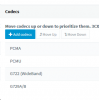
The SIP is using G711 but the PBX is using GSM. We can't add G711 as it's not an option in the lits?
 
Most common is to see everything using A-law or U-law (depending on which part of the world you are from) which are G711 CODECS so it might simply be that they are known as something else.
 
  • Like
Reactions: Neil Shaw
G711 is not on the 3CX PBX list. We're changing everything to PCM-A and PCM-U.
 
G711 is not on the 3CX PBX list. We're changing everything to PCM-A and PCM-U.

They are all the same. I believe it's GSM you want to get rid of.
 
  • Like
Reactions: Neil Shaw
Yes, but the order would depend on where in the world you are PCM-U / G711-U is used more in the USA whereas PCM-A / G711-A is used more in Europe.

So the way you describe would be best for USA, the opposite way around for Europe / UK.
 
  • Like
Reactions: Neil Shaw
Yes, but the order would depend on where in the world you are PCM-U / G711-U is used more in the USA whereas PCM-A / G711-A is used more in Europe.

Great thanks, We're in the UK so I'll switch them around and get some tests done.
 
  • Like
Reactions: Lee Cramman
Fingers crossed. I am also in the UK and we have nothing enabled but G711-A / PCM-A.

Let us know how you get on. Remember, you might need to re-provision phones to push out the new settings.
 
  • Like
Reactions: Neil Shaw
Will do Lee. Thanks for your help today!
 
  • Like
Reactions: Lee Cramman
Update! It appears the users at the site are suffering from broken voice on soft phones and mobile clients, just not as much as on the desk phones.

Last night we did a bunch more testing and it's after 15 seconds the voice just breaks up. Not a robot voice just gaps of silence.

We also removed the SIP and attached it which for a short while seemed to fix the problem. However, having just tested it now we're back to square one.
 
More info.. The person outside the business can hear voice OK but the person in the office gets bad audio. This happens any time up to 4 minutes into the call.
 
Hi Neil,

After your last description, it sounds like the packets going outwards to your provider reach their destination successfully and on time (the external caller can hear your voice fine). Meanwhile, the packets coming in to your network (bringing the external callers voice to you) seem to either not reach you on time or some of them don't reach you at all (which could explain the intervals of silence).

This would point to some sort of network issue or congestion. A capture on the PBX would give you a good idea if the problem is before the PBX (i.e. provider and firewall) or after the PBX (internal network issues). You should go ahead and run a capture from the management console and analyze it in WireShark to see what is happening.
 
  • Like
Reactions: Neil Shaw
Hi John,

Thanks for your reply. We're currently looking running the tests you've suggested. Not sure our WireShark skills are up to the task but we will see what it comes back with.
 
As JohnS said, it's now almost certainly a question of networking, the question is where.

Is your firewall check all green?

Do you use an SBC? If not, I would suggest trying one and seeing if your issues disappear. An SBC is very easy to set up.
 
  • Like
Reactions: Neil Shaw
Firewall all green. Do we need an SBC if the PBX is local? I thought it was just for hosted systems?
 
Status
Not open for further replies.

Forum statistics

Threads
112,091
Messages
590,700
Members
165,062
Latest member
Benzim