Pop Up and Get Talking! V16 Update 4 Beta adds Client in Chrome Extension

Status
Not open for further replies.

NickD_3CX

Community Manager
Silver Partner
Advanced Certified
Joined
Jun 2, 2014
Messages
5,571
Reaction score
1,981
Making calls from your desktop has never been easier with the Google Chrome Extension added in 3CX Update 4 Beta. The Chrome extension adds the web client within the browser, meaning you can make and receive calls directly from your desktop without the need to open the web client in a new tab, nor having the browser active. Instantly take action to...
Continue reading the Original Blog Post.
 
Great Work :)

Would it be possible to add Audio Options like in the Windows client?

Currently, if youre using speakers for music, webradio etc, you need to change Chrome to use your headset, which then results in no "loud" ringer.

It would be lovely, if the client allowed us to use specific devices like the windows client.

Thanks :)!
 
  • Like
Reactions: VoIPQZ
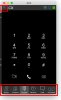
Is it possible when I click the phone number to trigger pop up click to call, can I disable or invisible the functional bottom bar as attachment snap. I want to keep only the Dial Pad more simple when user want to have a outbound call. Thanks!
 

Attachments

  • Snap1.jpg
    Snap1.jpg
    26.1 KB · Views: 16
Hi @mortenjorge

You will be glad to hear this is coming in Update 4:
13525
 
Is it possible when I click the phone number to trigger pop up click to call, can I disable or invisible the functional bottom bar as attachment snap. I want to keep only the Dial Pad more simple when user want to have a outbound call. Thanks!

Hello @Benson hunag ,

Bottom bar is always available for ease of access to other functional areas of the dialer. It is not possible to hide it under certain conditions.

Thank you.
 
  • Like
Reactions: Mercuris
Status
Not open for further replies.

Forum statistics

Threads
111,990
Messages
590,165
Members
164,929
Latest member
Cloudstar