Solved Portal API token

Status
Not open for further replies.

peter007

New User
Joined
Nov 22, 2021
Messages
3
Reaction score
0
Hello,

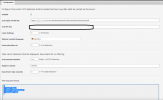
I always get the error in the Wordpress plugin:

{
"result": false,
"error": "404 Not Found",
"errorcode": 404
}

How can I fix this?

2021-11-22_17h48_01.png
 
Last edited by a moderator:
Hi!

Can you please check that your 3CX Webinar plugin you have installed is v18.2.3?
Also, is your 3CX Server on V18 Update 1?
 
  • Like
Reactions: Evolute IT
@peter007
Upon closer inspection of your screenshot, you have entered the incorrect "3CX HTTPS Public URL".
All you need to enter is:
Code:
https://<your FQDN>:<HTTPS Port>

You don't need to put at the end /meet/xxxxxxxxxxxxxxx .
Also, if your HTTPS Port is 443, you only need to put:
https://<your FQDN>

(also I obscured the FQDN from your post...)
 
Hi!

Can you please check that your 3CX Webinar plugin you have installed is v18.2.3?
Also, is your 3CX Server on V18 Update 1?
it's the latest update at
 
@peter007
Upon closer inspection of your screenshot, you have entered the incorrect "3CX HTTPS Public URL".
All you need to enter is:
Code:
https://<your FQDN>:<HTTPS Port>

You don't need to put at the end /meet/xxxxxxxxxxxxxxx .
Also, if your HTTPS Port is 443, you only need to put:
https://<your FQDN>

(also I obscured the FQDN from your post...)
I did it but it doesn't work either.
 
I did it but it doesn't work either.
In that case, could you please send me your FQDN and API Token in a PM so I can check from here what may be happening?
Once we have sorted things out you can generate a new Token and use that.
 
For other reading this, we just cleared the Cache, regenerated the API Token from the Management Console.

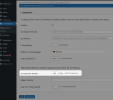
Also one note:
1637678175774.png

If you put in the field "3CX Extension Number", '0' value does not mean 'Any Extension', you have to leave it empty to show you any extension.
 
Status
Not open for further replies.

Forum statistics

Threads
111,973
Messages
590,076
Members
164,895
Latest member
jasonkkrause