


- Joined
- Nov 12, 2019
- Messages
- 19
- Reaction score
- 3
hi all, got some questions regarding ports to be opened for voice traffic. refer to the link below. im no voice expert so please execuse any dumb questions.
https://www.3cx.com/docs/ports/
I've destination port UDP 5060 allowed from Provider to 3CX server and from 3CX server to Provider, bidirectionaly. I can see calls setup correctly, but no voice and I know this is expected.
I then allowed DESTINATION port UDP 9000-10999 from Provider to 3CX server, following the arrows in the diagrams from the link below. it was not working.
https://www.3cx.com/docs/manual/firewall-router-configuration/
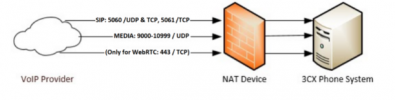
looking at the firewall log, it was actually 3CX using UDP 9000-10999 as SOURCE port, to communicate with Provider on some "random" ports. I then added a rule, something like "allow 3CX UDP port 9000-10999 to reach VOIP Provider UDP port any". and it worked.
it looks like I mis-understood the diagrams or there is some mis-configuration on our Fortigate firewall?
https://www.3cx.com/docs/ports/
I've destination port UDP 5060 allowed from Provider to 3CX server and from 3CX server to Provider, bidirectionaly. I can see calls setup correctly, but no voice and I know this is expected.
I then allowed DESTINATION port UDP 9000-10999 from Provider to 3CX server, following the arrows in the diagrams from the link below. it was not working.
https://www.3cx.com/docs/manual/firewall-router-configuration/
looking at the firewall log, it was actually 3CX using UDP 9000-10999 as SOURCE port, to communicate with Provider on some "random" ports. I then added a rule, something like "allow 3CX UDP port 9000-10999 to reach VOIP Provider UDP port any". and it worked.
it looks like I mis-understood the diagrams or there is some mis-configuration on our Fortigate firewall?


